
Bookings & Tours ships a REST API in the same style as WooCommerce’s own: JSON over HTTPS, authenticated with a WooCommerce REST API key, with the same pagination headers and error format WooCommerce developers already know. It lets an external system do everything the Rentals admin screens do: list and create reservations, check how many units are free for a date range, send and return items (by serial number where the product tracks serials), manage serials, and manage subscriptions, memberships and rental queues from the Subscriptions & Memberships add-on. Customers can also rent through the WooCommerce Store API, which is how a headless storefront adds a rental to the cart.
This page covers the setup and the conventions shared by every endpoint. The endpoints themselves are on three further pages:
- Bookings, availability & serials endpoints
- Subscriptions, memberships & rental queue endpoints
- Pricing and orders-by-date endpoints
- Sending & returning rentals, and serial codes
- Adding a rental to the cart and creating orders via the API
Requirements #
- Sales Igniter Bookings & Tours 1.0.62 or newer. The subscription, membership and queue endpoints need Subscriptions & Memberships 1.0.2 or newer as well.
- Your store must be served over HTTPS. WooCommerce refuses key authentication over plain HTTP.
- Pretty permalinks enabled, so that
/wp-json/resolves (any setting other than “Plain” in Settings → Permalinks).
Base URLs #
| Namespace | What lives there |
|---|---|
https://your-store.com/wp-json/wc-sibooking/v1/ | Bookings & Tours: bookings, availability, serials |
https://your-store.com/wp-json/wc-sisubscriptions/v1/ | Subscriptions & Memberships: subscriptions, memberships, queue |
https://your-store.com/wp-json/wc/store/v1/ | WooCommerce’s public Store API, which accepts rental dates on cart/add-item |
https://your-store.com/wp-json/wc/v3/orders | WooCommerce’s orders API; a line item with rental meta is booked in the calendar |
The namespaces start with wc- on purpose: WooCommerce only applies its key authentication to routes under a wc- or wc/ prefix.
Authentication #
Create a key under WooCommerce → Settings → Advanced → REST API → Add key. Pick a user who can manage WooCommerce (a Shop Manager or Administrator) and give the key Read/Write permissions. Every rental endpoint checks the manage_woocommerce capability of the key’s user, so a key belonging to a Customer account gets a 403.
Send the consumer key and secret as HTTP Basic authentication:
curl -u "ck_your_key:cs_your_secret" \
  "https://your-store.com/wp-json/wc-sibooking/v1/bookings?state=out&per_page=20"
WooCommerce also accepts the same pair as consumer_key / consumer_secret query parameters, and OAuth 1.0a signatures, exactly as it does for its own endpoints. JavaScript running inside wp-admin can use the logged-in cookie plus an X-WP-Nonce header (the value of wp_create_nonce( 'wp_rest' )) instead of a key.
The Store API cart endpoints are public and need no key: a cart is identified by the Cart-Token header (see adding a rental to the cart).
Conventions shared by every endpoint #
| Topic | Rule |
|---|---|
| Dates | Sent and returned in the store’s local time zone as Y-m-d or Y-m-d H:i (an ISO T separator is accepted). A date without a time means the start of that day for a start and 23:59 for an end, which is how a date-only rental of “3 to 5 October” is stored. |
| Request bodies | JSON with Content-Type: application/json. Form-encoded bodies work too. |
| Lists | Paged with page and per_page (default 20, maximum 200). The response headers X-WP-Total and X-WP-TotalPages carry the totals, as in WooCommerce. |
| Updates | PUT and PATCH are equivalent; send only the fields you want to change. |
| Deletes | Return { "deleted": true, "previous": { … } } with the record as it was. |
| Errors | WordPress’s standard shape: { "code": "…", "message": "…", "data": { "status": 4xx } }. 400 for a bad value, 401 when no valid key was sent, 403 for a key without permission, 404 for an unknown id, and 409 when the request conflicts with the calendar or the data (not enough units free, a duplicate serial code, a subscription already cancelled). |
| Booleans | true/false, or 1/0 in query strings. |
The API tester page #
The plugin includes a sample page for trying every endpoint from your browser without writing code. Open Rentals → Tools → Open the API tester in wp-admin, or go straight to https://your-store.com/wp-content/plugins/sibooking/docs/rest-api-tester.html. You can also download the tester page and open it from your computer against any store that runs the plugin.
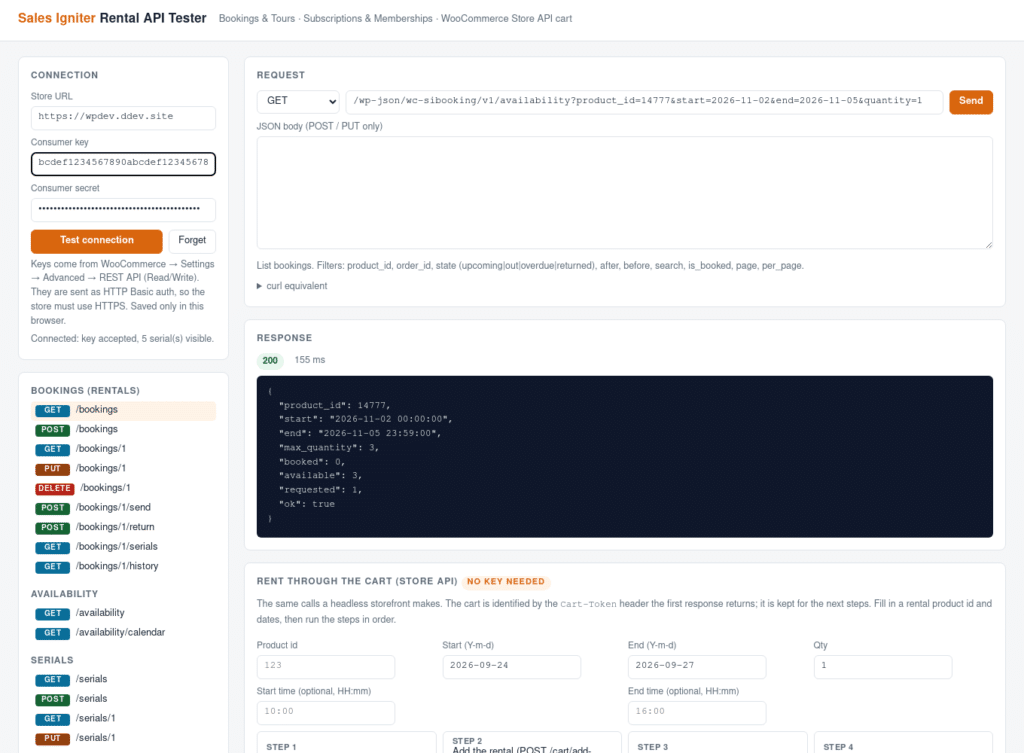
- Enter the store URL, consumer key and secret, then click Test connection. The key is kept only in that browser’s local storage; Forget removes it.
- Pick an endpoint from the list on the left. The method, path and a sample JSON body are filled in for you; edit the ids and dates, then Send. The response, its status, timing and pagination headers appear below, and curl equivalent shows the same request as a command you can paste into a terminal or a script.
- The Rent through the cart box walks through the customer-side flow: start a cart, add a rental with dates, view the cart, and place a test order with the “Direct bank transfer” method. It needs no key, because it uses the same public Store API a storefront uses.
The tester talks to your store directly from the browser. When it is opened from a different domain than the store (for example from a downloaded copy), WordPress answers the browser’s cross-origin requests itself, so nothing needs to be configured, but a firewall, CDN rule or security plugin that strips the Access-Control-* headers will block it. In that case open the copy that is served from the store.
A first request #
How many units of product 123 are free from 3 to 5 October, and is one unit enough?
curl -u "ck_your_key:cs_your_secret" \
  "https://your-store.com/wp-json/wc-sibooking/v1/availability?product_id=123&start=2026-10-03&end=2026-10-05&quantity=1"

{
  "product_id": 123,
  "start": "2026-10-03 00:00:00",
  "end": "2026-10-05 23:59:00",
  "max_quantity": 3,
  "booked": 1,
  "available": 2,
  "requested": 1,
  "ok": true
}
The numbers are the ones the product page and add-to-cart validation use, including the product’s turnover buffers, so a decision made from this response matches what the store would decide at checkout.


