
Skip to content
Sales Igniter
Sales Igniter
  • Features
    • Features
    • Reviews ⭐⭐⭐⭐⭐
    • Demo
      • Live Stores
      • Live Demo
    • Screenshots
      • Magento 2 / Adobe Commerce
      • WooCommerce / WordPress
  • Pricing
    • Magento 2 / Adobe Commerce
    • WooCommerce / WordPress
    • Magento 1.9.x / OpenMage
    • Web Hosting
  • Help
    • Documentation
      • Magento 2
      • WooCommerce / WordPress
    • Screencast
    • FAQ
    • Blog
  • Account
    • My Account
    • My Account (Alternate)
  • Contact
    • Contact Sales Igniter
    • Custom Project Quote Request
Search
Sales Igniter
Sales Igniter
Search
  • Features
    • Features
    • Reviews ⭐⭐⭐⭐⭐
    • Demo
      • Live Stores
      • Live Demo
    • Screenshots
      • Magento 2 / Adobe Commerce
      • WooCommerce / WordPress
  • Pricing
    • Magento 2 / Adobe Commerce
    • WooCommerce / WordPress
    • Magento 1.9.x / OpenMage
    • Web Hosting
  • Help
    • Documentation
      • Magento 2
      • WooCommerce / WordPress
    • Screencast
    • FAQ
    • Blog
  • Account
    • My Account
    • My Account (Alternate)
  • Contact
    • Contact Sales Igniter
    • Custom Project Quote Request

General

7
  • Turnover Time and Padding Days
  • Calendar Style (Color/Theme) Setup
  • Default – Calendar On Product Page
  • Default – Calendar on Product Page With Time of Day (hourly)
  • Global Calendar – Calendar On Side Bar
  • Global Dates – Calendar On Shopping Cart
  • Quick Getting Started Guide

Turnover Time

1
  • Turnover Time and Padding Days

Calendar Display Options

5
  • Calendar Style (Color/Theme) Setup
  • Default – Calendar On Product Page
  • Default – Calendar on Product Page With Time of Day (hourly)
  • Global Calendar – Calendar On Side Bar
  • Global Dates – Calendar On Shopping Cart

Adding Products

6
  • For Sale Products
  • Adding Reservation & Rental Queue Products
  • Adding Rental Membership Products
  • Adding Bundled / Kit Products
  • Configurable Products (Select Size/Color/Attribute)
  • Sell & Rent The Same Product

Rental Pricing

2
  • Rental Pricing Basics
  • Special Pricing for Dates, Weekends, Times, Holidays

Managing & Processing Orders

8
  • Settings
  • General Usage
  • Editing The Rental Contract Template
  • Extending Rental Orders & Late Fees
  • Processing Deposits
  • Processing Rental Reservation Orders
  • How Does Magento Handle Order Editing?
  • Adding Orders Via The Admin Panel

Deposits

1
  • Processing Deposits

Rental Contracts

3
  • Settings
  • General Usage
  • Editing The Rental Contract Template

How Do I?

16
  • Install A Magento Extension from Magento Connect
  • Export To Google Calendar (ical exports)
  • Convert Simple Products To Reservation Products?
  • Manually Reserve Inventory or Edit Rental Dates?
  • Manage Multi-Store or Store Views?
  • Import/Export Products Via Spreadsheet
  • Improve My SEO?
  • Adjust Sort Order Of Products In Categories?
  • Adjust Order Status or Add Custom Order Statuses?
  • Set Store Language (German, Spanish, Korean, etc.)?
  • Set Up Paypal
  • Edit Email Templates?
  • Edit The Top Navigation Menu?
  • Change Site Text?
  • Edit Default Elements Like Remove Dog Graphic, Back To School Banner?
  • Edit The Top Navigation Menu?

Edit Content

4
  • Edit Email Templates?
  • Change Site Text?
  • Edit Default Elements Like Remove Dog Graphic, Back To School Banner?
  • Edit The Top Navigation Menu?

Product Maintenance

1
  • Product Maintenance Usage

Magento Resources

1
  • Useful Magento Resources – Guides, Extensions & Templates / Themes

Troubleshooting Guide

9
  • Aheadworks reward points extension or another extension that calls a Cart observer is not working
  • Dates are automatically being added to the start and end dates for pay per rental pricing causing price lookups to fail, why?
  • It is not booking out inventory for orders
  • I am using a custom template and the rental pricing isn’t showing up
  • My products are not showing up on searches
  • I have a huge bundle / kit and I can’t save it when I add lots of products to it what is the issue?
  • Paypal Express is giving error 10002 what should I do?
  • When I try and add products to a bundle they don’t show up
  • Why aren’t any payment methods shown when trying to buy a rental membership?

Bundles

3
  • My products are not showing up on searches
  • I have a huge bundle / kit and I can’t save it when I add lots of products to it what is the issue?
  • When I try and add products to a bundle they don’t show up

Payment

2
  • Paypal Express is giving error 10002 what should I do?
  • Why aren’t any payment methods shown when trying to buy a rental membership?

Programming Guides

5
  • Basic Rental Module Flow (Version 1.4+)
  • Theme Customization
  • Inventory Calculations (Version 1.3+)
  • Rental Programming Guide Basics
  • Basic Rental Module Flow (Version 1.3 and earlier)

Version Release Notes & History

7
  • Version 1.4.2020
  • Version 1.4
  • Version 1.3.1
  • Version 1.3
  • Version 1.2
  • Version 1.1 – 1.1.1
  • Version .1 – 1.01 Release Notes

Future Version Roadmap

1
  • Feature request list
View Categories
  • Home
  • Doc
  • Rental System
  • How Do I?
  • Edit Content
  • Change Site Text?

Change Site Text?

1 min read

Method 1 Using Inline Translate #

1) Go to admin > system > config
2) Select the store view you want to translate from current configuration scope (mainly necessary if you have more than one store view for multi-language)
3) Go to the config > advanced > developer > translate inline and set enabled for frontend to yes
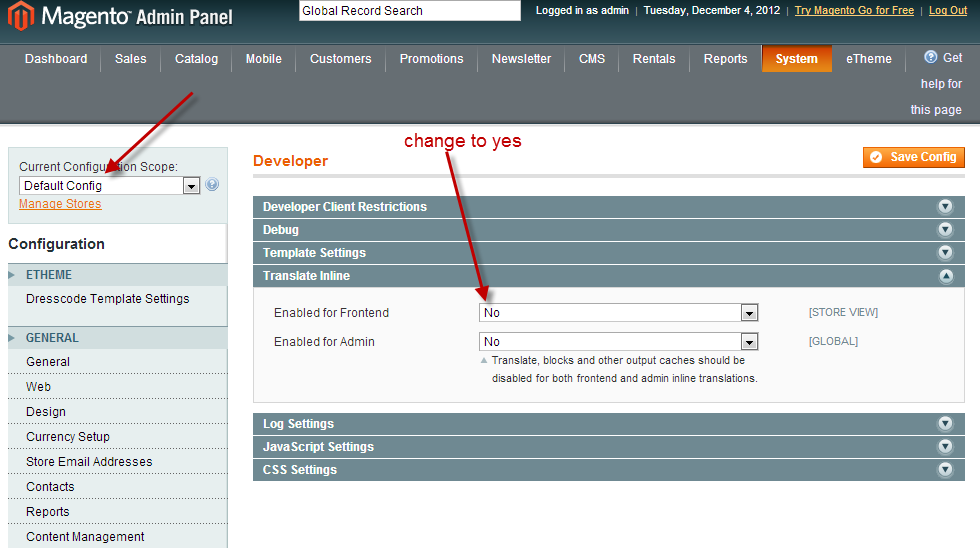
4) Save the config
5) Go to your website you will see red dotted lines around text. Click the book icon when you mouse over and it will open up a editor in a lightbox. Make the changes, save, refresh the page and you will see the text changes Note: Use Firefox NOT Chrome as Chrome does not work with the edit text feature.

Method 2 Using A Translate.csv file #

1. Find out what template package and name you are using in system > config > design

2. Go to app/design/templatepackage/templatename/locale/yourlocale/translate.csv download this file and edit it in a spreadsheet program. The first column is the text to translate, the second column is translation. Like if you wanted to change shopping cart to shopping basked, column 1 would be shopping cart, column 2 shopping basked.

3. After saving the file (make sure not to change it from csv to excel format) go to system > cache and refresh the translations cache.

What are your Feelings

  • Happy
  • Normal
  • Sad

Share This Article :

  • Facebook
  • X
  • LinkedIn
  • Pinterest
Edit Email Templates?Edit Default Elements Like Remove Dog Graphic, Back To School Banner?
Table of Contents
  • Method 1 Using Inline Translate
  • Method 2 Using A Translate.csv file

Rental Newsletter

Learn about the latest rental industry news, features added to our rental system, and receive special offers. Subscribe now.

loader

OVERVIEW
Home
Features
Pricing
Live Stores
FAQs
Blog
Contact Us
INDUSTRIES SERVED
Audio Video, Computer, Electronics
Baby Equipment Rental System
Car Reservation Software
Clothing, Dress, Purse Rental
Heavy Equipment, Construction
Hotel, Property & Vacation Rentals
Inflatable Bounce House
Movies, Video Games, Board Games
Party & Event Rental Software
Sporting Equipment
Watches and Jewelry Rental
LATEST UPDATES
How to Start An Equipment Rental Business
Rental Pricing: How Much Should I Charge To Make The Most Profit?
How to add Bookings and a Rental Calendar to a Magento 2 website?
10 Brilliant Rental Software Apps You’ll Love
ADDITIONAL LINKS
Terms & Conditions
Free Rental Contract Agreements
Free Rental Pricing Calculator
Awesome Rental Business Resources List
Affiliate Program
Social Media

Copyright © 2026 Sales Igniter. All Rights Reserved

Loading...

Insert/edit link

Enter the destination URL

Or link to existing content

    No search term specified. Showing recent items. Search or use up and down arrow keys to select an item.