
Basics #
For importing and exporting rental products please use system > data transfer > import / export.
First we recommend that you add a rental product using the admin interface and then do an export so you can see the columns that it adds and that are needed.
Note: We recommend using Google Sheets for editing your import and export spreadsheets (CSV files) instead of Microsoft Excel as Excel will sometimes mess up the encoding of the file in our experience
So the steps are:
1) Add a rental product
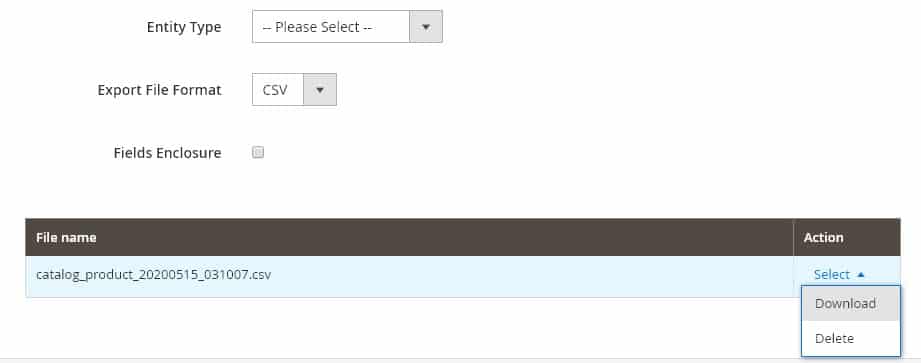
2) Go to system > data transfer > export
3) Choose entity type: products and scroll to the bottom and click the “Continue” button.
4) Make sure your web host has your Magento cron job setup. Your export should appear in the list of files. You can then download it.
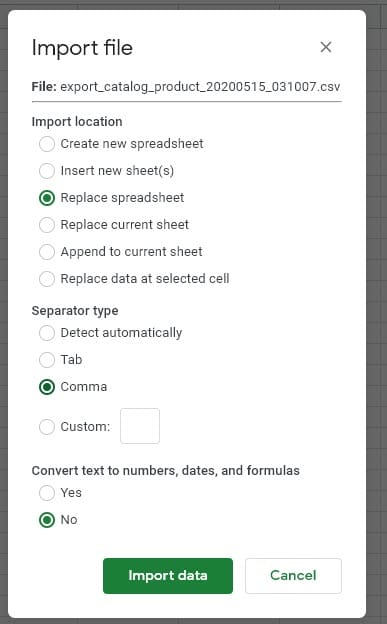
5) Now go to Google Sheets and make a new Sheet, and go to File > Import and import using settings like these:
ow you will see the product you added. We suggest you copy the row for the product that you already added and paste it into a new row. You will then want to change the basic product data like the name, description, SKU, pricing, images (see notes on importing images below). The SKU is used specially as the product identifier and needs to be unique, and not change on later spreadsheet uploads (or your product data will not know what product to update).
Default Columns Notes #
We recommend leaving these columns blank, they will be auto-filled by Magento:
url_key
meta_title
meta_keywords
Images: for importing images please see: https://docs.magento.com/m2/ce/user_guide/system/data-import-product-images.html
Columns Notes For Rental Products #
product_type – needs to be sirent
custom_options – this column needs to have the following in it, again we just recommend you copy it from a rental product you already added, you can add additional custom options too, but these ones are required in order for the rental calendar to showup:
name=Start Date:,type=date_time,required=0,price=0.000000,sku=,max_characters=0,file_extension=,image_size_x=0,image_size_y=0,price_type=fixed|name=End Date:,type=date_time,required=0,price=0.000000,sku=,max_characters=0,file_extension=,image_size_x=0,image_size_y=0,price_type=fixed|name=Rental Buyout:,type=field,required=0,price=0.000000,sku=,max_characters=0,file_extension=,image_size_x=0,image_size_y=0,price_type=fixed|name=Damage Waiver:,type=field,required=0,price=0.000000,sku=,max_characters=0,file_extension=,image_size_x=0,image_size_y=0,price_type=fixed
sirent_prices – holds the rental pricing. Note that multiple price points are separated by a | character. You can change the period= part or the price= part with the period or price you want.
website_id=0,period=1h,price=15,qty_start=0,qty_end=0,customer_group_id=0,all_groups=1,price_additional=0,period_additional=0d|website_id=0,period=1d,price=50,qty_start=0,qty_end=0,customer_group_id=0,all_groups=1,price_additional=0,period_additional=0d|
manage_stock – set to 0 for rental products as rental products have their own inventory tracking methods
use_config_manage_stock – set to 0 for rental products as rental products have their own inventory tracking methods
additional_attributes – our rental extension adds many additional attributes which you can see under product edit > rental as well as in the general area. It is best to copy them from a product you’ve already added, please do not copy/paste from here, but here is a sample.
It is important to note the sirent_quantity for example sirent_quantity=10 part that is your rental stock quantity. Also on many of these fields if something is set to -200 it means “use global config” from rentals > settings area for that attribute.
sirent_allow_overbooking=-200,sirent_always_show=-200,sirent_autoselectstartdate=-200,sirent_buyout_price=0.000000,sirent_damage_waiver=-200,sirent_disable_shipping=-200,sirent_enable_buyout=0,sirent_fixed_length=-200,sirent_fixed_type=-200,sirent_future_limit=-200,sirent_global_exclude_dates=1,sirent_hotel_mode=-200,sirent_max=-200,sirent_min=-200,sirent_padding=-200,sirent_pricepoints=-200,sirent_pricingtype=Not Pro-Rated,sirent_quantity=10,sirent_rental_type=Reservation (Calendar),sirent_replacepricepoints=,sirent_serial_numbers_use=0,sirent_turnover_after=-200,sirent_turnover_before=-200,sirent_use_times=Use Times With Grid
sirent_serials – if using serials for the product you can add them here, again separated by a | character for each one
serialnumber=bmw_1,notes=,cost=,date_acquired=,status=available|serialnumber=bmw_2,notes=,cost=,date_acquired=,status=out|


