
A refundable security deposit is the customer’s own money, charged with the rental order so that it can be given back, held against damage or a late return, and released when the kit comes home in one piece.
It is deliberately not treated like revenue: it is its own line, not taxed by default, and it has a lifecycle that ends with somebody deciding where the money goes. That is what separates it from a damage waiver, which is a sale and is not refundable. A shop can use either, or both.
Both charges come from the Deposits & Damage Waiver extension, which is included with Rental Booking Pro. See the Pro installation instructions for the Composer command, and the release notes for what has changed.
Setting it up #
Go to Stores > Configuration > Sales Igniter > Rental > Refundable Security Deposits. Every field is set per store view.
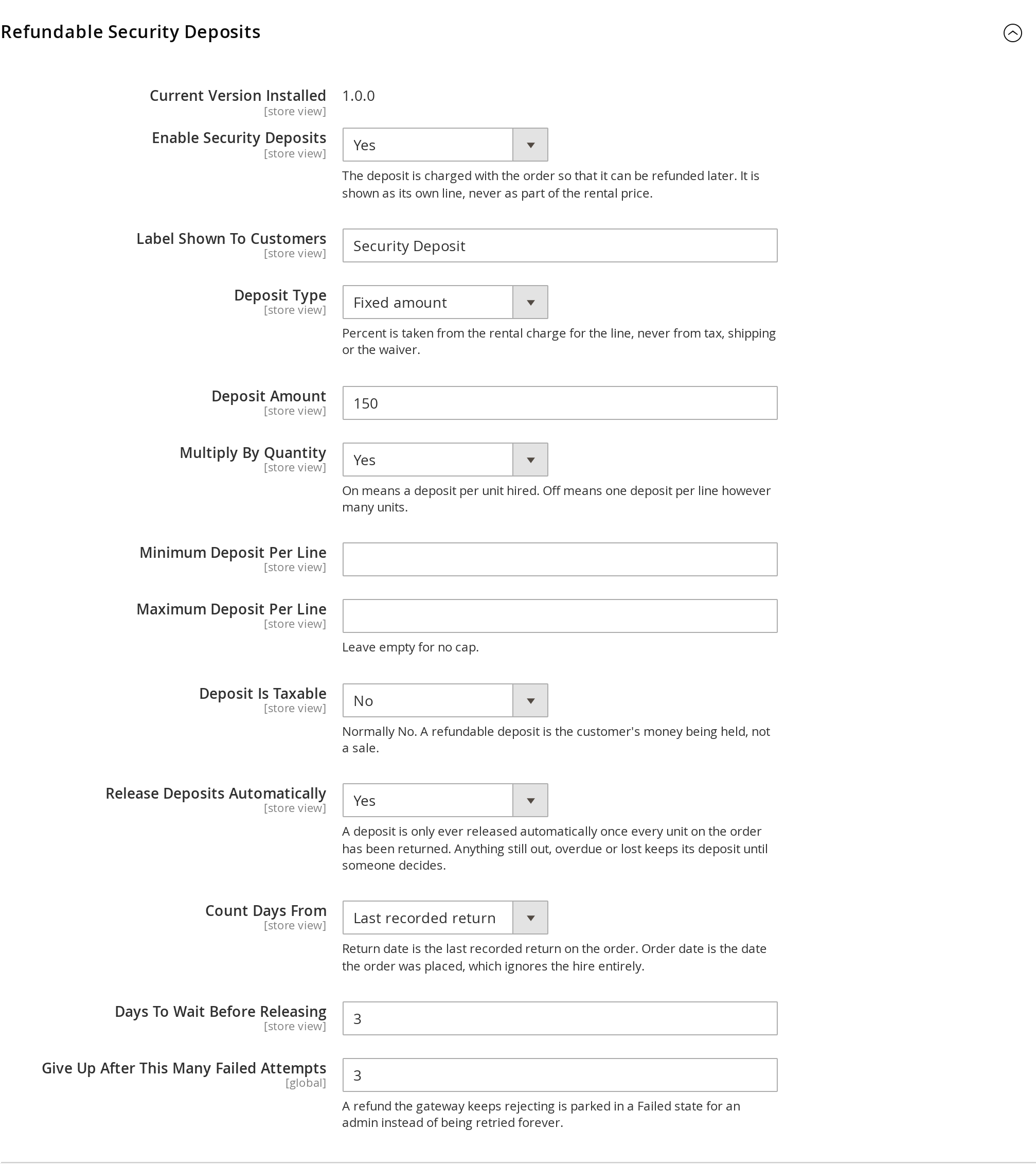
| Setting | Default | What it does |
|---|---|---|
| Enable Security Deposits | No | Turns the feature on for the store view. |
| Label Shown To Customers | Security Deposit | What the customer sees in the cart, at checkout and on the order. |
| Deposit Type | Fixed amount | A fixed amount, a percent of the rental charge, or an amount per day. Percent is taken from the rental charge for that line only — never from tax, shipping or the waiver. |
| Deposit Amount | 0 | The figure the type is applied to. |
| Multiply By Quantity | No | On, a deposit per unit hired. Off, one deposit per line however many units. |
| Minimum / Maximum Deposit Per Line | empty | A floor and a ceiling. Leave the maximum empty for no cap. |
| Deposit Is Taxable | No | Normally No. Holding money is not a sale. |
| Release Deposits Automatically | No | See Releasing deposits automatically below. |
| Count Days From | Return date | Whether the wait is counted from the last recorded return or from the order date. |
| Days To Wait Before Releasing | 3 | How long after that before the deposit goes back by itself. |
| Give Up After This Many Failed Attempts | 3 | A refund the gateway keeps rejecting is parked for a human rather than retried forever. |
Overriding it on a single product #
Open the product and find Rental > Deposit.

- Deposit — the amount for this product. Leave it empty to use the store setting.
- Deposit Type — how this product’s deposit is priced: Use config, No deposit, Fixed amount, Percent of rental charge or Fixed per day.
“Use config” and “No deposit” are not the same thing. A product left on Use config is silent: the store setting decides, and the product follows any later change to it. A product set to No deposit actively refuses and does not fall back — which is how a low-value item escapes a deposit you charge on everything else.
What the customer sees #
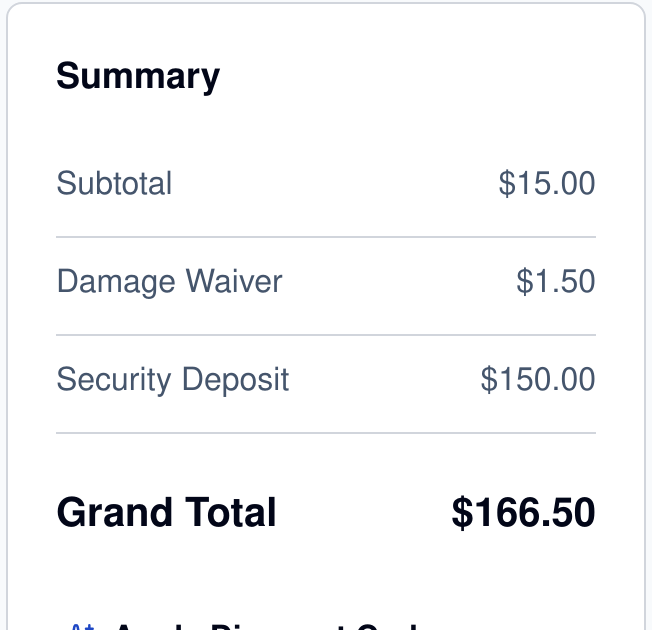
Nothing on the product page: a deposit is a condition of hire, not an offer, so there is nothing for the customer to decide. It appears as its own line from the basket onwards — in the cart, at checkout, on the order, the invoice and the order emails — so it never looks like part of the rental price.
The five states a deposit can be in #
| State | Meaning |
|---|---|
| Held | Charged with the order and waiting. Every deposit starts here. |
| Released | The whole balance went back, by a member of staff or by the automatic release. |
| Part released | Some went back; the rest is still held against damage or a late return. |
| Retained | Kept in full, with a recorded reason. |
| Failed | The gateway refused the refund, the attempts are exhausted, and it is waiting for a human. |
The state is stored on the order rather than worked out from the refunds against it, and that is deliberate. To a refund-shaped system, “we kept the money because the trailer came back with a bent drawbar” and “nobody has got round to it yet” look identical — and the difference between those two is exactly what a dispute, an unhappy customer on the phone or a chargeback turns on.
Releasing a deposit by hand #
Open any order with a deposit in Sales > Orders. The panel sits with the order’s own information, above the items.
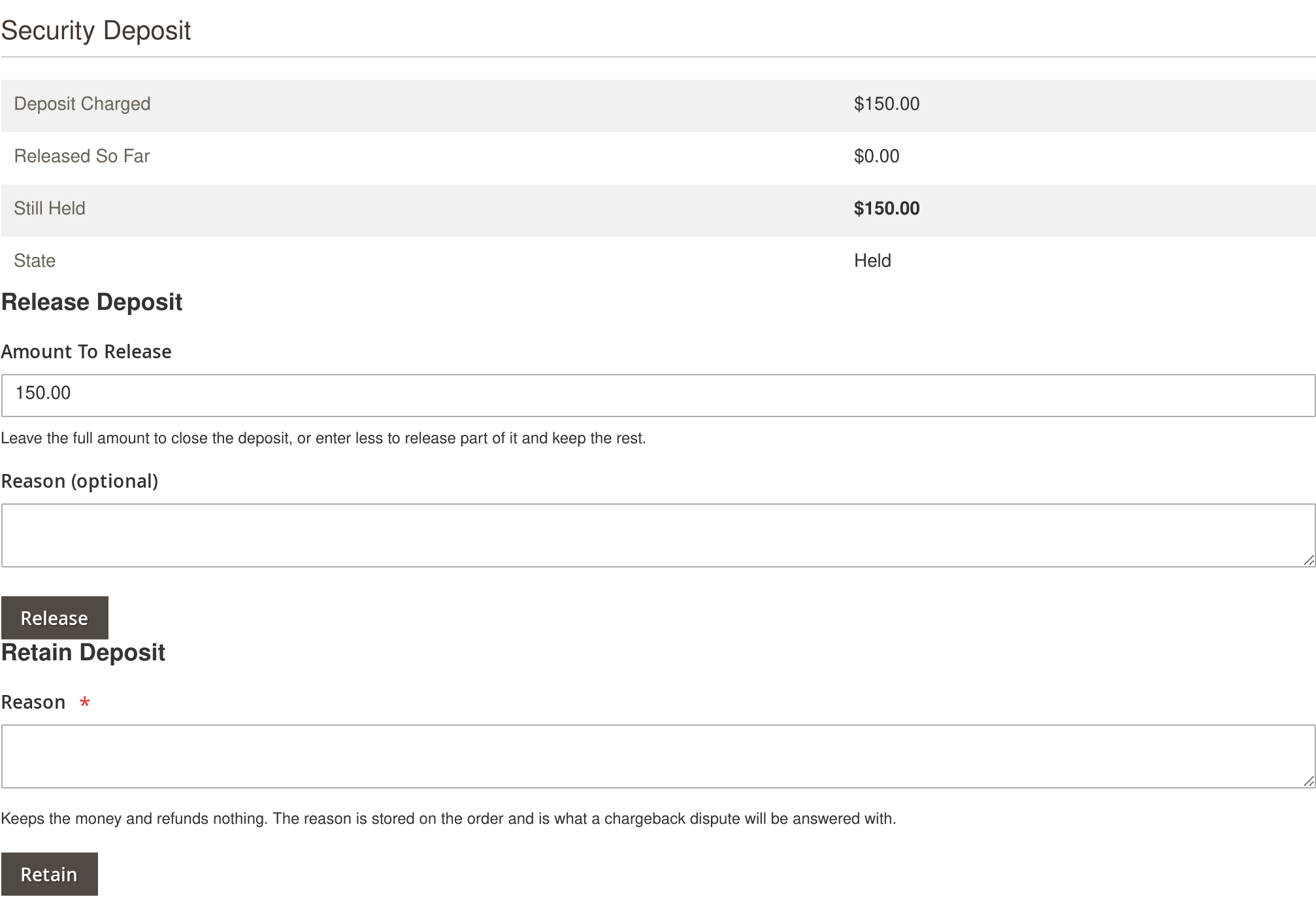
It shows what was charged, what has gone back so far, what is still held, the state, the automatic release date once the clock has started, and the retained reason if there is one. On an order with no deposit the panel renders nothing at all, so installing the extension leaves every order you already have looking exactly as it did.
- Give all of it back — leave Amount To Release at the figure it is pre-filled with, which is the outstanding balance, add a reason if you want one on the record, and press Release. The state becomes Released.
- Give part of it back — lower the amount to whatever you are refunding and press Release. The customer gets that, you keep the rest, and the state becomes Part released. This is the one to use for a deduction, because the order then records both halves: what went back and what did not.
- Keep all of it — use Retain, which refunds nothing. A reason is required, and it is enforced on the server, not just by the browser. It is the field that answers the question months later, so it is not optional.
Releasing deposits automatically #
Turn on Release Deposits Automatically, choose whether the wait counts from the return date or the order date, and set the number of days. A background task then picks up deposits as they fall due, so nothing sits on your books waiting for someone to remember it.
The automatic release will not run early. It only ever fires once every unit on the order has actually been returned. Anything still out, overdue or lost keeps its deposit until a person decides — which is the behaviour you want, because an automatic refund on a hire that never came back is the one mistake this feature could make that costs real money.
If your gateway refuses a refund, the extension tries again on later runs up to the limit in Give Up After This Many Failed Attempts. After that the deposit is parked in Failed and the panel says so, rather than the refund being retried forever against a card that is not going to accept it. Deal with it by hand from the same panel once the underlying problem is fixed.
Who is allowed to release a deposit #
Releasing and retaining are governed by their own permission, nested under the rental extension’s resources in System > Permissions > User Roles. A role that can see an order does not automatically get to move the money on it, so a counter or warehouse role can be given the order screens without being given the deposits.


