
A booking deposit lets a customer pay part of the rental price when they book and the rest, the balance, later. You choose how the balance is collected: from a payment link the customer is emailed, charged to their saved card on the due date, or at pick-up. It reserves the booking while keeping the checkout light for the customer, and it brings your cash in earlier than a single payment at pick-up.
It is part of Rental Booking 1.2.213 and works on Luma and Hyvä. It needs salesigniter/releasecommon2 1.2.58 or later, which Composer installs for you.
A booking deposit is not a security deposit #
A booking deposit is part of the rental price. The security deposit is refundable money held against damage, set up separately in the Deposits & Damage Waiver extension and always shown as “Security deposit (refundable)”. A booking can have both. The customer pays the booking deposit, any security deposit and any tax or shipping you ask for today, and the balance later. See Refundable Security Deposits.
Turn it on #
Booking deposits are off until you turn them on.
- Go to Stores > Configuration > Sales Igniter Rental and open the Booking deposit group.
- Set Let customers pay a booking deposit to Yes.
- Adjust the settings below, or keep the defaults, and save the configuration.
You can set these per website. They are not available per store view.
Settings #
| Setting | Default | What it does |
|---|---|---|
| Let customers pay a booking deposit | No | The master switch. |
| Who chooses | The customer | “The customer” shows Pay in full and Pay part now. “Always take a deposit” takes the deposit on every order that qualifies, with no choice. |
| Deposit amount | Percentage of the rental price | Percentage of the rental price, Fixed amount per unit, Fixed amount per order, or Price of the first days. |
| Amount | 25 | A percentage (25 means 25%) or an amount in your base currency. |
| Number of days | 1 | For “Price of the first days”: the deposit is the price of that many days. |
| Minimum deposit | 0 | The smallest deposit you will take. 0 means no minimum. |
| Offer it from an order total of | 0 | A deposit is only offered when the rental rows of the order, after discounts, reach this total. |
| Offer a deposit with these payment methods | Every active method except the offline ones | Tick the methods that can take a deposit. Cash on Delivery, Check / Money order, Bank transfer and Purchase order stay unticked until you tick them. A method that cannot save a card still takes a deposit: its balance is collected from a link or at the counter. |
| Balance collection | Customer pays online from a link | Collect at pick-up, Charge the saved card automatically, or Customer pays online from a link. |
| Balance due, days before the start | 7 | When the balance falls due. A rental that starts sooner is paid in full. With collection at pick-up the balance is due at pick-up. |
| Balance due at (store time) | 09:00 | The time of day the balance falls due, as HH:MM. |
| Automatic charges with | Every method that can be charged later | Shown for automatic collection. A method left out has its balance collected from a link. |
| Customers without an account | Pay from a link | Shown for automatic collection. Guests have no saved card. The other choice is “Must create an account for an automatic charge”. |
| After the last failed attempt | Keep the booking | Or “Release the booking after the days below”. |
| Release the booking after (days past the due date) | 7 | How long you wait after the due date before releasing. |
| Hand-over with an unpaid balance | Warn | Warn asks before handing the rental over. Block refuses the hand-over everywhere (Send, Ship, auto-send and the API). Allow does nothing. |
| Booking deposit refundable | Yes | Yes, No, or “Until the days below before the start”. |
| Taxes | Each payment carries its share | Or “All tax today”. Either way tax is never counted twice. |
| Shipping and delivery | Due today | Or “With the balance”. |
| Balance reminders, days before the due date | 3,0 | Comma separated. 0 means on the day. |
| Reminder after the due date (days) | 1 | One more reminder this many days after the due date. 0 means none. |
| Hold the security deposit release while a balance is unpaid | Yes | Shown when Deposits & Damage Waiver is installed. |
| Allow rental extensions while a balance is overdue | No | Shown when the Rental Extend extension is installed. |
| Balance email sender, and the five email templates | Sales | The sender and the templates of the balance emails. Edit the wording under Marketing > Email Templates. |
The settings only apply to rentals that qualify, and the next sections say which.
Set a deposit on one product #
Open a rental product, then the Rental section and Booking deposit.
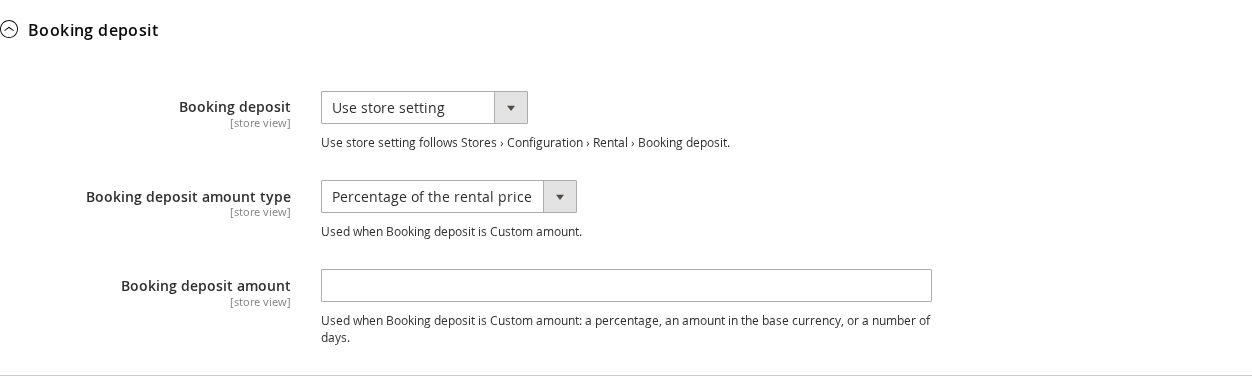
- Use store setting follows the settings above. This is the default.
- Custom amount gives this product its own amount type and amount. The timing and the collection method stay store-wide, because one order has one balance.
- Off: always paid in full keeps this product out of booking deposits.
Products inside a bundle follow the bundle.
Which rentals and payment methods qualify #
A deposit is offered when all of this is true:
- Booking deposits are on and the customer’s payment method is ticked in Offer a deposit with these payment methods.
- The cart has at least one qualifying rental. Fixed-length rentals qualify. Subscription rentals, buy-out lines and rental extensions do not: they are paid in full.
- The rental does not start sooner than Balance due, days before the start. A rental that starts too soon shows “Your rental starts soon, so it’s paid in full.”
- The order total reaches Offer it from an order total of and the deposit reaches the Minimum deposit.
- The order is not a multi-address (multishipping) checkout.
Other lines in the same cart, such as products for sale, are paid in full today. Only the qualifying rental lines are split. If a deposit is not offered, the customer simply pays in full.
What the customer sees #
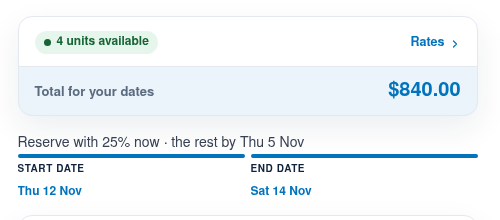
On the product page a short line shows the deposit: “Reserve with 25% now, the rest by Thu 5 Nov”.
In the cart (Hyvä) and the payment step of the checkout (Luma) the customer is asked “How would you like to pay?” with two choices: Pay in full and Pay 25% now, with the amount for today, the balance and its date. A short note says how the balance will be collected: “we’ll email you a payment link”, “charged to your card on Fri 23 Oct” or “pay at pick-up”. With “Always take a deposit” there is no choice, only the schedule. For an automatic charge the customer sees a sentence of consent next to the choice and agrees to it by placing the order.
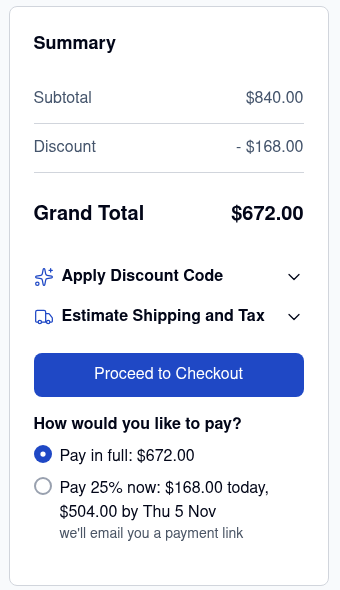
- A Due later row in the totals shows the balance and its date. The order total is what the customer pays today.
- The order emails, invoices and PDFs carry a Payment schedule row.
- In My Account, the order page shows a Payment schedule: what was paid today, the security deposit if there is one, and the balance with its due date. When the balance can be paid, a Pay … now button appears. The customer can pay before the due date. My Orders has a Balance column.
Hyvä Checkout support is in beta. It was built without a Hyvä Checkout licence to test against, so try it on a staging store first.
Orders you create in the admin #
When you create an order under Sales > Orders > Create New Order, you can choose Pay in full or Booking deposit above the totals. The deposit is taken with the payment method you choose there, or the order is left for the customer’s payment link. The balance is collected the same ways as for a storefront order.
Good to know #
- The balances are collected by the
sirent_balancecron group, which runs every 5 minutes. Make sure the Magento cron is running. - If you use Hyvä, install
hyvarentalfrom the same release. - The booking order is not changed when the balance is paid: each balance is a separate order. See Collecting and managing balances.


