
Add a Guests field to your rental search so visitors can say how many people are coming. The listing then leaves out rentals that can never take the party, and checks the rest for enough free units on the searched dates. Product pages opened from the results start with the party already filled in and priced.
This is part of Rentals & Bookings Regular (and Pro), like the search widget it adds to. The products need guests turned on first; see Guests and party size.
Turning on the Guests field #
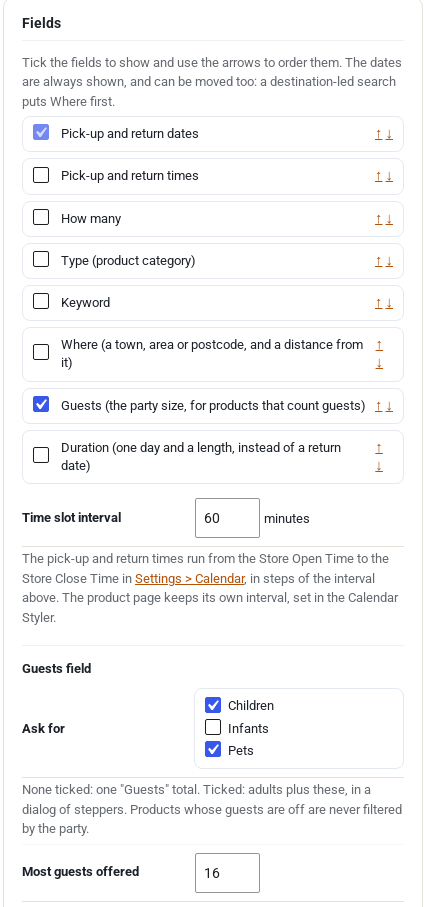
- Go to Rentals > Settings > Search Builder.
- Under Fields, tick Guests (the party size, for products that count guests). Use the arrows to move it in the row.
- Under Guests field, choose what to Ask for. Tick nothing for a single Guests list. Tick Children, Infants or Pets to ask for adults plus those.
- Set Most guests offered: the largest party the field offers. It is 16 unless you change it (1 to 99).
- Click Save search form.
One form can also be set up on its own with shortcode options:
| Option | Example |
|---|---|
fields | [sibooking_search fields="dates,guests"] |
guest_types | [sibooking_search fields="dates,guests" guest_types="children,pets"] |
guests_max | [sibooking_search fields="dates,guests" guests_max="10"] |
What visitors see #
With nothing ticked under Ask for, the field is a list: “Add guests”, then “1 guest” up to the most you offer. “Add guests” means no guest filter.

With children, infants or pets ticked, the field is a button. It opens a small window with a row for adults and each type you ask for, with the age notes from Rentals > Settings > Guests, and Clear and Done buttons. On a phone it opens from the bottom of the screen.
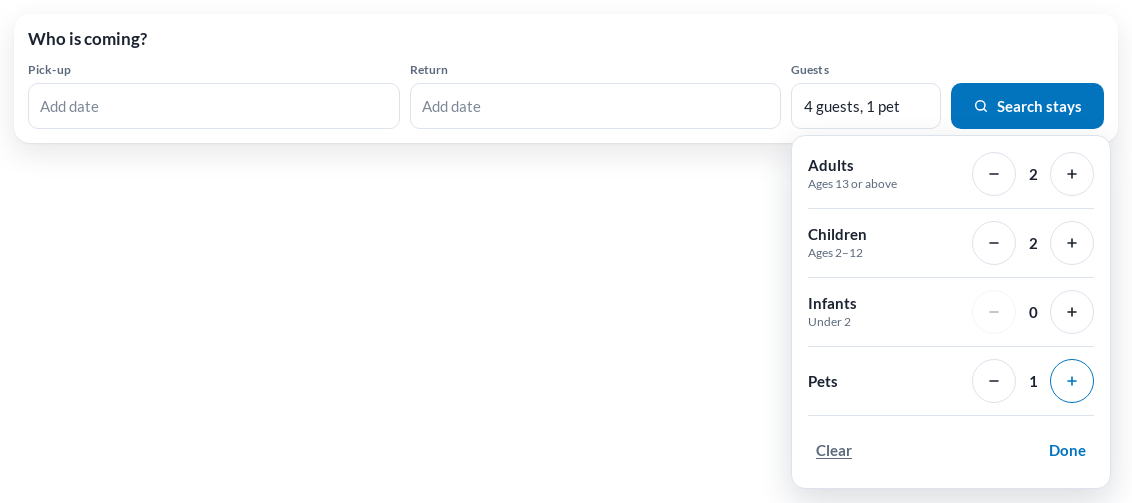
The Guests field is optional. The form still asks for dates before it searches.
What the search does with the party #
It asks two questions.
1. Can this rental ever take the party? A rental that never can is left out of the results, with or without dates:
- Each unit holds up to a number of guests: Maximum guests times the units in stock is less than the party. Four cabins that sleep 4 can take up to 16.
- Each guest takes one place: Maximum guests, or the places in stock, is less than the party.
- The party is smaller than the rental’s Minimum guests per booking.
- The party brings pets or infants the rental does not take, or more than its limit.
2. Are enough units free on the dates? Each rental needs the units the party takes: 5 guests in rooms for 2 need 3 rooms, and a tour needs one place per guest. A rental without enough free units is marked Not available for your dates or hidden, as set in Filter products by the visitor’s dates under Rentals > Settings > Search.
Rentals whose guests are Off are never filtered by the party. They stay in the results and are checked for the dates as before.
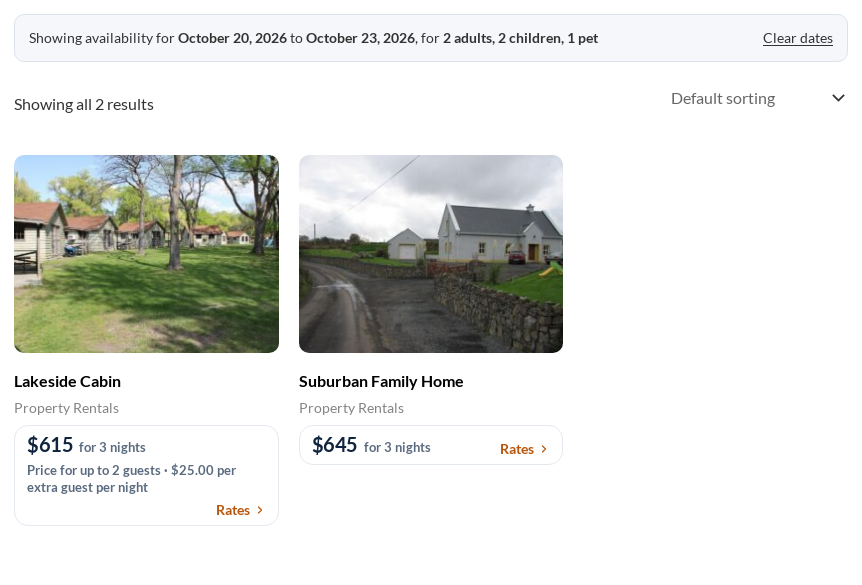
The bar above the listing names the party: “Showing availability for October 20, 2026 to October 23, 2026, for 2 adults, 2 children, 1 pet”. On the modern pricing card, the price for the searched dates includes the party’s guest fees (“$615 for 3 nights”).
Product pages start with the party #
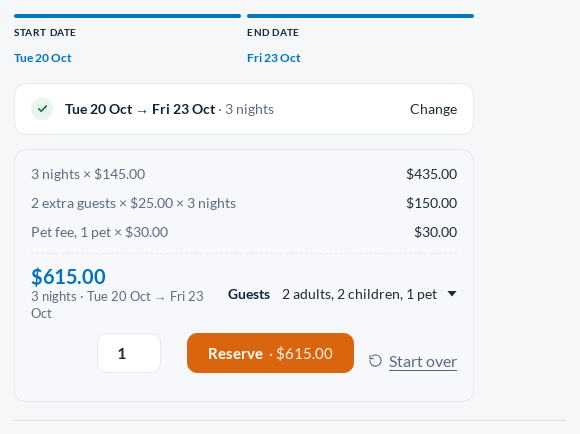
- A rental opened from the results already has the dates and the party, with the price for them.
- If the party is more than that rental takes, the page lowers it to the most it takes and says so: “You searched for 6 guests; this rental takes 4, so the party is set to 4.”
- On a rental that does not ask for children separately, searched children are counted as adults.
- The party is remembered while the visitor browses. A new search without a party, or Clear dates, forgets it.
- Only the search address filters the listing. The remembered party just fills in product pages.
Links you can share #
Every search is a plain web address, so a link can carry the party too:
https://yourstore.com/shop/?sib_from=2026-10-20&sib_to=2026-10-23&sib_guests=4&sib_children=2&sib_pets=1
| Part | Meaning |
|---|---|
sib_guests | Adults and children together |
sib_children | How many of them are children (optional) |
sib_infants | Infants (optional) |
sib_pets | Pets (optional) |
sib_adults | Sent instead of sib_guests by a browser with JavaScript off; adults plus children make the party |
Leave the guest parts out for no guest filter. A link with a party but no dates filters by the party alone, and the bar reads “Showing rentals for 4 guests”.
Questions #
A rental I expected is missing. Check its Guests tab: Maximum guests times the units in stock, Minimum guests per booking, and the pet and infant limits. A rental that can never take the party is left out even when it is free on the dates.
Every rental is still listed. Rentals with guests Off are never filtered by the party. Turn guests on for them, or they will keep showing for any party.
Can visitors search by guests without dates? Not from the form, which asks for dates. A shared link without dates works, as above.


