
Table of Contents
Available from Magento Rental 1.2.219.
Guests let a customer say who is coming, such as 2 adults and 1 child, instead of only picking a quantity. The party sets how many units or seats are booked, and it can set the price. Guests are off on every product until you turn them on, so an upgrade changes nothing by itself.
Set it up #
- Go to Stores > Configuration > Rental > Guests and set the store defaults.
- Open the rental product (Catalog > Products), go to the Rental tab and fill in the Guests fields.
- Open the product on the storefront and try a booking.
Store settings #
| Setting | What it does |
|---|---|
| — | — |
| Default guest types | The types offered when a product uses the store’s types. None means one “Guests” total. Choosing Children, Infants or Pets adds Adults too. |
| Age notes | A short note under each type, such as “Ages 3 to 12”. |
| Infants take a seat | Whether an infant uses a seat. Person mode only. |
| Picker maximum | The highest party the picker allows when neither stock nor the product sets a capacity. |
Product settings #
Guest mode has three choices:
| Mode | What happens |
|---|---|
| — | — |
| Off (the default) | The quantity box works as before. |
| Guests per unit of stock | Each unit sleeps or seats up to Maximum guests. The customer picks the party, and the quantity rises to the units the party needs. Five guests in rooms that sleep 2 book 3 rooms. |
| One unit of stock per seat | Each guest takes one seat from stock. The quantity box is hidden and follows the party. |
Also on the product:
- Maximum guests and Minimum guests.
- A label, such as “Guests” or “Passengers”.
- The guest types: the store’s types, or the product’s own.
- The maximum infants and pets per unit. Set 0 to remove that type.
- A configurable rental’s variants use these values unless a variant sets its own.
Fees #
Guest fees work with unified pricing only.
- Guests included in the rate and an extra guest fee, charged per night, per day or per stay.
- A pet fee, per night, per day or per stay.
- A child price: the same as an adult, a percentage off, or a fixed price.
- Infants are free.
With legacy pricing (deprecated) the party still sets the units and seats and is checked, but no guest fee, child price or free infant is charged. The product’s Guests fields say so.
What the customer sees #
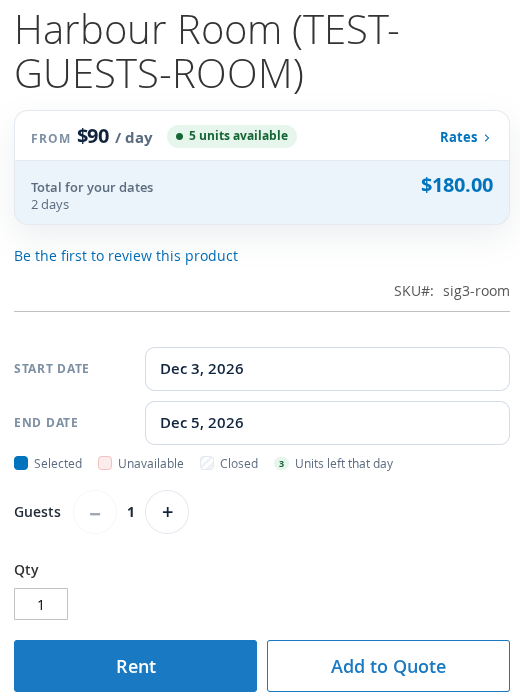
- A guest picker in the booking bar, on Luma and Hyvä. With one type it is a single row. With several types it is a summary button that opens a small dialog.
- The price for the dates, with the fee lines under it.
- The party on the cart, mini cart, checkout, order, invoice, credit memo, emails, PDFs and My Account.
- Each party booking stays its own cart line, even when two bookings are identical.
- Rental search can take a party. It lists only the rentals that fit it, and says how many units it needs, such as “3 units for 5 guests”.
What you see in the admin #
- The order grid, the Send and Returns desks and the reservations grid have a Guests column. It is hidden by default: turn it on under Columns.
- Create New Order prices the party in the product’s configure popup. Party limits apply to admin orders too.
Good to know #
- Infants and pets do not count as guests.
- A guest type with a limit of 0 is not shown in the picker, and the server refuses it.
- Products with guests off ignore a party sent to them.
- Tour products with departures use the same guest settings. See Tours and Activities.


