
When a rental comes back after its due time, the rental extension can charge a late fee. It measures every late return, works the fee out from your rules and puts it in a list for staff to check. Nothing is charged until someone accepts the fee, unless you choose to charge automatically. The fee is then taken from the security deposit, charged to the card saved at checkout, paid by the customer from an emailed link, or recorded as paid at the counter.
Late fees are part of the Rental extension from version 1.2.216. Taking a fee from a security deposit needs the Refundable Security Deposits feature of the Deposits & Damage Waiver extension, which is included with Rental Booking Pro. The late-fee clause in the rental contract needs Rental Contracts 1.2.66 or later.
Turning late fees on #
Go to Stores > Configuration > Sales Igniter > Rental > Late fees and set Charge late fees to Yes. Every setting in this group is set per website.
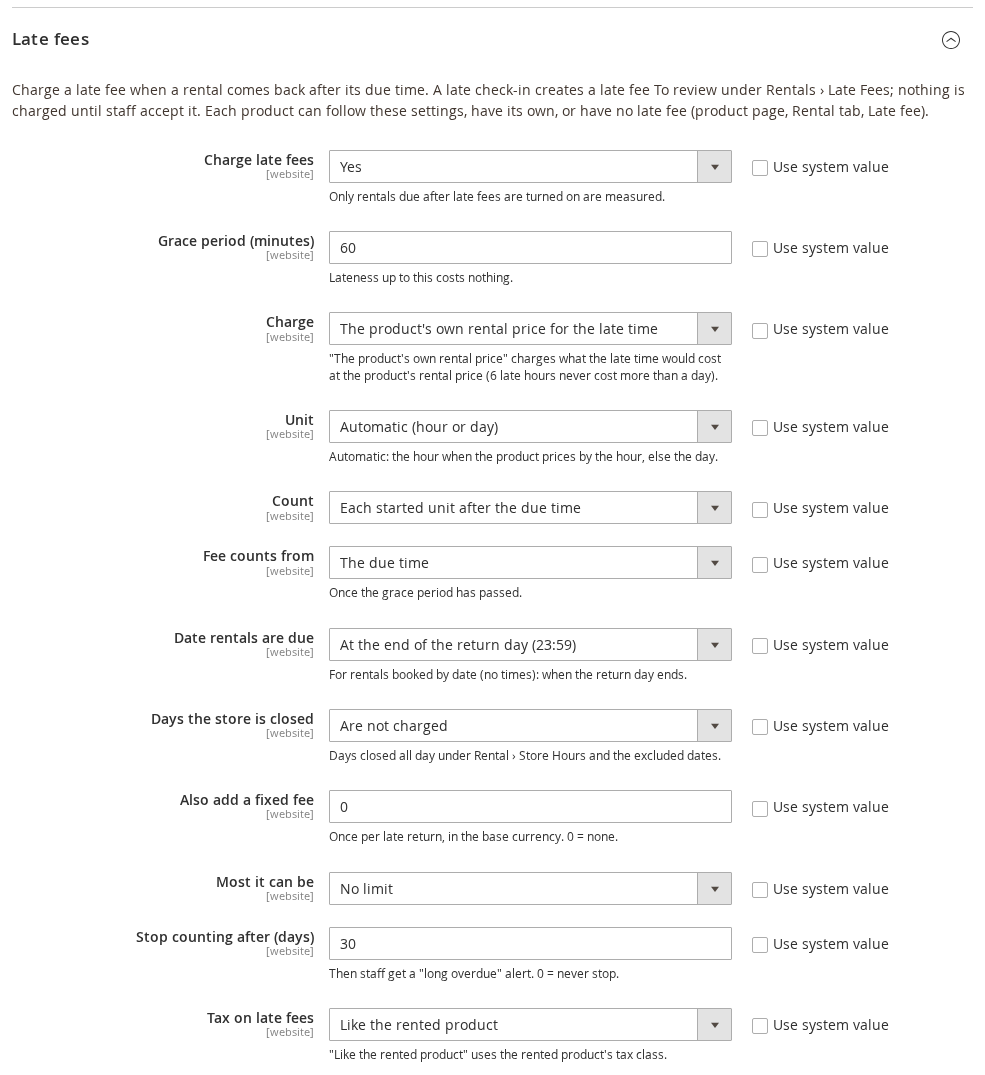
Only rentals due after you turn late fees on are measured. A rental that was already overdue at that moment never gets a late fee on its own, so switching the feature on cannot surprise a customer with a charge for a booking made under the old terms.
From Rental 1.2.217 you can still bill those rentals if you want to. When some exist, Rentals > Send and Return > Late Fees shows Apply late fees to rentals already overdue (N) with the order numbers. Apply late fees to these rentals gives each one a late fee measured from its due date, like any late rental: Accruing while items are out, then To review. Nothing is charged until you accept it, and items already returned stay free.
The Magento cron must be running. Every 15 minutes the sirent_late_fee cron group updates the running totals of rentals that are still out, opens a fee for a rental that has just gone past its grace period, sends the daily list and the reminders, and retries declined card charges.
Settings for the amount #
| Setting | Default | What it does |
|---|---|---|
| Charge late fees | No | Turns late fees on for the website. |
| Grace period (minutes) | 60 | Lateness up to this costs nothing. |
| Charge | The product’s own rental price for the late time | How each late unit is priced. The product’s own rental price for the late time prices the late time like a booking of that length, so 6 late hours on a product with a day rate never cost more than a day. A fixed amount per unit per item uses Amount per unit (default 10, base currency). A percentage of the rental price per unit uses Percentage per unit (default 20, of the booked rental price of the item). The fixed fee only charges just the fixed fee below. |
| Unit | Automatic (hour or day) | Hour, Day or Week. Automatic uses the hour when the product prices by the hour, and the day otherwise. |
| Count | Each started unit after the due time | Or Calendar days: every date after the due date up to and including the return date, at least one. |
| Fee counts from | The due time | Or The end of the grace period. Either way nothing is charged until the grace period has passed. |
| Date rentals are due | At the end of the return day (23:59) | For rentals booked by date, without times. Or At the store’s closing time, or At a set time (Due time, HH:MM in store time). A rental booked with times is due at its booked end. |
| Days the store is closed | Are not charged | Days closed all day under Store Hours and the excluded dates come off the late time. Or Are charged. |
| Also add a fixed fee | 0 | Added once per late return, in the base currency. 0 means none. |
| Most it can be | No limit | Or An amount per item (Most per item), or A percentage of the rental price (Most as a percentage of the rental price, default 100: never more than the booked rental price of the item). |
| Stop counting after (days) | 30 | After this many days the fee stops growing and staff get a “long overdue” email. 0 means never stop. |
| Tax on late fees | Like the rented product | Or Always (the default tax class for products) or Never. |
Settings for collecting the fee #
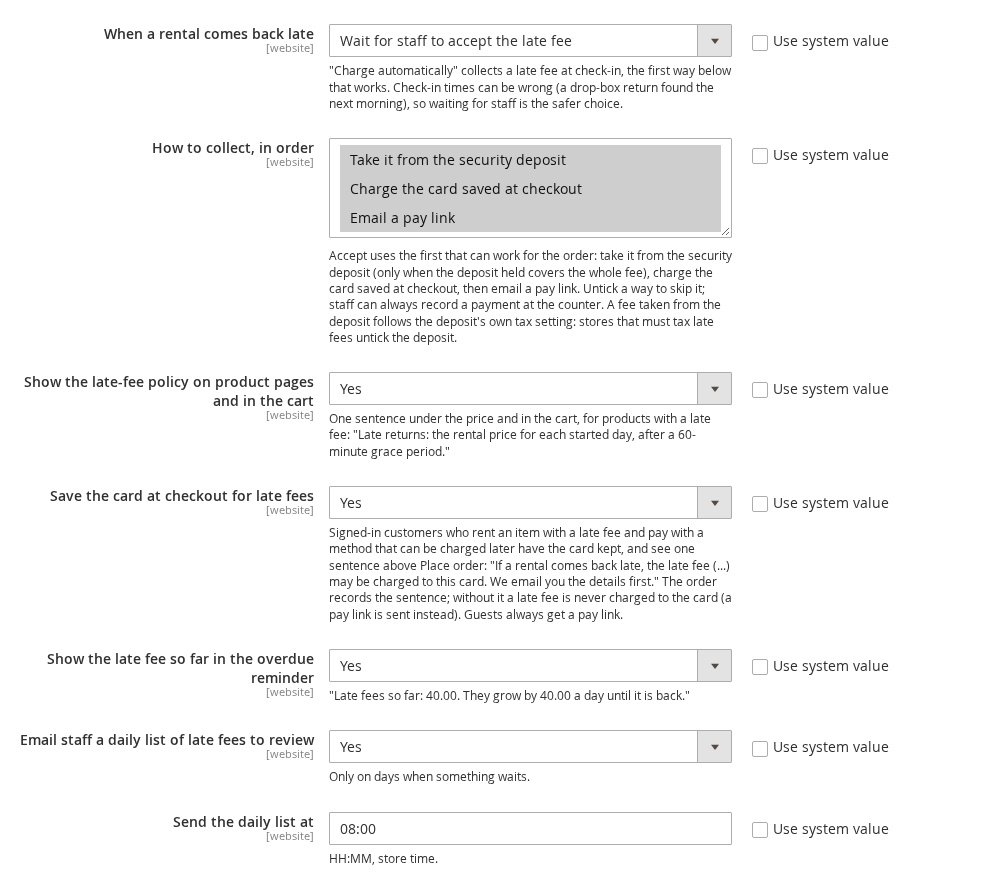
| Setting | Default | What it does |
|---|---|---|
| When a rental comes back late | Wait for staff to accept the late fee | Or Charge automatically: the fee is collected at check-in, by the first way below that works. Check-in times can be wrong (a drop-box return found the next morning), so waiting for staff is the safer choice. |
| How to collect, in order | All three | Take it from the security deposit, Charge the card saved at checkout, Email a pay link. Accepting a fee uses the first one that can work for the order. Untick a way to skip it. Staff can always record a payment at the counter. |
| Show the late-fee policy on product pages and in the cart | Yes | One sentence under the price and in the cart, for products with a late fee. |
| Save the card at checkout for late fees | Yes | Signed-in customers who pay with a method that can be charged later have the card kept, and see a consent sentence above Place order. |
| Show the late fee so far in the overdue reminder | Yes | Adds “Late fees so far: 40.00. They grow by 40.00 a day until it is back.” to the overdue reminder email. |
| Email staff a daily list of late fees to review | Yes | Sent at the time in Send the daily list at (default 08:00, store time), only on days when something is waiting. |
Email settings #
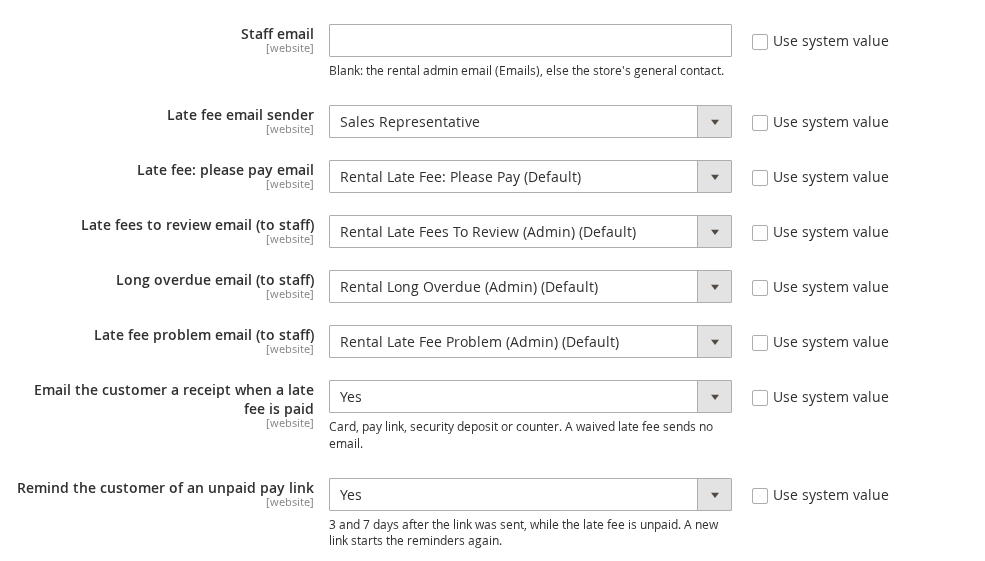
| Setting | Default | What it does |
|---|---|---|
| Staff email | (blank) | Where the staff emails go. Blank uses the rental admin email, or else the store’s general contact. |
| Late fee email sender | Sales Representative | The store identity the late-fee emails come from. |
| The five email template settings | The Rental Late Fee templates | One setting per email. Choose your own template here once you have made one (the emails are listed under What the customer sees). |
| Email the customer a receipt when a late fee is paid | Yes | Whether it was paid by card, pay link, security deposit or at the counter. A waived fee sends no email. |
| Remind the customer of an unpaid pay link | Yes | 3 and 7 days after the link was sent, while the fee is unpaid. Sending a new link starts the reminders again. |
A different late fee for one product #
Open the product, go to the Rental tab and open Late fee. Late fee has three choices:
- Use store setting: the product follows the settings above. This is the default.
- Custom: the fields below are used. Fill in only what differs; a blank field keeps the store setting.
- No late fee: this product is never charged a late fee, and shows no policy sentence.
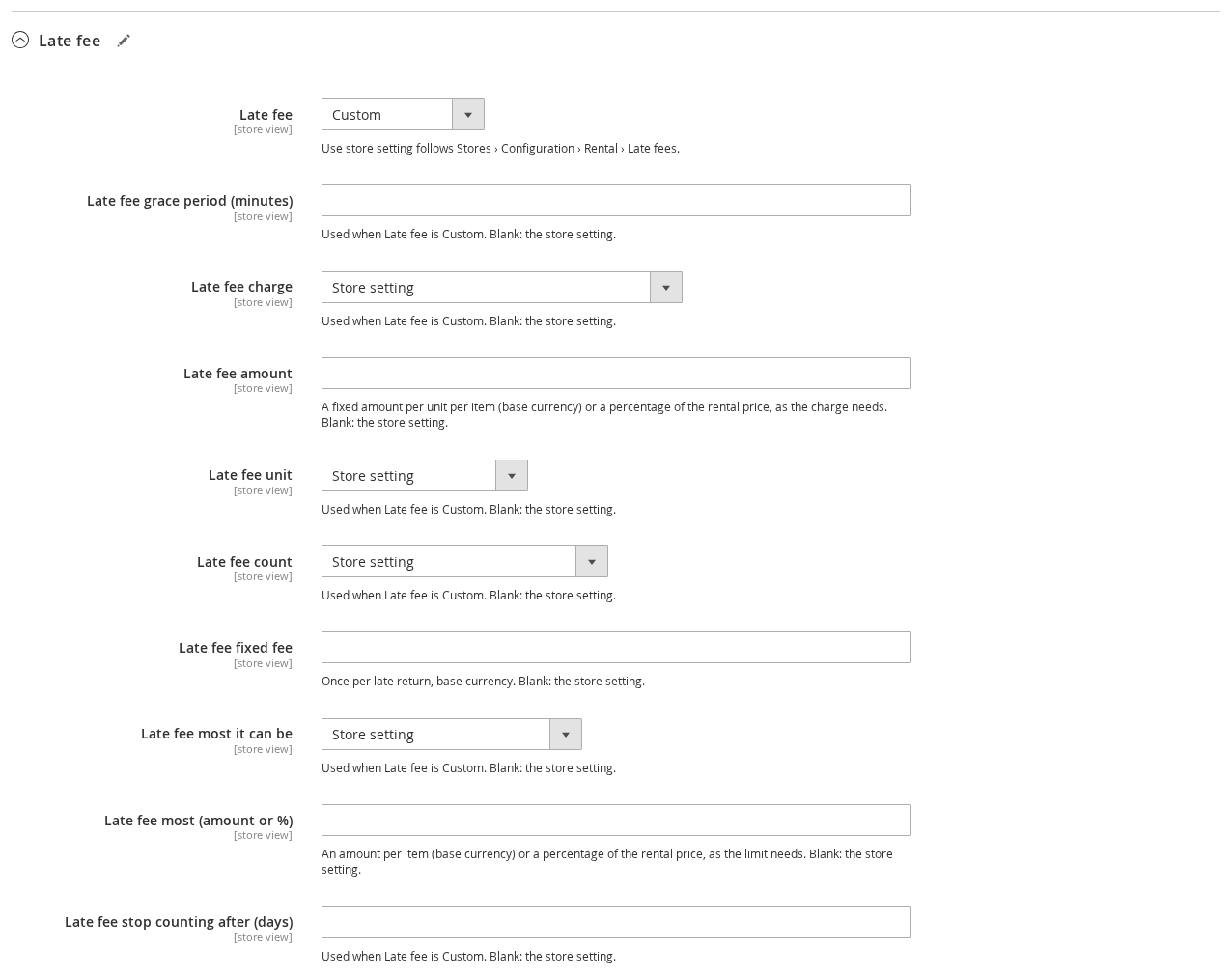
The custom fields match the store settings: grace period, charge, amount (a fixed amount per unit or a percentage, as the charge needs), unit, count, fixed fee, most it can be, the limit (an amount per item or a percentage) and stop counting after. The fields are set per store view.
How a late fee is worked out #
- The due time. A rental booked with times is due at its booked end. A rental booked by date is due on its return day at the time in Date rentals are due. Turnover time never moves it. All times are the store time of the store view the rental was booked in.
- The late time runs from the due time to when the items came back. Up to the grace period, there is no fee. Days the store is closed all day come off it, unless you charge them.
- The units. Each started hour, day or week counts as one (or each calendar day, if you count that way). Counting stops at Stop counting after (days).
- The price. With the product’s own rental price, the late time is priced like a booking of that length at the price the customer booked, so a cheaper day or week rate wins when it applies. A fixed amount is the amount times the units. A percentage is that share of the booked rental price of one item, times the units.
- Each item. The amount is charged per item that came back late. Items returned on time cost nothing, and each check-in of a partial return is measured on its own.
- Then the limit (per item), the fixed fee (once per late fee) and the tax. Amounts are worked out in the base currency and shown in the order’s currency at the order’s rate.
Some examples, all with the default settings unless the row says otherwise:
| Rental | Due and returned | Late fee |
|---|---|---|
| Party tent, $40 a day, booked by date | Due Friday 23:59, back Sunday 10:15: 34 h 16 min late, 2 started days | $80.00 |
| The same tent | Back 45 minutes late, inside the 60-minute grace period | None |
| Kayak, $15 an hour or $60 a day | Due 14:00, back 17:20: 4 started hours | $60.00 |
| The same kayak | Due 14:00, back 19:30: 6 started hours would be $90, but the day rate is cheaper | $60.00 |
| 50 chairs, fixed $1 per chair per day, store closed on Sunday | Due Saturday 18:00, back Tuesday 09:00: 63 hours less Sunday = 39 hours, 2 days | $100.00 |
| 3 bikes, $30 a day | Two back on time, one back 42 hours late | $60.00 (the late bike only) |
Checking items in #
A late fee is measured when items are checked in, on Rentals > Send and Return > Return Rentals, on Scan Returns, or through the GraphQL API. If the items came back earlier than you check them in, for example a drop-box return found in the morning, fill in Returned at (store time) first. The fee is measured from that moment. It can never be in the future.

A fee goes through these statuses:
| Status | Meaning |
|---|---|
| Accruing | Items are still out past their due time. The fee grows until they are back, and cannot be accepted yet. |
| To review | Everything is back. The fee waits for staff. |
| Charging | A card charge is running, or waiting for the payment provider to confirm it. |
| Pay link sent | The customer was emailed a link to pay. |
| Failed | The card was declined. It is tried again, and the customer has a pay link meanwhile. |
| Needs confirmation | The bank wants the customer to confirm the payment (3-D Secure). They were emailed a pay link. |
| Paid | Collected. |
| Waived | Written off by staff. The customer is not emailed. |
| Cancelled | The late-fee order was cancelled. |
| Refunded / Part refunded | Paid, then refunded in full or in part. |
An order has one open late fee at a time, numbered after the order (LF-000001026-1). If more items of the same order come back late after the fee was accepted, a second fee opens (LF-000001026-2).
Reviewing and collecting a late fee #
Open the rental order. The Late fees section shows when the items were due back, when they came back, how late they were, each line and the total.
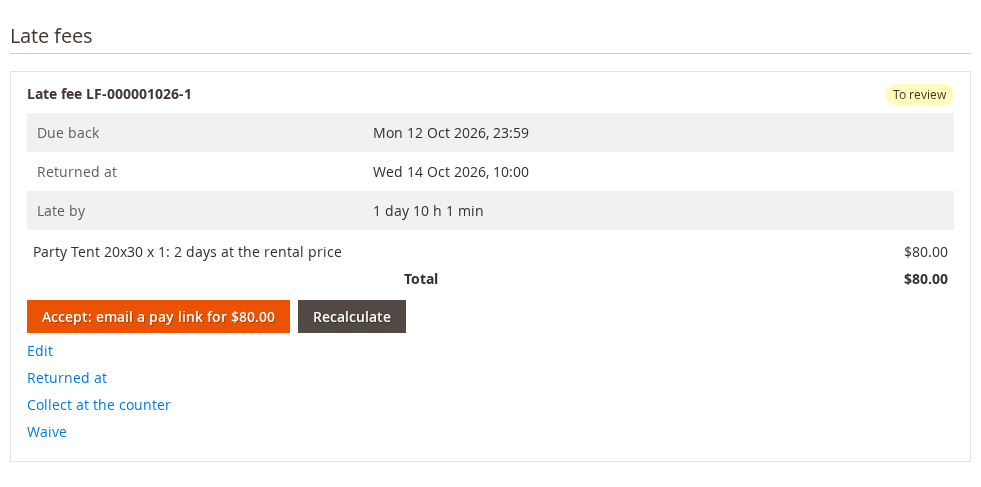
The orange button accepts the fee and collects it the first way that can work for this order. Its label says which:
- Take 90.00 from the deposit (200.00 held): only when the deposit left covers the whole fee. The fee is kept from the deposit and the rest of the deposit is released.
- Charge Visa ending in 4242: only when the customer was signed in, agreed to the card being kept at checkout, and paid with a method that can be charged later (Braintree and other Magento Vault methods, Stripe, Adyen, Mollie, or ParadoxLabs TokenBase methods such as Authorize.Net CIM). A soft decline is tried again one day later and then two days after that; the customer is emailed a pay link at the first decline and you get an alert. A hard decline switches to the pay link at once.
- Accept: email a pay link for $80.00: the customer gets an email with a signed link, valid 14 days, to pay the fee through your normal checkout.
The other ways that can work appear as buttons next to it, and Send pay link is always there. Once a link is sent, Send pay link again and Copy pay link appear.
A paid late fee is a separate Magento order for a hidden “late fee” product, linked to the rental order, with its own invoice and tax. It never asks for the rental contract signature.
Other actions #
| Action | What it does |
|---|---|
| Edit | Change a line amount, add a line (for example cleaning), write a note shown to the customer, and give a Reason (staff only), which is required when an amount changes. The calculated amount is kept beside your change. Save or Save and accept. |
| Recalculate | Works the fee out again from the rules and drops staff changes. |
| Returned at | Corrects the time of a check-in. The fee is measured again from the new time. |
| Collect at the counter | Records a payment taken in the shop: choose Paid by (Cash, Card terminal, Bank transfer or Other), add a Reference and click Record payment of …. |
| Waive | Writes the fee off with a Waive reason (Waive late fee). Its pay links stop working. |
| Refund | On a paid fee: refunds all or part of it, as a credit memo on the late-fee order (online when the payment provider can), or back through the deposit when it was kept from the deposit. |
A fee can be edited or waived only before a late-fee order exists for it; cancel that order first. After payment only a refund changes it.
With When a rental comes back late set to Charge automatically, the fee is collected at check-in (or on the next cron run) without anyone pressing Accept, in the order set in How to collect, in order.
What the customer sees #
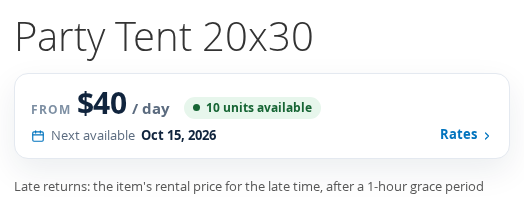
On the product page and in the cart, a product with a late fee shows the policy in one sentence (on Luma and Hyvä). Turn it off with Show the late-fee policy on product pages and in the cart.
At checkout, a signed-in customer renting an item with a late fee, who pays with a method that can be charged later, sees one sentence above Place order: “If a rental comes back late, the late fee (…) may be charged to this card. We email you the details first.” The order records the sentence. Without it, a late fee is never charged to the card; the customer gets a pay link instead. Guests always get a pay link.
In My Account, the order page lists the late fee with its lines, and a Pay now button while it can be paid. My Orders has a Late fee column. Fees still To review, and cancelled ones, are not shown to the customer.


The emails are in Marketing > Email Templates (load the default template to make your own copy):
| Sent to | When | |
|---|---|---|
| Rental Late Fee: Please Pay | Customer | A fee is accepted with a pay link, a link is sent again, or a card charge is declined. |
| Rental Late Fee: Receipt | Customer | A fee is paid. |
| Rental Late Fee: Confirm Your Payment | Customer | The bank asks the customer to confirm a card charge. |
| Rental Late Fee: Unpaid Reminder | Customer | 3 and 7 days after a pay link, while unpaid. |
| Rental Late Fees To Review (Admin) | Staff | The daily list of fees waiting. |
| Rental Long Overdue (Admin) | Staff | A rental reaches Stop counting after (days). |
| Rental Late Fee Problem (Admin) | Staff | A card charge was declined or could not be made. It also appears as an admin notification. |
The overdue reminder email also shows the late fee so far, while Show the late fee so far in the overdue reminder is on.
The Late Fees list and report #
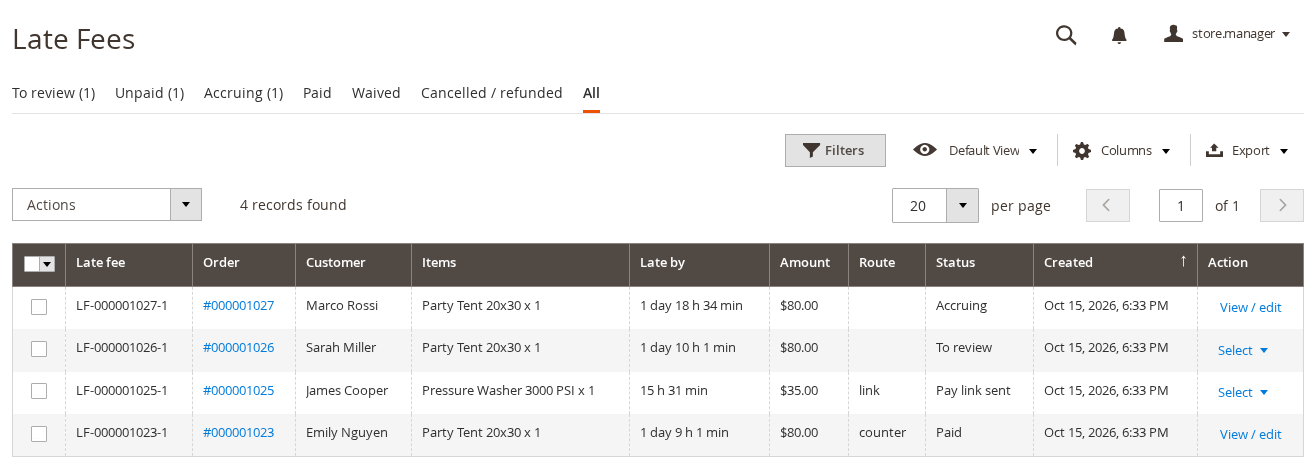
Rentals > Send and Return > Late Fees lists every late fee, in tabs: To review, Unpaid, Accruing, Paid, Waived, Cancelled / refunded and All (it opens on To review from Rental 1.2.217). Tick fees and use Actions to Accept or Waive several at once. More columns (calculated and edited amounts, paid via, reviewed by, waive reason and others) are under Columns, and Export gives a CSV.
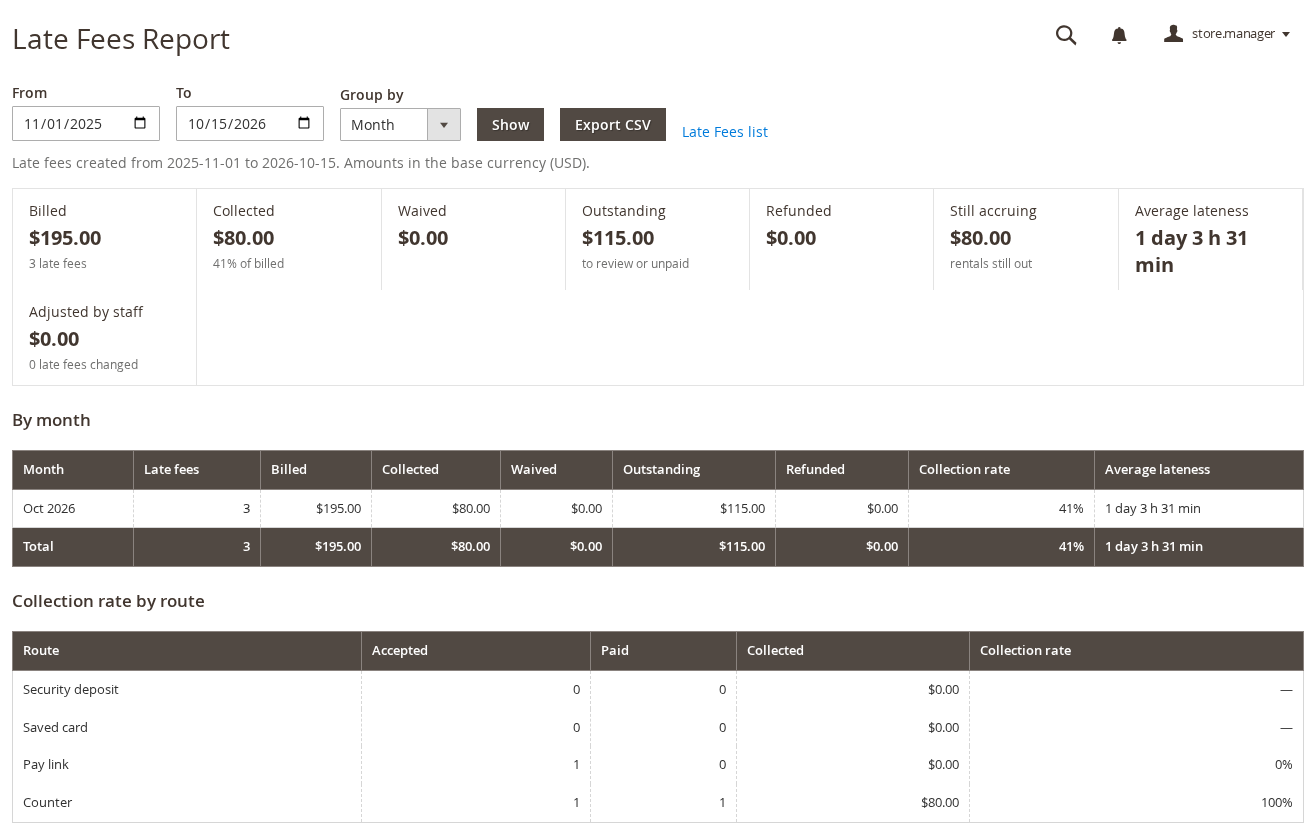
Rentals > Reports > Late Fees Report totals the late fees created in a date range, grouped by month, product, customer, website or location: billed, collected, waived, outstanding (to review or unpaid), refunded, still accruing, average lateness and how much staff changed. Collection rate by route compares the deposit, saved card, pay link and counter. Export CSV downloads it. Amounts are in the base currency.
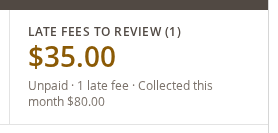
The Rental Dashboard has a Late fees to review tile with the unpaid amount, and the admin customer page shows Late returns in the last 12 months under Personal Information.
Deposits held while a fee is open #
When a security deposit is released automatically, the release waits while the order has an open late fee and taking fees from the deposit is on. That keeps the deposit there to pay the fee. Releasing a deposit by hand is not held back.
The late fee in the rental contract #
With Rental Contracts, the placeholder {{var late_fee_policy}} in Terms and conditions in the contract (Stores > Configuration > Sales Igniter > Rental > Rental contracts) prints the late-fee policy sentence for the order’s rentals, and nothing when no late fee applies. The default terms already include it.
Permissions #
Two permissions in System > Permissions > User Roles, under Rental:
- Late fees: view: the Late Fees section on orders, the list, the report and the dashboard tile.
- Late fees: accept, edit, waive, record payment: every action on a fee.
Roles that already had other rental permissions when the extension was updated were given both.
GraphQL #
The back-office list and every action are also in the GraphQL API (rentalLateFees, acceptRentalLateFee and the other late-fee mutations), and so are the customer’s own late fees with a pay link (customerRentalLateFees). See GraphQL API: Late Fees.


