
Available from Magento Rental 1.2.219.
A tour can depend on a guide, a boat or a driver being free. On each staff or resource row you choose whether it only tracks the job or limits what the shop sells.
Track or Limit sales #
Open the tour and find the Staff & resources box on the Rental tab. Each row has a Track select:
| Choice | What happens |
|---|---|
| — | — |
| Track (as before) | The job shows as unassigned when nobody is free. A sale is never stopped. |
| Limit sales | The shop sells only what the free people and resources can cover. |
A tour with no Limit row behaves exactly as before.
Departures #
With Limit sales, seats left is the lowest of the stock, the capacity and the seats the Limit rows can fill. Only active staff and resources that are free for the departure’s time count. The bookings already on the departure are its load.
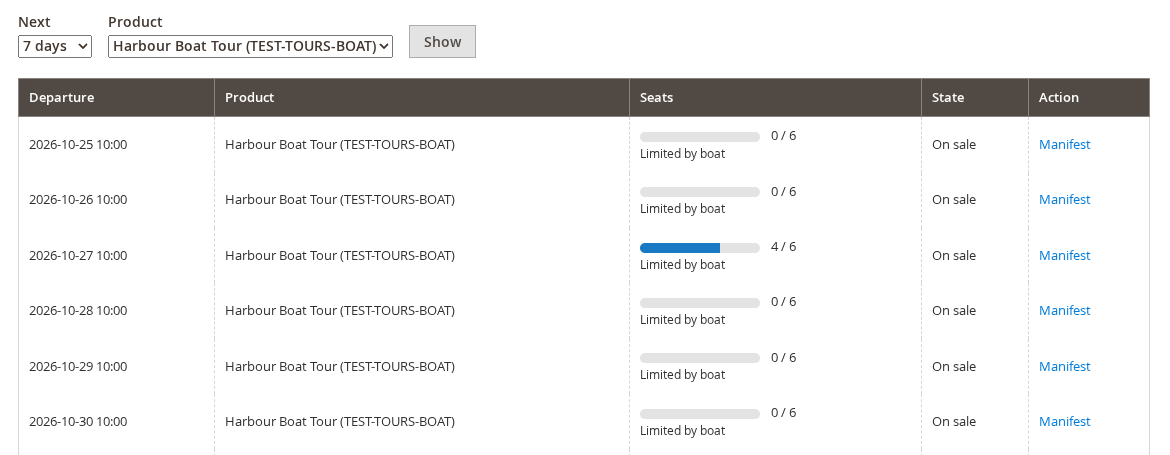
A boat that seats 6 on a tour with capacity 12 sells 6. With 4 sold, 2 more can be booked. If no qualified person or resource is free, the departure shows as sold out.
On the Departures page and the manifest you see seats such as 4 / 6 and Limited by boat. It names the row, by its label or role, that stops another seat from being sold. It only shows when the Limit row, and not stock or capacity, sets the seats.
Other rentals #
A product that is not a departure can use Limit sales too. When nobody qualified is free at the chosen time, the online booking is refused:
- “No guide is free for this time any more.”
- “No boat with enough seats is free for this time any more.”
A whole-day booking is checked in the opening-hour windows its jobs will have. Bookings made in the admin are not checked, because staff assign by hand.
Good to know #
- Jobs are still filled automatically only when the product says Automatically.
- A resource linked to stock is busy from its assignments, not yet from the stock ledger.
- The date calendar of a non-departure product does not grey out times nobody can staff. The refusal comes when the date is added to the cart.


