
Available from Magento Rental 1.2.219.
A tour can offer prices by type of guest, a price for a whole group, private bookings and a minimum number of guests. Turn on guests first. See Guests and party size.
Guest types and their prices #
Besides adults, children, infants and pets, a tour can offer seniors, students and up to three types of your own.
- Name your own types in Stores > Configuration > Rental > Guests. A type with no name is not offered.
- On the tour, set Senior price, Student price and Own guest type 1 to 3 price: the same as an adult, a percentage off, or a fixed price (with an amount field next to each). Only the types the product offers are priced.
The price lines show on the page, for example “2 seniors at $52.00” or “Youth: 1 at $40.00”.
Group price #
A group price charges one price for the whole party. It works in “One unit of stock per seat” mode.
On the tour, set Group price:
| Choice | What happens |
|---|---|
| — | — |
| None | Normal per-guest prices. |
| For private bookings | Customers choose in the guest picker: Join the group or Book it privately (up to 8 guests, $399.00). |
| For every booking | One price for the whole party, always. |
Then fill in Price for the whole party and Up to this many guests (empty means any party size). Larger parties takes price bands, one per line, such as 4=200. A private party larger than the last band is refused.
The party is priced as one booking, and the total is spread over the seats. A $399 private booking for 5 guests shows as 5 seats at $79.80.
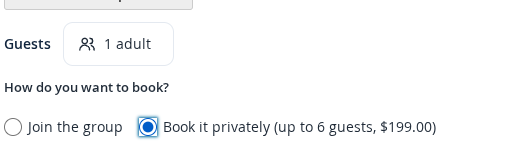
Private or shared #
A private booking takes the whole departure.
- A departure with a private booking shows Booked privately and has no seats left.
- A customer cannot book a departure privately once other guests have booked it.
Minimum guests #
Some tours only run with enough guests. On the tour, set:
- Runs with at least (guests): the minimum.
- Decide by (hours before): when the minimum is decided. Empty means 24 hours before the start.
- Cancel automatically at the deadline: off by default.
- Email the guests when it is guaranteed: on by default.
Until the seats sold reach the minimum, the departure is pending. Once they do, it is guaranteed. You can set a different minimum or decision time for one departure on its manifest page.
An hourly check does the rest:
- When a departure reaches its minimum, the guests are emailed once.
- A day before the deadline, the general contact gets a warning.
- At the deadline, the managers are emailed, or the departure is cancelled if you chose that. A cancel releases the stock and you refund with a credit memo.
The guaranteed email can go out up to an hour after the minimum is reached. You can also run the decision yourself from the manifest.


