
This page covers the people and statuses you set up, every setting, every email Maintenance sends, the import from version 1, and notes for developers.
Technicians #
Go to Rentals > Maintenance Setup > Technicians. Tickets can be assigned to technicians. Click Add yourself to start, and Add a technician for anyone else.
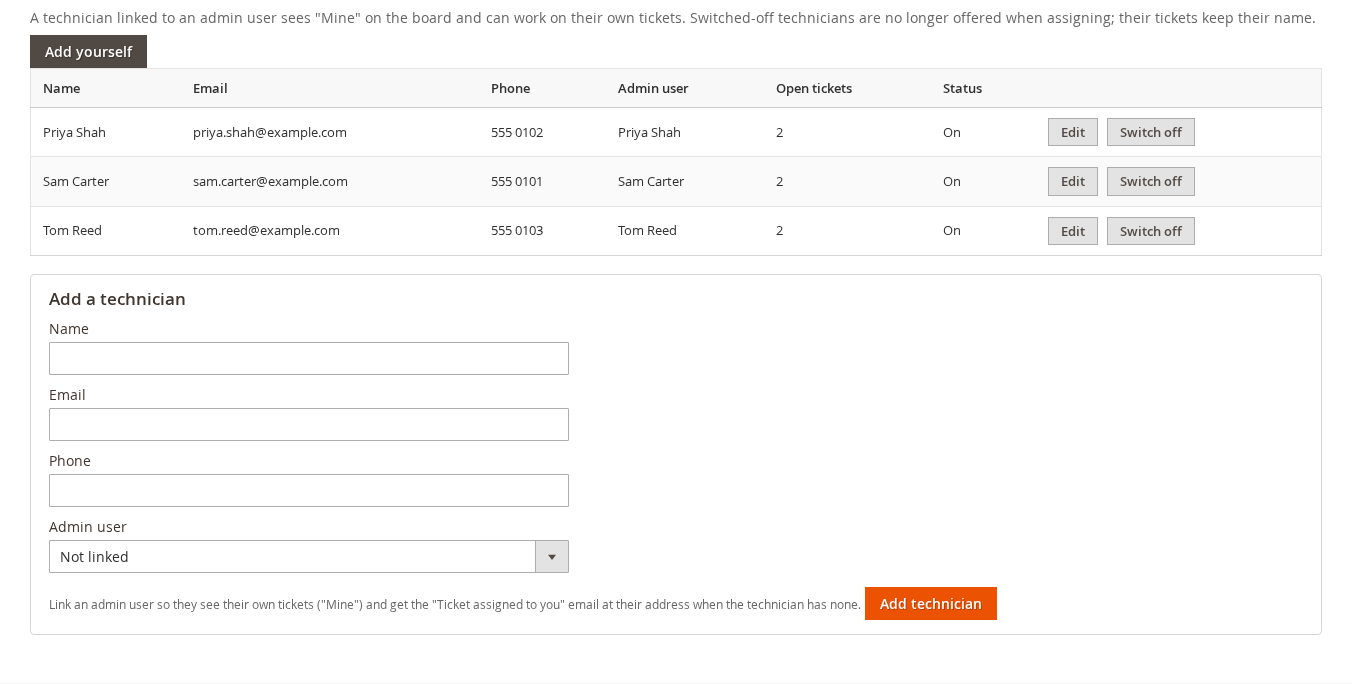
- A technician has a Name, Email and Phone.
- Link an Admin user so they see their own tickets (Mine on the board) and get the “Ticket assigned to you” email at their admin email when the technician has none.
- Switch off a technician who left: they are no longer offered when assigning, and their tickets keep their name.
- On a ticket, Assign to me adds the admin user behind the click as a technician if they are not one yet. Other admin users show under Other admin users (added as technicians).
A technician only needs a role with See tickets and the board and Work on tickets assigned to me (see getting started).
Statuses #
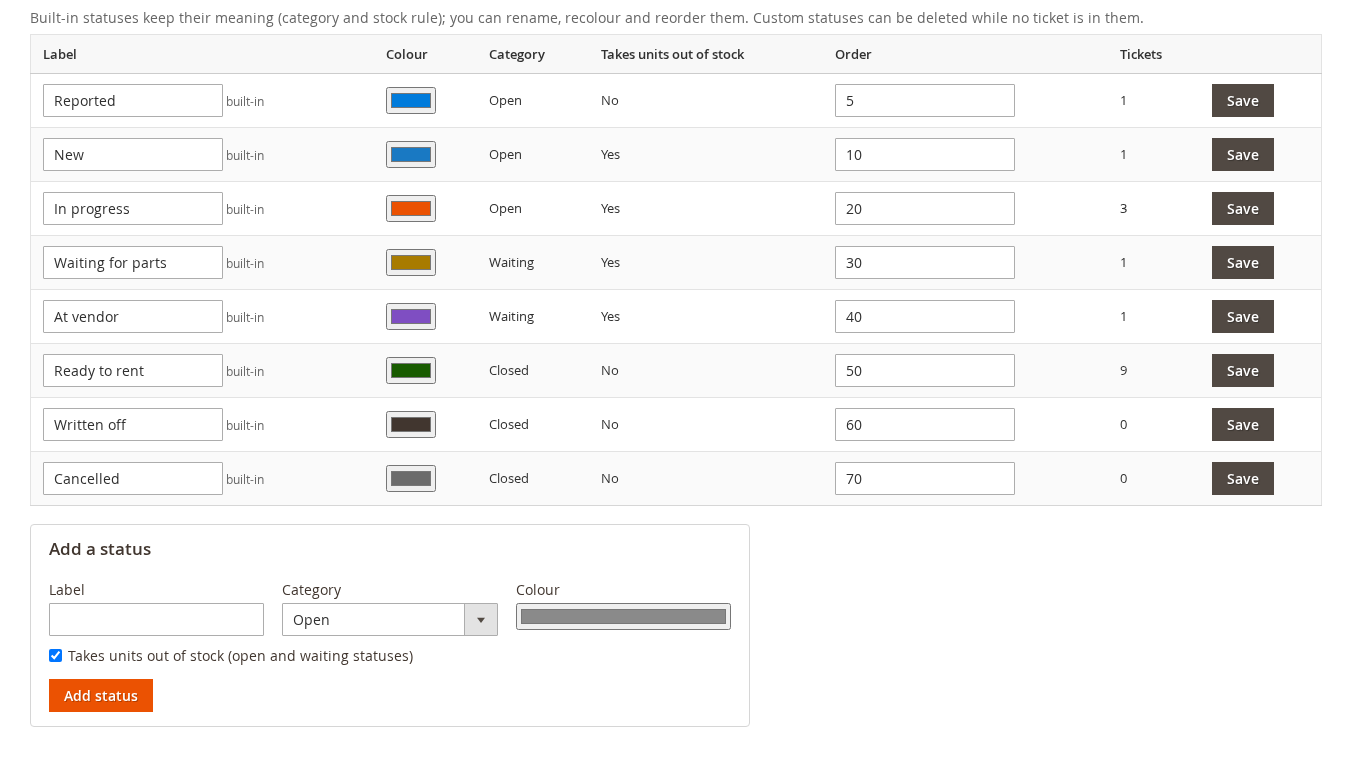
Go to Rentals > Maintenance Setup > Statuses. The eight built-in statuses are described in Tickets and the board. Here you can:
- rename a status and change its Colour and Order;
- choose which open and waiting statuses take units out of stock;
- for closed statuses, set the Outcome (for example Fixed, Replaced or No fault found);
- add your own with Add a status. A custom status can be deleted while no ticket is in it.
Built-in statuses keep their category and their stock rule.
Settings #
Go to Rentals > Maintenance Setup > Settings. It opens the Maintenance Tickets group of Stores > Configuration > Sales Igniter > Rental.
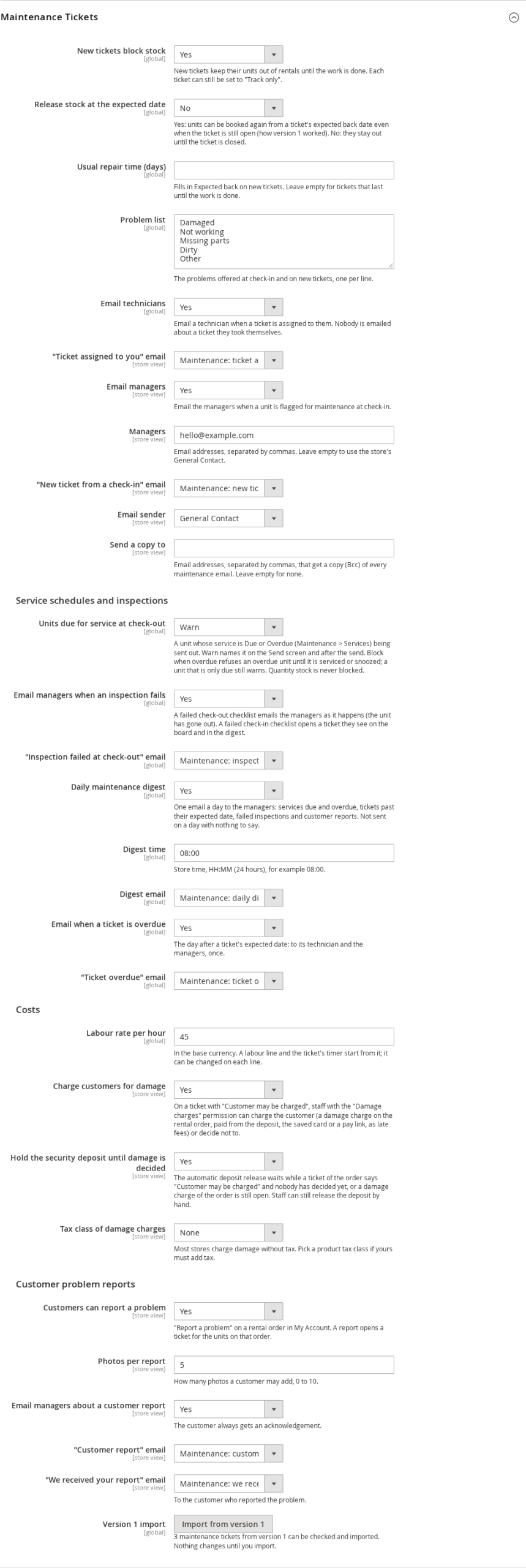
| Setting | What it does | Default |
|---|---|---|
| New tickets block stock | New tickets keep their units out of rentals until the work is done. Each ticket can still be set to “Don’t block (log only)”. | Yes |
| Release stock at the expected date | Yes: units can be booked again from a ticket’s expected back date even when it is still open. No: they stay out until the ticket is closed. | No |
| Usual repair time (days) | Fills in Expected back on new tickets. Empty: until the work is done. | Empty |
| Problem list | One per line, shown at check-in, on new tickets and in the customer’s report form. | Damaged, Not working, Missing parts, Dirty, Other |
| Email technicians | Email a technician when a ticket is assigned to them (not when they take it themselves), and the template. | Yes |
| Email managers | Email the managers when a unit is flagged for maintenance at check-in, and the template. | Yes |
| Managers | Email addresses, separated by commas. Empty: the store’s General Contact. | Empty |
| Email sender | The store identity the emails come from. | General Contact |
| Send a copy to | Email addresses that get a copy (Bcc) of every maintenance email. | Empty |
| Units due for service at check-out | Warn, or Block when overdue. See Service schedules. | Warn |
| Email managers when an inspection fails | A failed check-out checklist emails the managers as it happens. | Yes |
| Daily maintenance digest | One email a day at the digest time (store time, 24 hours). Not sent on a day with nothing to say. | Yes, 08:00 |
| Email when a ticket is overdue | The day after a ticket’s expected date: to its technician and the managers, once. | Yes |
| Labour rate per hour | The rate labour lines and the timer start with, in the base currency. | 0 |
| Charge customers for damage | Staff can charge the customer for damage; the tax class; hold the deposit release until decided. See Damage charges. | Yes, no tax, hold |
| Customers can report a problem | “Report a problem” on a rental order in My Account; photos per report (0 to 10); email the managers. | Yes, 5 photos, yes |
| Version 1 import | A link to the import (shown only when version 1 tickets exist). |
Most settings apply to the whole store. The email and customer report settings can differ per website or store view.
Emails #
All emails are Magento email templates. Edit their text, or pick another template in the settings, under Marketing > Communications > Email Templates (Add New Template, then load the template named below).
| Sent to | When | |
|---|---|---|
| Maintenance: ticket assigned to you | The technician | A ticket is assigned to them |
| Maintenance: new ticket from a check-in | Managers | Needs service at check-in opens a ticket |
| Maintenance: ticket overdue | The technician and the managers | Once, the day after a ticket’s expected date, while it is still open |
| Maintenance: daily digest | Managers | Once a day at the digest time, only when something is overdue, due back, reported, waiting or at a vendor, or a service is due |
| Maintenance: inspection failed at check-out | Managers | A unit’s check-out checklist fails |
| Maintenance: customer report (managers) | Managers | A customer reports a problem from My Account |
| Maintenance: we received your report (customer) | The customer | With their reference, after they report a problem |
| Maintenance: damage charge, please pay (customer) | The customer | A damage charge is to be paid from a link, or the saved card could not be charged |
| Maintenance: damage charge receipt (customer) | The customer | A damage charge is paid |
| Maintenance: damage charge, confirm the card payment (customer) | The customer | The bank asks the customer to confirm the card payment |
| Maintenance: damage charge reminder (customer) | The customer | An unpaid damage charge |
Every email sent for a ticket is also noted on the ticket’s timeline.
Import from version 1 #
If you used Maintenance 1.x, the import copies your version 1 tickets into the new tickets. It keeps their numbers (ticket 37 becomes MT-37), keeps the stock holds that are still needed and releases the stale ones. Statuses, templates and automated maintenance come over too: the automated schedules become service schedules, paused. Version 1 tables are only read, and Undo puts everything back.
Open it from the Version 1 import link in the settings (shown only when there is something to import).
- Check. Plans the import and lists what would change. Nothing is written. It lists errors (tickets that cannot be imported), warnings and the stock holds. Download the report (CSV) has every line.
- Read the warnings, tick I have read the warnings, then click Import.
- Undo import removes the imported tickets and gives the holds and serial numbers back as they were. It refuses while tickets created in 2.0 exist, because it would lose them.
From the command line:
bin/magento salesigniter:maintenance:import --dry-run
bin/magento salesigniter:maintenance:import --apply
bin/magento salesigniter:maintenance:import:status
bin/magento salesigniter:maintenance:import:rollback --batch=N
Add --allow-errors to import the tickets without errors and leave the others out.
Notes for developers #
- GraphQL, not REST. Everything in Maintenance is in the GraphQL schema: tickets, statuses, technicians, service schedules and due units, checklists and inspections, parts and vendors, costs, damage charges, reports and the dashboard. See Maintenance Tickets in GraphQL. Version 1’s operations keep working.
- Check-in input. The Rental extension’s return mutations (
RentalReservationMoveInput,RentalSerialScanInput) take amaintenancefield for Needs service: serials or quantity, problem, note, whether to keep the units out, whether the customer may be charged, and photo ids fromuploadRentalMaintenancePhoto. They answer withmaintenance,maintenance_inspectionsandmaintenance_warnings. - Permissions. Each GraphQL operation checks the permission named in its description (for example
SalesIgniter_Maintenance::tickets_manageto open a ticket). - Cron. The extension runs three jobs:
simaint_sweepandsimaint_remindersevery 15 minutes (holds, overdue tickets, reminders and emails) andsimaint_dueevery hour (service states). - CSV. Export CSV on the board, the parts and schedule imports (up to 2 MB per file, with a template and Check only), and every report.
- Stock and availability. A ticket’s hold is not a booking: nothing is written into your orders. It is handed to the Rental extension’s availability as a reservation of its own. A ticket never changes a product’s stock setting; only a write-off with Reduce stock by 1 lowers the stock count.
- Uninstall.
bin/magento module:uninstall SalesIgniter_Maintenance --remove-datadrops the Maintenance tables, after giving back what tickets wrote into the Rental tables.


