
Available from Magento Rental 1.2.219.
Three optional parts of a tour: the guests’ names, where guests are picked up, and a day-by-day itinerary. They are set on the tour’s Rental tab, with the other tour fields.
Guest names #
Set Ask for each guest’s name:
| Choice | What happens |
|---|---|
| — | — |
| Optional (the default) | The departure list has a box Guests’ names (one per line). |
| Required | One name per seat before the tour can be added to the cart. The customer sees “Please enter a name for each of the 3 guests (one per line).” |
| Not asked | No names. The manifest shows “Guest 1”, “Guest 2” and so on. |
Staff booking in the admin are not asked.
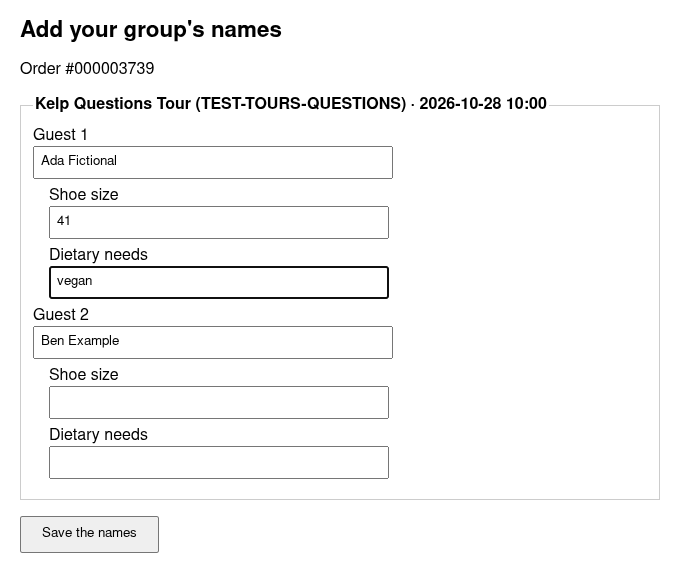
Add your group’s names. While guests have no name, the order email and the order in My Account (under Your tickets) show Add your group’s names. The link opens a page that lists each booking’s guests. The customer types the names and saves them. No sign-in is needed: the link is private to the order.
A name typed later, on that page or on the manifest, is kept. The names show on the manifest and the names page. They are not on the cart line, order lines or PDFs yet.
Questions for each guest #
Some answers belong to one guest, not to the booking: a shoe size, a dietary need. In the Questions for each guest field on the tour (Rental tab), type one question per line, up to 10:
Shoe size
Dietary needs- The questions are asked after booking, on the Add your group’s names page, under each guest’s name. This works even when the tour’s names are set to Not asked.
- Each answer stays with its guest. An answer can be up to 255 characters.
- Answers are optional. A guest with no answers does not bring up the names link.
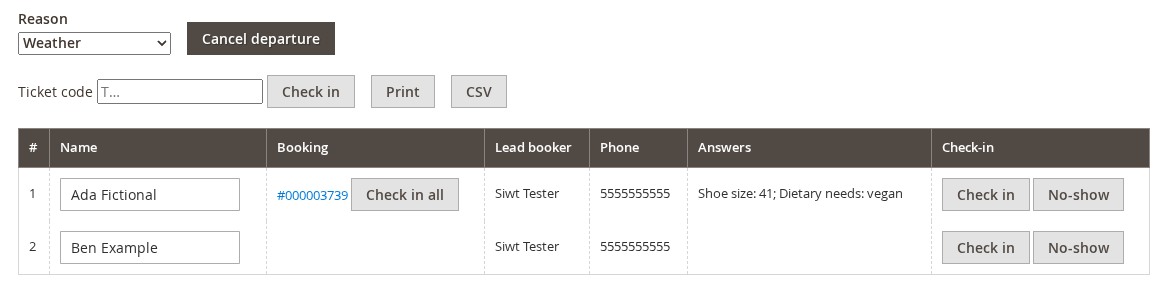
- On the manifest, an Answers column shows what each guest said, such as “Shoe size: 42; Dietary needs: vegan”. It shows once any guest has answered. The CSV has an Answers column too.
- The questions are not asked on the product page or at checkout, and an answer cannot be made required.
Pickup points #
Fill in Pickup points, one per line, as name | minutes before | address:
Hotel Plaza | 45 | 1 Beach Road
Marina Gate | 20 | 8 Harbour Street
Turn on the Meet at the start option to add that choice as well. It is chosen by default.
- The booking bar gets a required Pickup point select. A booking without one is refused (“Please choose a pickup point.”). Staff in the admin may leave it out.
- The booking keeps the pickup as it was booked, so changing the list later changes no booking.
- The pickup shows as “Pickup: Hotel Plaza, 08:10”: the departure’s start minus the minutes, with the date when that is the day before. It appears on the cart line, the order line, emails, invoices, PDFs, the admin order, My Account and the ticket page.
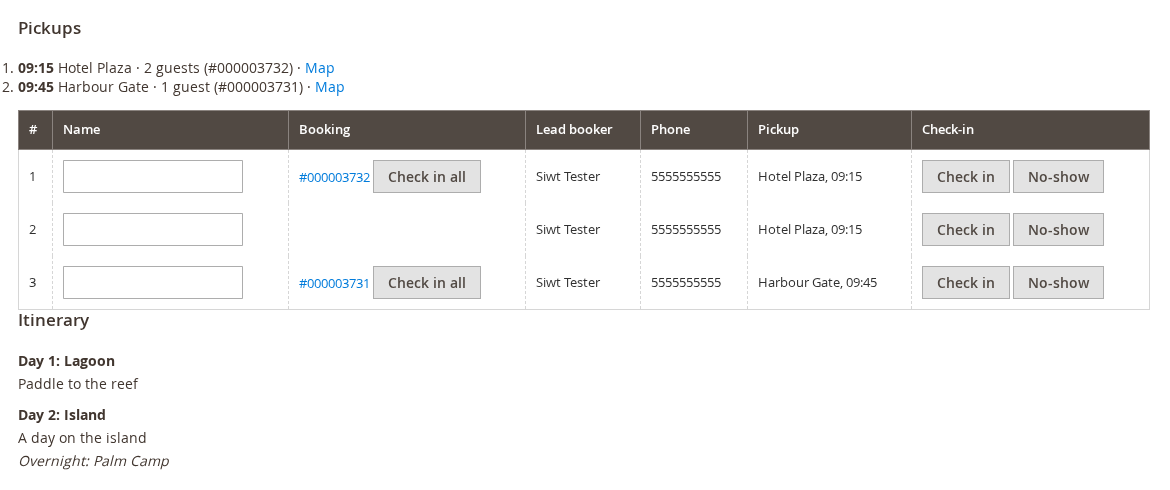
- On the manifest, rows are sorted by pickup time. A Pickups list gives the time, point, guests, bookings and a map link for each stop. The CSV has Pickup and Pickup time columns.
A different pickup time for one departure is not available yet. Change time does not rewrite the time written on the order line, but the manifest and tickets follow the new time.
Itinerary #
For tours that last several days, fill in Itinerary, one day per line, as day | title | what happens | overnight. A line without a day continues the one before it.
1 | Arrival | Welcome dinner at the lodge | Riverside Lodge
2 | Canyon day | Guided hike and picnic | Riverside Lodge
The itinerary shows as an Itinerary section in the product details on Luma and Hyvä, and on the manifest.


