
Available from Magento Rental 1.2.219.
A tour is a rental product that runs on set departures, such as the 9:00 kayak trip on Saturday. Customers choose a departure instead of dates, and the shop sells one seat at a time. This page covers the setup and what customers see.
Make a product a tour #
- Open the rental product (Catalog > Products) and go to the Rental tab.
- In the Departures group, fill in the Departures field, one departure rule per line.
- Set Stop online sales (hours before) if you want booking to close before the start. Empty means booking stays open until the departure starts.
- For a tour shorter than a day, turn on the product’s times.
- Turn on Guests for the product if the tour sells seats by party. See Guests and party size.
The Departures field #
Each line is one rule:
{"start":"2027-05-01 09:00","length":"3h","repeat":"daily","weekdays":["sat","sun"],"until":"2027-09-30","price":"49","capacity":12}| Part | What it means |
|---|---|
| — | — |
start | The first departure, date and time. |
length | How long it runs, such as 90min, 3h or 2d. |
repeat | none, daily, weekly, monthly or yearly. |
weekdays and until | Optional. Limit the repeat to some weekdays and end it on a date. |
price | Optional. The price of one seat on this run. Without it the run is priced like any rental. |
capacity | Optional. The most seats to sell. Without it, stock is the limit. |
A rule the system cannot read is refused when you save the product.
Stop online sales closes online booking that many hours before the start. After that the page says “Call us to book” with the store phone number (Stores > Configuration > General > Store Information). Staff can still book in the admin.
What customers see #
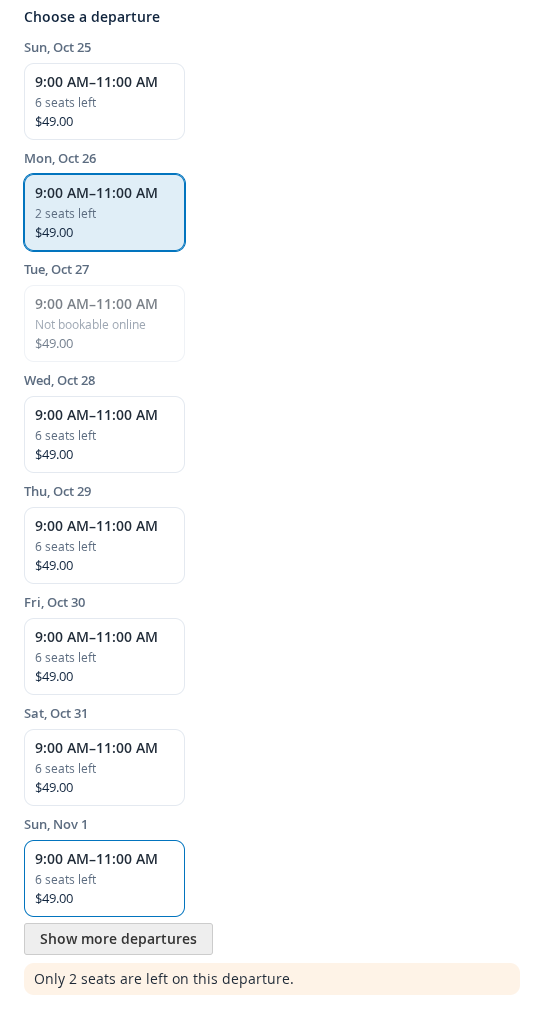
- The booking bar shows Choose a departure instead of the date pickers. Departures are listed by day, with the time, “N seats left” and the price.
- The seats are loaded fresh each time, so a cached page never shows old numbers.
- Choosing a departure fills in the booking and enables Reserve. Asking for more seats than are left lowers the quantity and says why.
- A departure can be linked to directly with
?sib_departure=<id>. - The shop checks the departure again when the tour is added to the cart and when the cart quantity changes. A departure that is gone, closed or full is refused.
- Two departures never merge into one cart line.
- Search engines get event details (up to 10 coming departures with a price) from the product page.
A departure shows as open, sold out, closed, cancelled, past its cut-off or started. Closed means online sales are off: staff can still book it.
Seats left #
Seats left is the lower of the stock free for the departure and the capacity minus the seats sold. With a guest mode, each seat is one unit. With Limit sales on staff or resources it can be lower again. See Limit sales: staff and resources.
Tickets #
In My Account, each booking on a departure shows Your tickets: a QR code and a ticket code, with a ticket page the customer can open on a phone. Staff scan or type the code at check-in. See Departures, manifest and check-in.


