
Shopify lets a product be sold with purchase options, also called selling plans: “every month”, pre-orders, try before you buy. They are created by an app such as Shopify Subscriptions, Recharge, Appstle, Seal or Loop, or by you. This page says how those options work together with rentals.
What happens to a rental sold with a purchase option #
These rules are in place for every plan, whether or not you turn on ongoing rentals.
- Shopify sets the price. A line bought with a purchase option is priced by Shopify: the variant’s price with the plan’s discount. Shopify doesn’t let any app change that price, so the date prices of the rental calendar can’t apply. Other rentals in the same cart keep their date prices.
- The calendar rents one time only unless Offer rentals billed per period is on in Settings › Subscriptions. If a shopper picks a subscription for a rent variant some other way, such as a theme’s own purchase options, checkout stops with “Choose the subscription for {item} on its product page.”
- Subscription-only products (products that can only be bought with a plan, set by “Only show this product with these purchase options” in Shopify) can’t be added by the calendar until you turn on rentals billed per period. The health line on the app’s home page lists them. Either turn on one-time purchase for them in Shopify, or turn on rentals billed per period.
- Renewal orders never create a second booking or a false “not enough stock” conflict. The booking made by the first order records each renewal, and you see them in the booking’s activity.
- Rent variants in a plan. The health line says how many rent variants are in a plan. While rentals billed per period are off, remove the plan from the rent variant. Keep it on the Buy variant if you also sell the product.
- Kits can’t be sold with purchase options, because of a Shopify rule. A rental kit is always one-time.
- Discounts. Since mid-2026 an app discount applies to subscription lines by default, with an “Applies on subscription” setting. Check each rental discount code if subscription lines shouldn’t get it.
Rent with a subscription app’s plan #
With rentals billed per period on and Offer subscription apps’ plans on, you can let the other app charge each period:
- In the subscription app, create a plan, for example “Every month”.
- Add the plan to the product’s rent variant.
- Set that variant’s Shopify price to the period fee. One-time rentals are priced by their dates, so the variant’s own price never reached them.
- In the subscription app, turn off shipping for renewals of rent variants.
- Open the product’s Subscriptions card in the rental app. It lists the plans found on each rent variant, and whether each is usable: a pre-order or try-before-you-buy plan isn’t offered.
The calendar then asks How do you want to rent? and offers the plan, for example “Monthly rental · $49.00 every month until you return it”. The customer picks a start date, sees the consent line, and the rental is added with its plan in one step. Shopify shows the plan name and the subscription agreement at checkout.
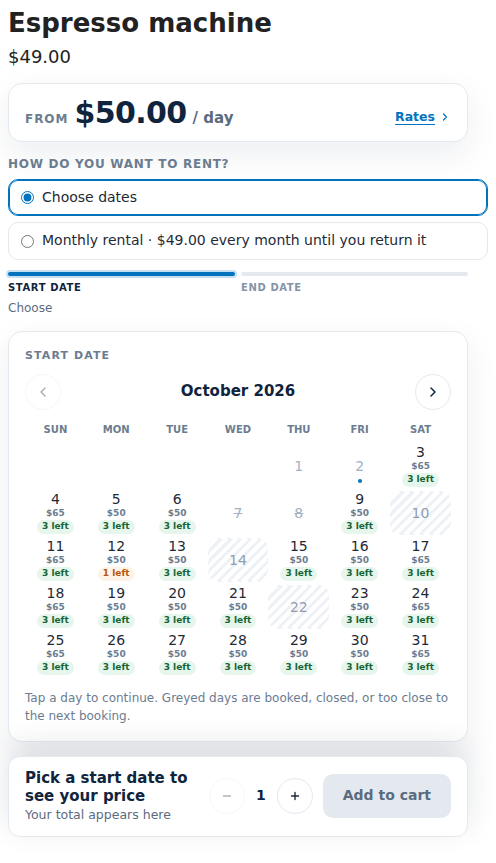
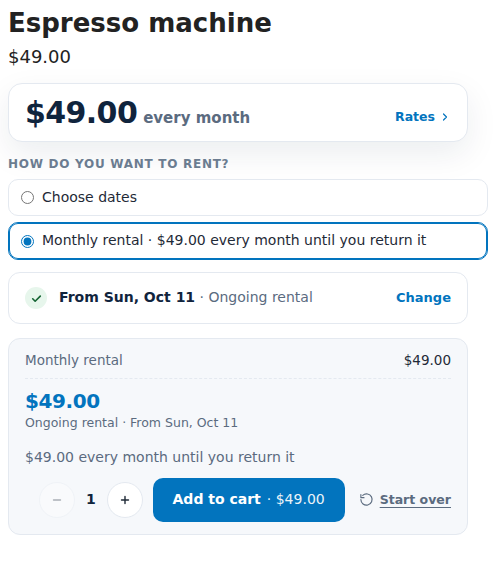
The app holds the unit from the start date. The subscription app charges the card and makes a renewal order for each period. The app records the payment and moves Paid through on. Each renewal appears in the Subscriptions page like any other rental, billed by “Subscription app”.
Cancelling #
When the customer cancels in the subscription app’s portal, end the rental here too, or let Shopify Flow do it:
- In Flow, use the trigger Subscription contract updated.
- Add the condition “status is Cancelled”.
- Add the action End ongoing rental, with the contract’s origin order.
The rental is then due back by the end of the paid period. Return and overdue reminders run against that date. Ending the rental in the rental app does not cancel the subscription in the other app. Do that there too.
A renewal that is late by the grace days marks the rental “Payment overdue”, emails you and fires the Flow trigger Rental payment overdue. Nothing is recalled automatically.
Limits #
- A subscription line is priced by Shopify, never by the rental dates.
- Part payments, kits and draft orders (including quotes) can’t carry a subscription app’s plan. Use billing by invoice for those.
- The rental app can’t read another app’s subscription contracts, because Shopify requires approval for that. So it sees renewal orders, not the contract. A cancelled subscription reaches the rental app through Flow, through you ending the rental, or through a missing renewal.
- A store needs a payment provider that supports subscriptions, such as Shopify Payments, for a subscription app’s checkout. Billing by invoice works with every payment method.


