
This page lists every setting, every email the plugin sends, and the notes for developers: the REST API, the CSV files and the hooks.
Settings #
Go to Maintenance › Settings (users with manage_woocommerce). The screen has tabs: General (the settings below), Checklists, Parts, Vendors, Technicians and Statuses.
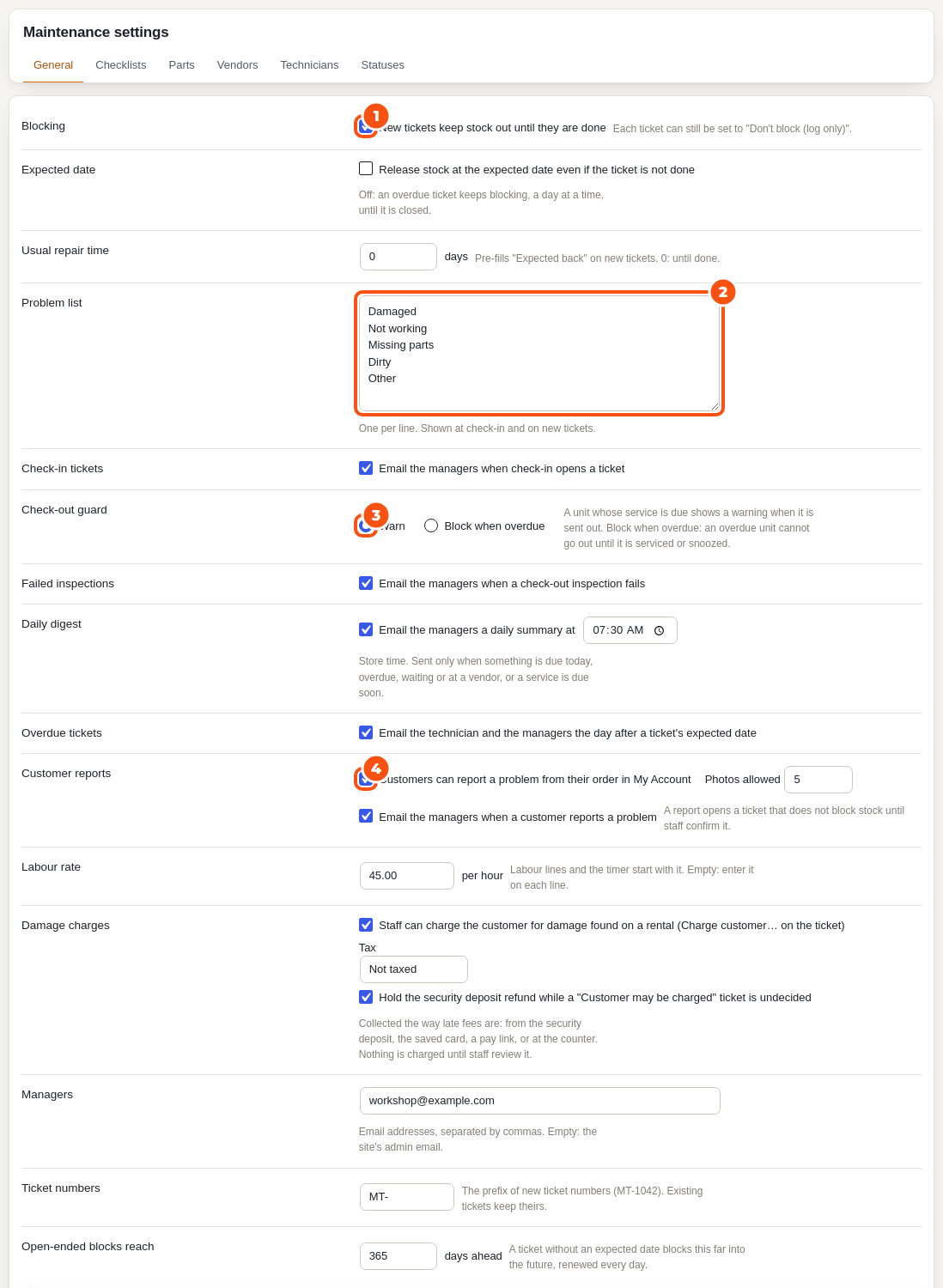
| Setting | What it does | Default |
|---|---|---|
| Blocking | New tickets keep stock out until they are done. Each ticket can still be set to “Don’t block (log only)”. | On |
| Expected date | Release stock at the expected date even if the ticket is not done. Off: an overdue ticket keeps blocking, a day at a time, until it is closed. | Off |
| Usual repair time | Pre-fills “Expected back” on new tickets. 0: until done. | 0 days |
| Problem list | One per line, shown at check-in, on new tickets and in the customer’s report form. | Damaged, Not working, Missing parts, Dirty, Other |
| Check-in tickets | Email the managers when check-in opens a ticket. | On |
| Check-out guard | Warn, or Block when overdue. See Checklists and the check-out guard. | Warn |
| Failed inspections | Email the managers when a check-out inspection fails. | On |
| Daily digest | Email the managers a daily summary at a store time. | On, 08:00 |
| Overdue tickets | Email the technician and the managers the day after a ticket’s expected date. | On |
| Customer reports | Customers can report a problem from My Account; photos allowed; email the managers. | On, 5 photos |
| Labour rate | The hourly rate labour lines and the timer start with. Empty: enter it on each line. | Empty |
| Damage charges | Staff can charge the customer for damage; the tax of a charge; hold the deposit refund while undecided. | On, standard rate, hold |
| Managers | Email addresses, separated by commas. Empty: the site’s admin email. | Empty |
| Ticket numbers | The prefix of new ticket numbers. Existing tickets keep theirs. | MT- |
| Open-ended blocks reach | How far ahead a ticket without an expected date blocks, renewed every day. | 365 days |
The Statuses tab lets you rename the statuses, choose which keep stock out, set their colour and order, and add your own.
Emails #
All emails are WooCommerce emails: edit their subject, heading and text, or switch them off, under WooCommerce › Settings › Emails, where each one also has a preview.
| Sent to | When | |
|---|---|---|
| New ticket from a check-in | Managers | Needs service at check-in opens a ticket |
| Maintenance job assigned | The technician | A ticket is assigned to them (not when they assign it to themselves) |
| Maintenance ticket overdue | The technician and the managers | Once, the day after a ticket’s expected date, while it is still open |
| Daily maintenance digest | Managers | Once a day at the digest time, only when something is overdue, due back today, reported, waiting or at a vendor, or a service is due |
| Inspection failed at check-out | Managers | A unit’s check-out checklist fails |
| New customer report | Managers | A customer reports a problem from My Account |
| We received your report | The customer | With their reference, after they report a problem |
| Damage charge: please pay | The customer | A damage charge is to be paid from a link, or the saved card could not be charged |
| Damage charge: receipt | The customer | A damage charge is paid (card, link, deposit or counter) |
REST API #
The endpoints live under wc-sibooking/v1/maintenance and use the same authentication as the rest of the Rentals & Bookings REST API (see REST API overview and authentication). Each request is checked against the maintenance capabilities of the user it runs as.
| Endpoint | What it does |
|---|---|
GET, POST /maintenance/tickets | List (filters: tab, status, priority, kind, technician, product, serial, order, booking, search) and open tickets |
GET, PATCH /maintenance/tickets/{id} | Read and change a ticket |
POST /maintenance/tickets/{id}/status, /comments, /assign, /write-off, /attachments | Move it on, comment, assign, write off, add photos |
GET /maintenance/statuses | The statuses |
POST /maintenance/uploads | Upload a photo first, then pass its id with a return |
GET, POST /maintenance/schedules, /maintenance/due, /maintenance/schedule-units | Service schedules, the units due, done and snooze |
GET, POST /maintenance/checklists, /maintenance/inspections | Checklists and inspections |
GET, POST /maintenance/tickets/{id}/costs, /costs/{id}, /tickets/{id}/timer, /tickets/{id}/vendor | Costs, the labour timer and the ticket’s vendor |
GET, POST /maintenance/parts, /maintenance/vendors | The parts and vendors lists |
POST /maintenance/tickets/{id}/charge, /no-charge; /maintenance/charges | Damage charges: open, collect, counter, resend, retry, waive, refund |
GET /maintenance/reports/{type} | cost, downtime, utilisation, compliance, problems |
The Rentals & Bookings return endpoint takes a maintenance field for Needs service:
"maintenance": {
  "serials": ["PW-04"],
  "problem": "Damaged",
  "note": "Cracked lance",
  "block": true,
  "may_charge": true,
  "priority": "high",
  "photo_ids": [5123]
}
true alone sends every unit returned to maintenance with the store’s defaults. Without serial numbers, pass quantity. A send answers with maintenance_warnings (the check-out guard) and a send or return with maintenance_inspections (checklists).
CSV #
- Export CSV on the board: the tickets in view, one row per unit.
- Import parts from CSV (Parts) and Import schedules from CSV (Services): each has a template, Check only first, rows matched to existing parts (SKU or name) and schedules (product, unit and name) are updated, and bad rows are listed by line. Files up to 2 MB.
- Every report has Export CSV.
Stock and availability #
A ticket’s block is not a booking: nothing is written into your bookings or orders. It is handed to availability as a reservation of its own, and it never changes a product’s stock setting. Write off with Reduce stock by 1 is the only action that lowers the stock count.


