
Live Chat & AI Agent keeps everything on your own server, asks for consent before it tracks anyone, and gives you the tools to answer a person’s request for their data. Chatting never needs consent: a visitor who says no to tracking can still chat. The settings are under Live chat › Settings › Privacy.
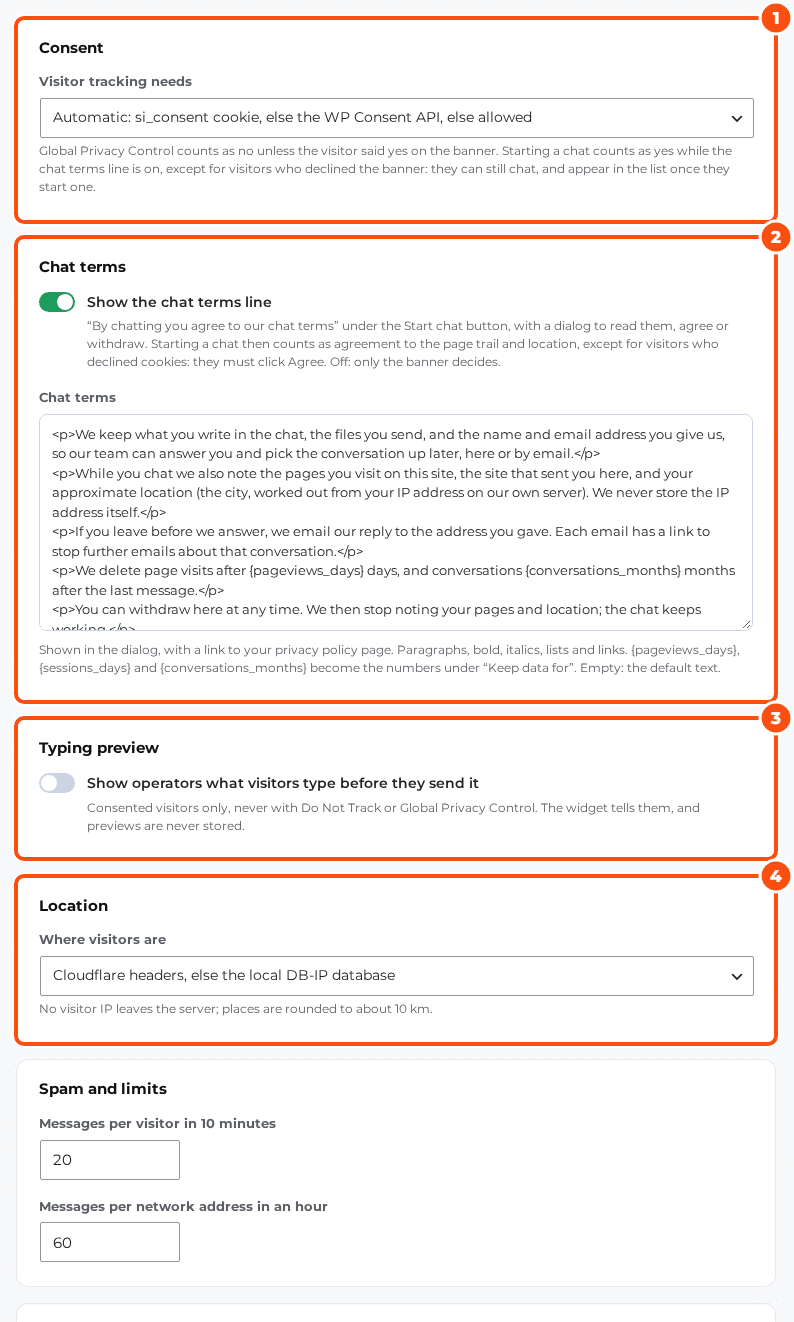
What needs consent #
Tracking means the Live visitors screen, the pages a visitor viewed and the map. It runs only with consent. Visitor tracking needs:
| Choice | Where the yes or no comes from |
|---|---|
| Automatic (default) | The si_consent cookie, else the WP Consent API, else allowed |
| The si_consent cookie | The cookie; without a choice, implied outside the EU/EEA, the UK and Switzerland |
| The WP Consent API | A consent plugin that supports the WP Consent API |
| Always allowed | Only where no consent banner is needed |
| Never track visitors | No tracking, whatever the visitor does |
Global Privacy Control counts as a no in every mode, unless the visitor said yes on your banner or agreed to the chat terms.
The chat terms #
With Show the chat terms line on (the default), the widget shows “By chatting you agree to our chat terms” under the Start chat button. The link opens your Chat terms text, a link to your privacy policy page (set it under WordPress’s Settings › Privacy) and Agree / Close. After agreeing the visitor sees the date, with Withdraw.
- Starting a chat under the line counts as agreeing, except for a visitor who declined your cookie banner: they can still chat, and are not tracked.
- Withdraw stops tracking at once, until the visitor agrees again.
- The chat terms text takes paragraphs, bold, italics, lists and links;
{pageviews_days},{sessions_days}and{conversations_months}become your retention numbers.
The typing preview (operators see what a visitor types before they send it) is off by default. It needs an explicit yes (the banner’s, or Agree), and Do Not Track or Global Privacy Control always turn it off. Typing previews are never stored.
Cookies #
| Name | What for | Lasts |
|---|---|---|
silc_vid | Recognises the browser’s chats; the server keeps only a hash of it. Set when a chat starts | 12 months |
silc_terms | The visitor’s answer to the chat terms (chat started, agreed or withdrawn) and the time | 12 months |
The widget also keeps a few values in the browser’s session storage (unread count, proactive-message caps for this visit) and, only with consent, in local storage (when a proactive message may show again, the visit count). Your cookie banner’s si_consent cookie is never changed by the chat.
What is kept, and for how long #
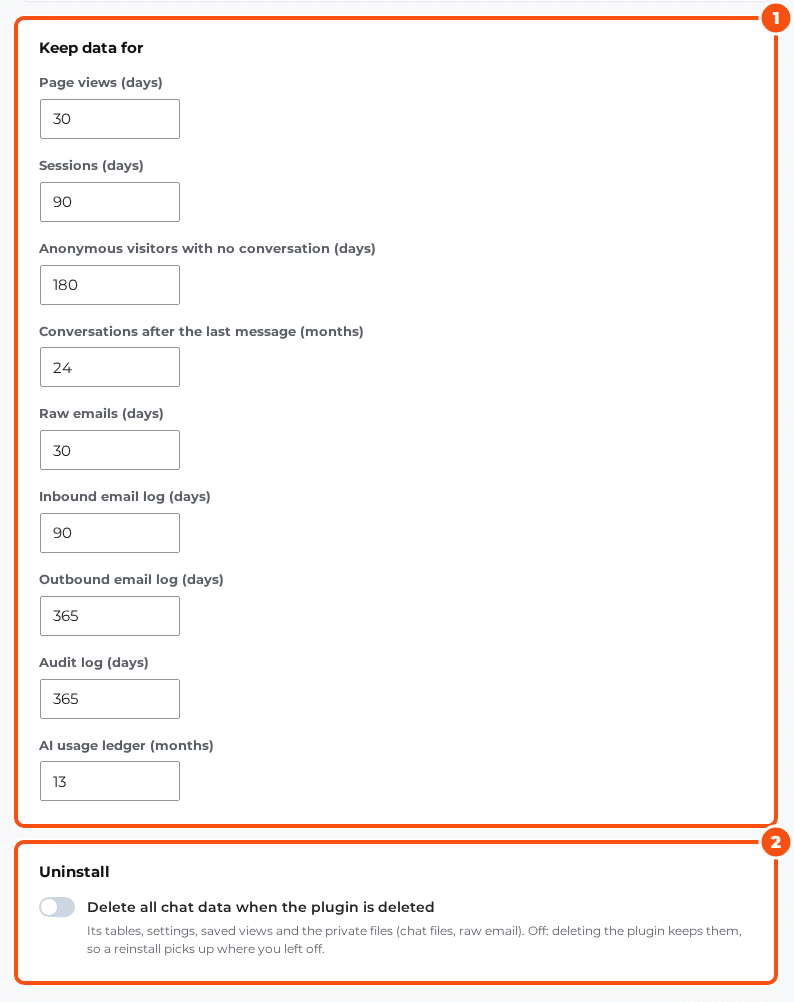
| Data | Kept (default) |
|---|---|
| Page views | 30 days |
| Visits (sessions) | 90 days |
| Anonymous visitors with no conversation | 180 days |
| Conversations, with their messages, files and email | 24 months after the last message |
| Raw emails | 30 days |
| Inbound email log | 90 days |
| Outbound email log | 1 year |
| Audit log | 1 year |
| AI usage ledger | 13 months |
A daily job deletes what is older. IP addresses are never stored (a salted hash is used for spam limits), locations come from Cloudflare’s headers or a local DB-IP file and never from an outside service, and coordinates are rounded.
Delete all chat data when the plugin is deleted (off by default) removes the tables, settings and chat files when you delete the plugin. Capabilities, the Chat operator role and the scheduled jobs always go.
A person’s rights #
- WordPress tools: Tools › Export Personal Data and Tools › Erase Personal Data include “Live chat”, matched by email address.
- On the person’s profile: the More menu has Export data (a JSON file) and Delete person, for users with the
silc_export_contactscapability (administrators). - An export holds the person’s details, the facts your team noted, their devices, visits and pages, every conversation’s public messages and file names, and the email log. Private notes stay out.
- Deleting removes the person and anyone merged into them, their conversations, messages and files, their email, devices, visits and facts.
- Both are written to the audit log (Settings › Audit log), with ids and counts only, never the person’s details. Revealed licence keys, merges, blocks and rule changes are logged there too.
Your privacy policy #
WordPress’s Settings › Privacy › Policy Guide gets a “Sales Igniter Live Chat & AI Agent” section with suggested text: what the chat keeps, the two cookies, tracking only with consent, email replies with a stop link, the AI provider as a processor, and your retention numbers. Copy it into your privacy policy and edit it to match your setup.
The AI and your data #
When the AI answers, the conversation goes to your AI provider (OpenRouter and the model’s host, by default). Every request asks the provider not to collect it, Zero-data-retention hosts only is on by default, and Hide emails and phone numbers from the model replaces email addresses, phone numbers and card-like numbers before they leave your site. See The AI agent.
Security #
- Every part of the chat’s REST API needs a logged-in user with the right capability, except a short list for the widget, each with its own guard. A visitor only ever reaches their own conversations.
- Messages and names are stored and shown as plain text, never HTML.
- Files are checked by their content (images, PDF, text, CSV, ZIP, Word and Excel; nothing executable), stored under random names in
wp-content/uploads/silc-private/and served only through signed links. Apache and IIS refuse that folder by themselves; on nginx, add this rule:
location ^~ /wp-content/uploads/silc-private/ { deny all; }- API keys, mailbox passwords and the WebSocket secret are encrypted with libsodium and never leave the server.
- Spam limits: 20 messages per browser every 10 minutes and 60 per IP address an hour by default (Spam and limits).


