
Note: this is an optional feature. A transported rental travels by parcel: it leaves your store some days before the rental starts and comes back some days after it ends. Rentals & Bookings holds the unit for those days in transport, plus its turnover time, so it is never booked again while it is on its way. You can set the days in transport once for everywhere, by destination, or by shipping option.
Transport is one of the three ways of Delivery & pickup. Switch it on under Rentals › Settings › Delivery & pickup › Ways offered.
The Transport box #
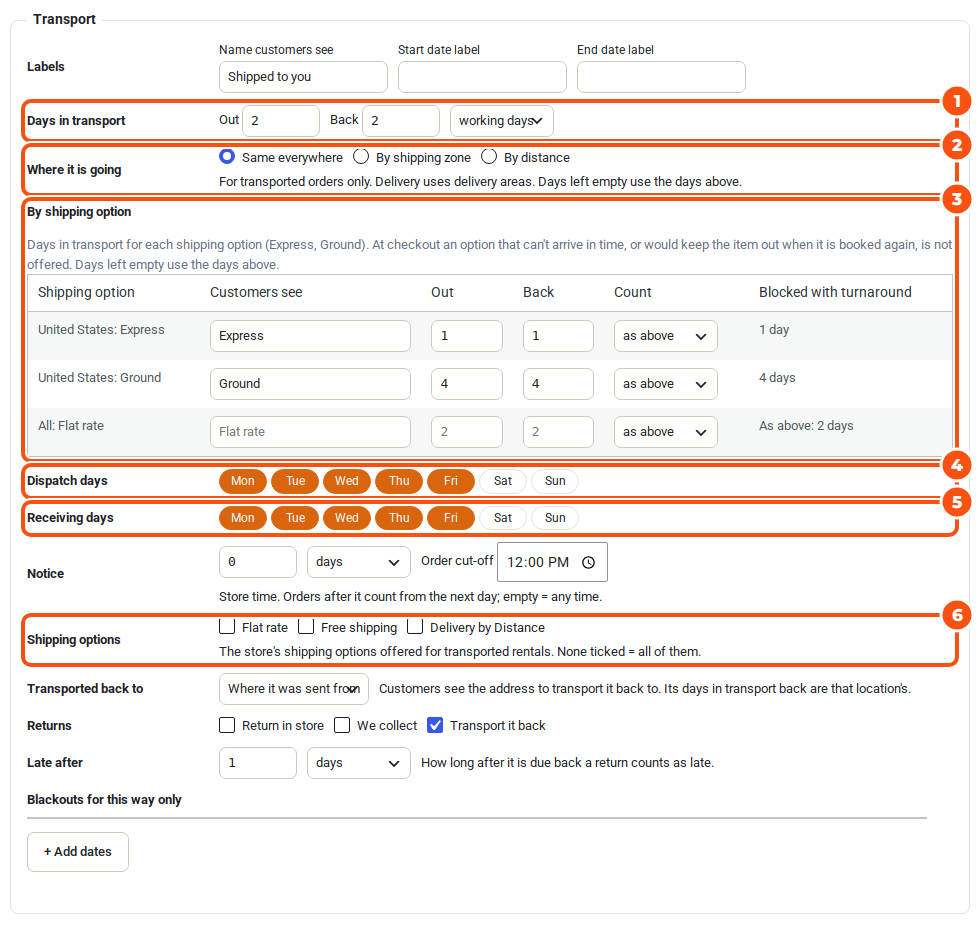
- Days in transport: Out and Back, counted in calendar days or working days.
- Where it is going: Same everywhere, By shipping zone or By distance (below).
- By shipping option: days in transport per shipping option (below).
- Dispatch days: the days parcels leave. Receiving days: the days returns can arrive.
- Notice and Order cut-off, as for the other ways.
- Shipping options: the store’s shipping options offered for transported rentals. None ticked = all of them.
- Returns: usually Transport it back. With Multi Location Inventory, Transported back to can be Where it was sent from or another location; customers see the address to transport it back to.
Days in transport by destination #
Under Where it is going:
- By shipping zone: one row per WooCommerce shipping zone, with what Customers see, the days Out and Back, the Count, and Blocked with turnaround (what each row holds in total). Add or edit zones under Edit shipping zones in WooCommerce.
- By distance (needs Delivery by Distance): bands Up to a distance (km or mi) with their days, and Farther. It is the straight-line distance from where it is transported from; an address Delivery by Distance can’t place is planned with every band.
Days left empty use the days above. The product page asks Where is it going?; until the customer says, the calendar offers dates that suit every place. At checkout the shipping address decides: “Shipping to Western Australia takes 4 days, so 15 Oct is too soon. The first date we can ship for is 17 Oct.” With Multi Location Inventory’s “ship from any”, the location with the fewest days to the address sends it.
Days in transport by shipping option #
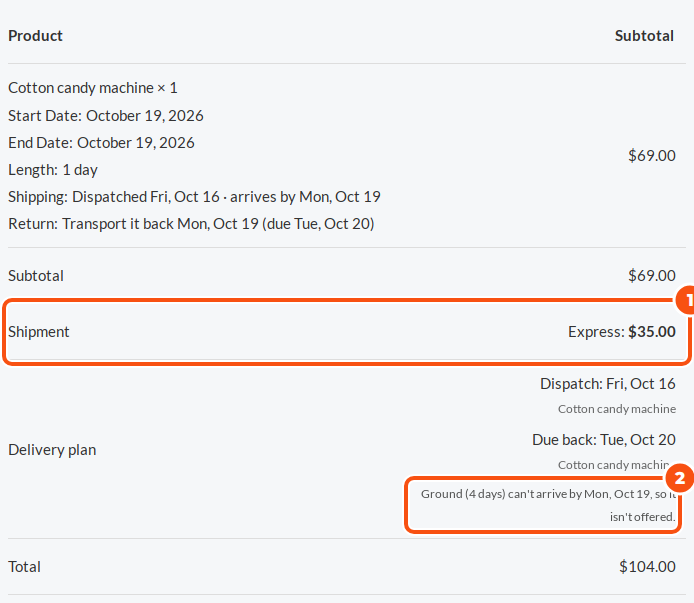
Under By shipping option, set the days in transport for each of your shipping options: Express 1 day, Ground 4 days. A side left empty uses the days above. Add the options to your WooCommerce shipping zones first.
- The rental is held for the chosen option’s days, out and back.
- At checkout an option that can’t arrive in time, or would keep the item out when it is booked again, is not offered, and the Delivery plan says why.
- If every option would go, they all stay and placing the order explains what to choose.
What staff see #
- The product screen shows the longest days in transport a product can be held for.
- With Smart Routing, Rentals › Schedule lists the day’s parcels To transport and those Due back by transport, with the place and its days. See The Schedule.
- The order’s Delivery & collection box has the transported return’s Return tracking number.
- A late fee counts from the day it is due back by transport.
For developers #
The REST API’s booking gives the days in transport as handover.transit_by.


