
Every departure has a manifest: the list of who is coming, with their party, phone, pickup point and check-in. Guests get a ticket with a QR code, and staff check them in from the manifest or by scanning the ticket on their phone.
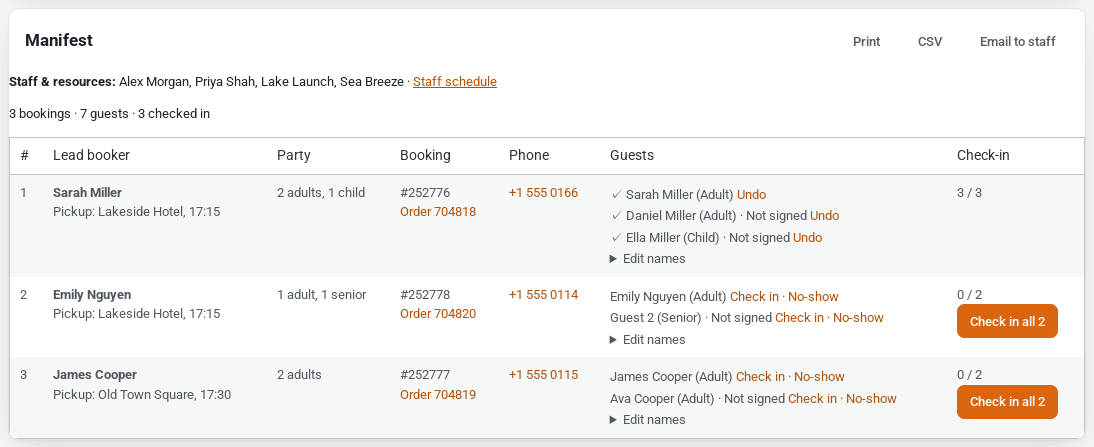
The manifest #
Open Rentals › Departures and click a departure. Under Manifest you see the staff and resources on it, a count (“5 bookings · 14 guests · 9 checked in”) and a row per booking:
| Column | What it shows |
|---|---|
| Lead booker | The customer, with their pickup point and notes. |
| Party | The guests by type, for example “2 adults, 1 child”. |
| Booking | The booking number and a link to the order. |
| Phone | The customer’s phone, as a link to call. |
| Guests | Each guest by name (“Guest 2” until a name is given), with their type and, with Each guest signs, whether they signed. |
| Check-in | The check-in buttons. |
With pickup points, the manifest is sorted by pickup time.
- Print: a printable manifest.
- CSV: a spreadsheet with a row per guest: departure, booking, order, guest, name, type, lead booker, phone, party, pickup, checked in, no-show, ticket and notes.
- Email to staff: emails the manifest to the staff on the departure. It shows once someone is assigned.
Check guests in #
- Check in next to a guest checks that guest in. Check in 3 checks in the whole booking.
- No-show marks a guest who didn’t come; Not a no-show takes it back.
- Undo takes back a check-in.
- Edit names lets you type the guests’ first and last names, then Save names.
The first check-in of a booking also marks its rental as handed over (sent), as on the Send and Return screen. A checked-in tour booking is never shown as Out or Overdue, and gets no return reminder, late fee, Extend or Swap item. Only guests who were checked in are asked for a review (see Tour emails and the review request).
Tickets with a QR code #
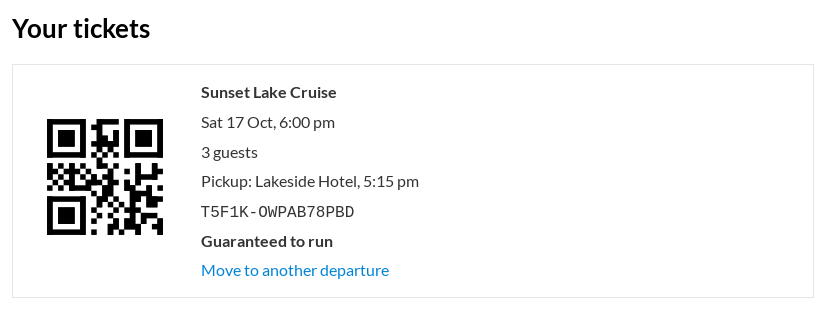
Each booking gets a ticket. Customers find it:
- in their order emails, under Your tickets (“Show this code when you check in.”);
- in My Account, on the order.
The ticket shows the tour, the time, the guests, the pickup point and time, any Note on the tickets you wrote for the departure, and whether a departure with a minimum is guaranteed. The code is signed: an order number or a guessed code is never accepted.
Check in on a phone #
Staff open My Account › My schedule on their phone:
- Scan a ticket opens the camera (or Or type the code). A good ticket checks the booking in at once: “Checked in: Sarah Miller, 3 guests.” A ticket for another departure says so (“Wrong departure (booked for Sat 10:00).”), as does a ticket that was already used or a cancelled departure.
- The card of a departure opens Manifest & check-in: the pickups in time order with a map link, then each booking with its party and phone, and Check in per guest or for the whole booking. With Each guest signs, Sign on this phone lets a guest sign their waiver there.
Staff only see the departures they are assigned to. See Staff schedule and My schedule.


