
A custom field is one question you ask the customer. Go to Rentals › Settings › Custom Fields and click Add field. Every setting on the form has a help tooltip explaining what it does and where the value ends up.
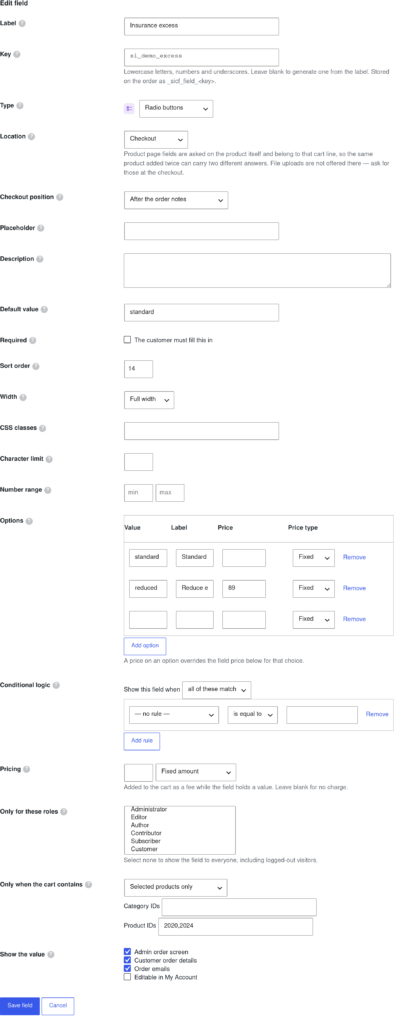
The essentials #
| Setting | What it does |
|---|---|
| Label | What the customer sees above the input, and the name the custom fields data is stored under on the order. Write it the way you want to read it back months later. |
| Key | The internal name used in exports and order meta. Leave it blank to have one generated from the label. |
| Type | What kind of control is shown — see the table below. |
| Location | Where the question is asked: the checkout, the product page, the registration form or the My Account area. |
| Required | Blocks the order — or, for a product page field, the add to cart — until it is answered. |
Field types #
Each type carries its own icon in the admin, tinted by family, so a long list of fields can be read at a glance.
| Family | Types |
|---|---|
| Text & numbers | Text, Text area, Email, Phone, URL, Number, Password, VAT / tax number |
| Choices | Select (dropdown), Multi-select, Radio buttons, Checkbox, Checkbox group |
| Date & time | Date, Time |
| Uploads & pickers | File upload, Colour |
| Layout | Heading, Message / HTML — these display text and store no data |
Choices and their prices #
The choice types read the Options list. Each option has a stored value, a label the customer reads, and optionally a price. A price on an option overrides the field price for that choice, so one dropdown can offer “Basic cover” free and “Full cover” at £40.
Conditional logic #
Any field can be shown only when other fields hold particular values — ask for a second driver’s licence number only when “Add a second driver” is ticked. A field hidden by these rules is never required, never charged for and never stored, so a customer cannot be billed for something they could not see.
Who sees it, and when #
- Only for these roles restricts a field to particular user roles. Select none to show it to everyone, logged-out visitors included.
- Only when the cart contains limits the field to carts holding matching products. For more than one or two fields, field groups are the easier way to do this.
- Width and Sort order control the layout, so two half-width fields sit side by side.
Export and import #
At the bottom of the Custom Fields tab you can download every field definition as JSON and import it into another site — useful for moving a staging setup into production. Importing merges by default; tick Replace to wipe the existing definitions first.


