
Your hosted store is a WooCommerce rental store that we run for you. Hosting, backups and updates are included. You run the shop from its WordPress admin. You manage the hosting side (your address, domain, email, backups and billing) on the My store page of your account on rentalbookingsoftware.com.
After you sign up #
- Confirm your email. Right after checkout we send you an email called “Confirm your email to build your store”. Click the link in it, then press Confirm my email. The link works for 7 days. If you can’t find the email, check your spam folder, or press Send the link again on My store.
- We build your store. This usually takes a few minutes. While we work, My store shows Building.
- You get “Your store is ready”. This email has your store’s address and a link to set your password and sign in. The link works once and expires after 24 hours. If it has expired, reply to the email and we will send you a new one.
You also get a purchase receipt. If you didn’t have an account with us before, you also get the login details for your new account.

The My store page #
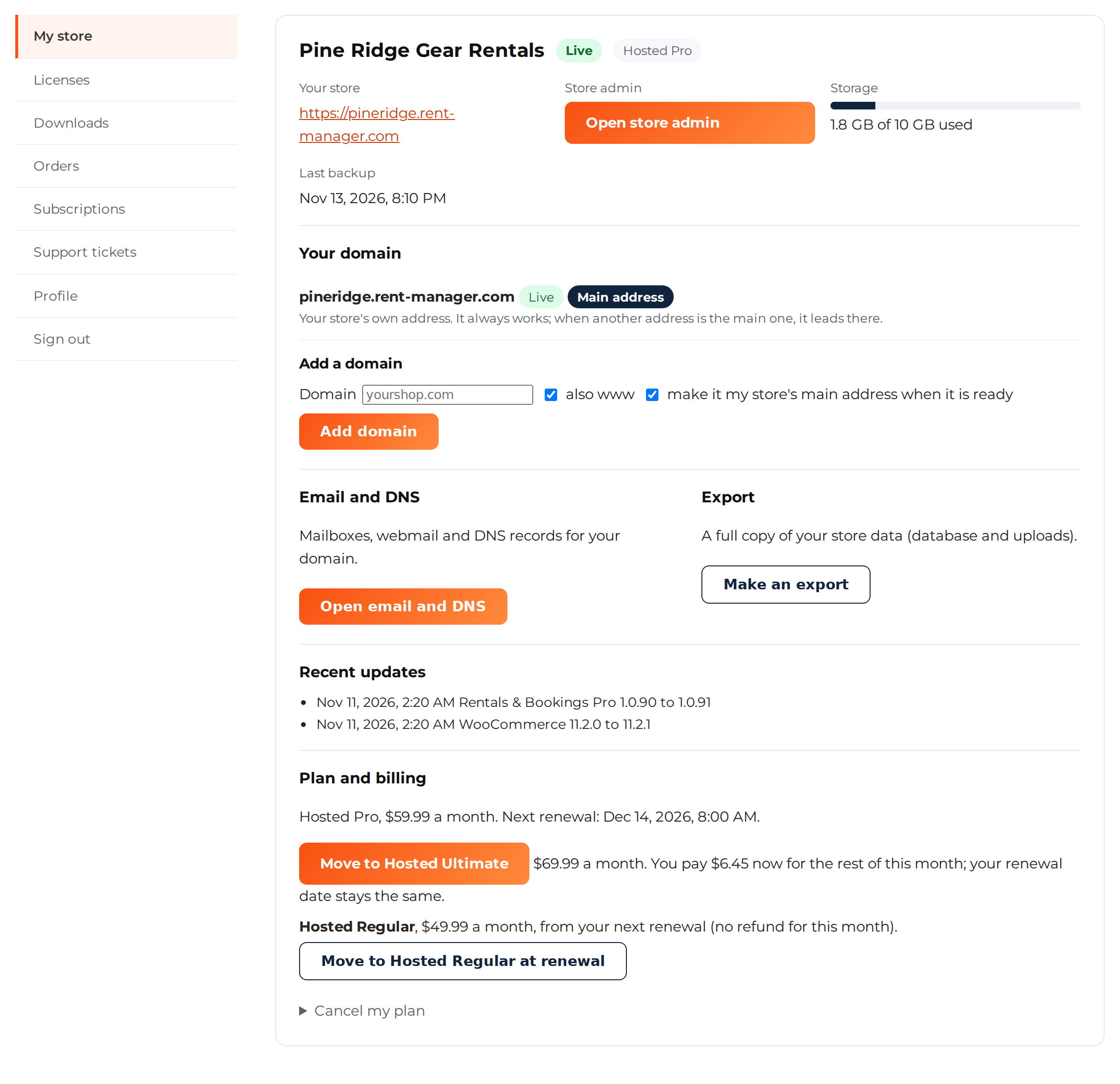
Sign in on rentalbookingsoftware.com and go to My Account > My store. For each store you see:
- Your store: the store’s address.
- Open store admin: opens your store’s WordPress admin.
- Storage: how much of your 10 GB is used. Files, the database and mailboxes all count.
- Last backup: when we last backed up your store.
- Your domain: connect a domain you own. See Use your own domain.
- Email and DNS: mailboxes and webmail. See Email and DNS.
- Export: a full copy of your store data.
- Recent updates: what we updated on your store, and when.
- Plan and billing: your plan, its price, your next renewal, plan changes and cancelling.
Next to the store’s name you see its status. Live means everything is working. The other statuses are Building, Waiting for your email confirmation, Bookings paused, Suspended and Cancelled, running to the end of the month.
Sign in to your store admin #
Press Open store admin on My store, or go to https://your-store-address/wp-admin/. Sign in with your email and the password you set from the “Your store is ready” email. If you forget your password, use Lost your password? on your store’s sign-in page.
In the store admin you run the whole shop: products and stock, bookings and orders, prices, pages, WooCommerce settings and the rental plugins in your plan. Payment, shipping and other extra tools are under Store add-ons, where you turn each one on or off. We look after the server and the WordPress and plugin files, so there is no file manager, FTP or plugin upload.
Launch your store. Anyone with your store’s address can see it from day one, but it asks search engines not to list it yet. When your products and a way to take payments are ready, press Launch your store in the Your store checklist box on the dashboard.
Plan and billing #
- Price. Your first month costs $1. After that your plan renews every month: Hosted Regular $49.99, Hosted Pro $59.99, Hosted Ultimate $69.99.
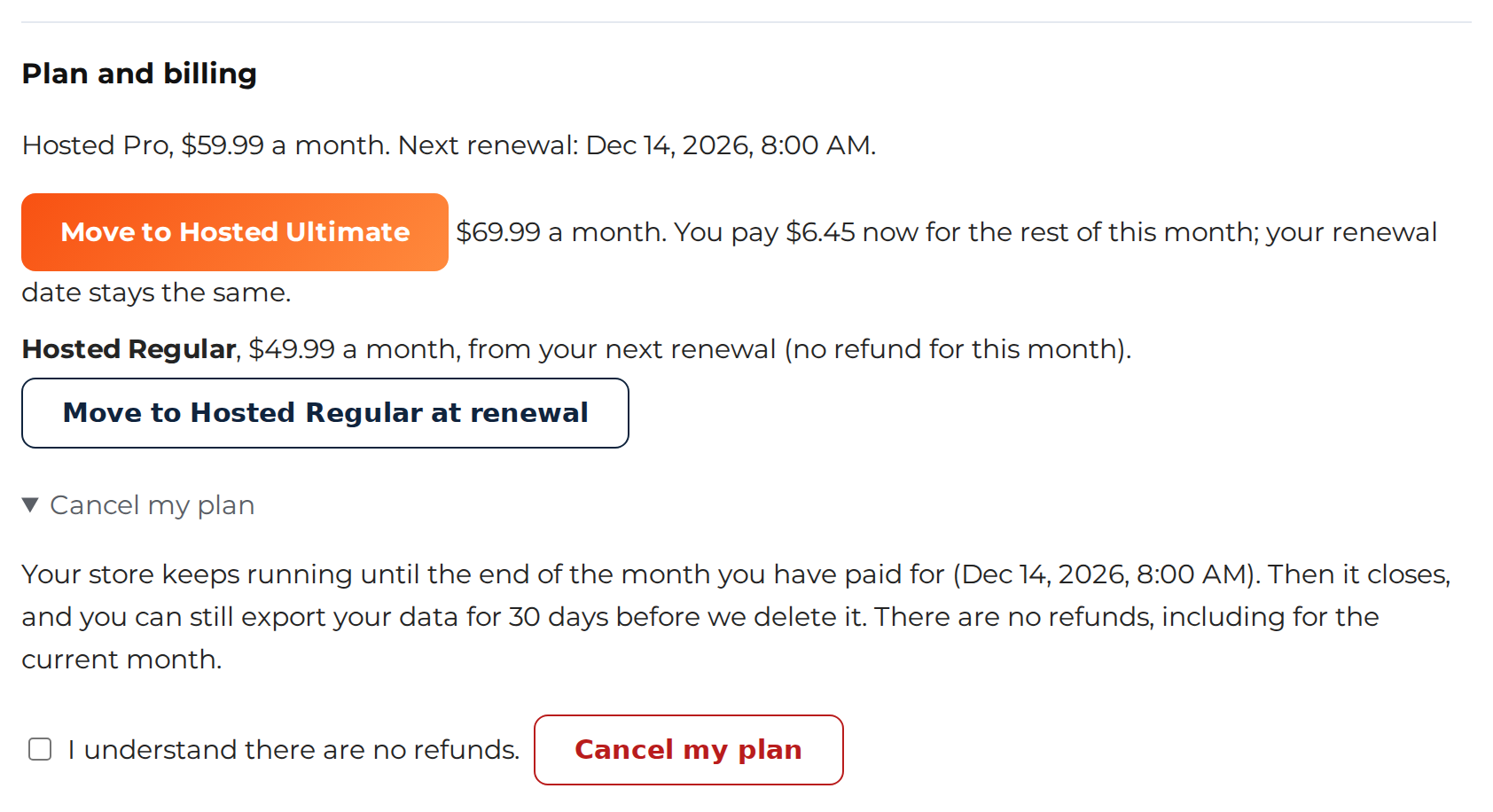
- Move to a higher plan with the Move to … button. You pay the difference for the rest of this month, and your renewal date stays the same.
- Move to a lower plan with Move to … at renewal. The change happens at your next renewal. There is no refund for the current month. Your store may use something the lower plan doesn’t have, such as live customer subscriptions, more than one stock location, or more than 10 GB. If so, My store lists what to sort out first. Changed your mind? Press Keep with your current plan. If you pay with PayPal, contact us and we will change your plan for you.
- Change your card on My Account > Subscriptions.
- If a payment fails, we email you and try again. After 14 days, bookings are paused and checkout closes. After 30 days, the store is suspended. After 60 days, it is deleted. If you pay before then, your store comes back within minutes.
Backups and exports #
- We back up every store daily and weekly, and keep 3 daily and 2 weekly backups. My store shows the time of the last one.
- Need something restored? Contact us. Two restores a month are free. We can restore the whole store or only its database, to a day you choose.
- Want your own copy? Press Make an export on My store. The download link shows up there when the export is ready, usually within the hour.
Updates #
We update WordPress, WooCommerce and our rental plugins on every hosted store for you. Updates go out in waves. We back up each store’s database before its update and check the store after it. If a store has a problem after an update, we roll the update back. Updates can’t be turned off. My store lists the recent ones.
Cancel your plan #
On My store, under Plan and billing, open Cancel my plan. Tick I understand there are no refunds and press Cancel my plan. Your store keeps running until the end of the month you paid for, then it closes. After it closes, you have 30 days to get a copy of your data before we delete the store. The simplest way is to make an export before your month ends. You can also contact us within those 30 days. Changed your mind? Contact us before the store closes.
Need help? #
Reply to any email from us, open a ticket on My Account > Support tickets, or ask in the chat on rentalbookingsoftware.com.


