
Calendar sync stops the same item being booked twice when you rent it out in more than one place. Your shop can publish its booked-up dates as a calendar that Airbnb, Booking.com, Google Calendar or your own diary can subscribe to, and it can read their calendars back so dates sold elsewhere stop being sellable here.
Everything lives in one box on the product you are renting out. Open Products › the product › Edit and scroll down to Calendar sync (iCal). It has three parts: share your availability, an optional staff-only feed, and the list of outside calendars you want to block dates from.
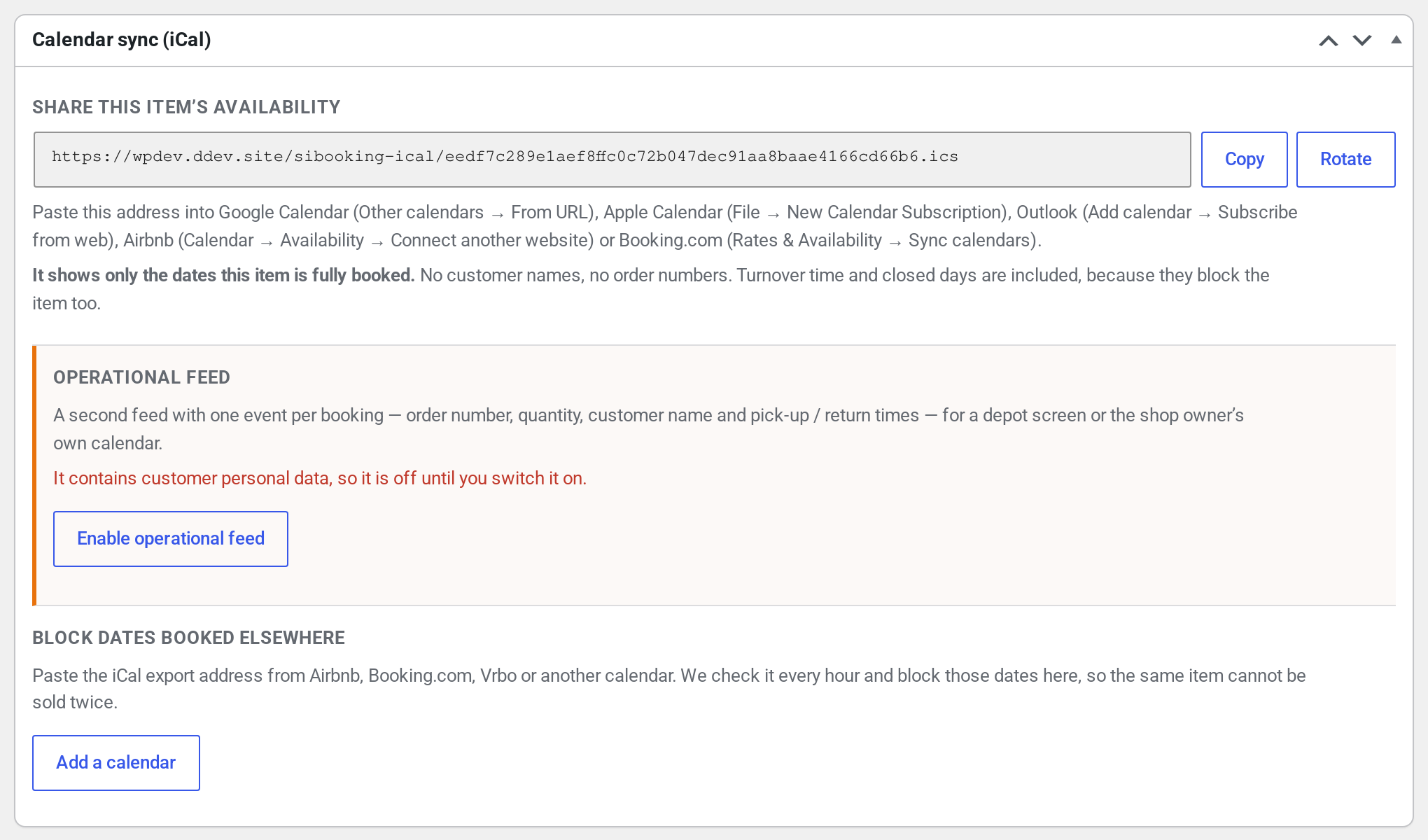
Share your availability #
The first section shows a long web address ending in .ics. That is this product’s availability calendar, and it is ready the moment you open the page — there is nothing to switch on. Anyone who has the address can see which dates the item is fully booked, and nothing else.
- Copy puts the address on your clipboard so you can paste it into the other calendar or channel. The button says “Copied” when it has worked.
- Rotate throws the address away and creates a brand new one. Use it if the old address has gone somewhere it should not have — a former employee, a public spreadsheet. It is not something you need to do routinely, and it has a real cost: every calendar already subscribed to the old address stops updating until you paste the new one in. See the troubleshooting note below.
This feed contains no customer names and no order numbers. Each blocked period is simply called “Unavailable”. It is safe to give to a channel, a partner or a customer — all they learn is that the item is not free on those dates.
Where to paste it #
Copy the address first, then follow whichever of these you need. The wording moves around from time to time on the bigger platforms, but the path is always some variation of “subscribe to a calendar from a web address”.
- Google Calendar — in the left-hand column, next to Other calendars, click + and choose From URL. Paste the address and click Add calendar.
- Apple Calendar (Mac) — File › New Calendar Subscription, paste the address, click Subscribe, then pick how often it should refresh.
- Outlook — Add calendar › Subscribe from web, paste the address, give the calendar a name and click Import.
- Airbnb — open the listing’s Calendar › Availability › Connect another website (Airbnb also calls this “Sync calendars”), choose to import a calendar, and paste the address.
- Booking.com — in the extranet, Rates & Availability › Sync calendars, then add a calendar and paste the address.
Each product has its own address. If you rent five different items and list them all on Airbnb, you subscribe five times, once per listing — there is no single address that covers the whole shop.
The operational feed, for staff only #
The second section offers a different calendar for a different job: a depot screen, a van driver’s phone, or your own diary, where you want to see who is taking what and when rather than just “busy”. Every booking appears as its own entry with the order number, the quantity, the customer’s name and the pick-up and return times.
Because of that, it is off until you switch it on, and when you do it gets its own separate address. The two are not the same calendar with a setting — they are two different addresses, so handing the availability address to Airbnb or to a customer can never expose your customer list. Turning the operational feed off again destroys its address entirely.

Treat that address like a password: it carries personal data, so it belongs on staff calendars and nowhere else.
Block dates booked elsewhere #
The third section is the other direction: dates that get booked on Airbnb, Booking.com, Vrbo or any other system, arriving here so nobody can book the same item on your own site.
- Find the export address on the other platform. It is on the same screen you used to subscribe, and it will end in
.ics. On Airbnb it sits under the listing’s calendar sync options; on Booking.com it is on the Sync calendars page. - Click Add a calendar here, give it a name you will recognise later (“Airbnb”, “Vrbo — cabin 2”), and paste the address in.
- Set Units blocked. This only matters if the product has more than one unit — if you have five kayaks and Airbnb sells one, how many of the five should that take out of your shop? The default is all of them, because the usual case is a single item listed in two places, and blocking everything is the safe direction to be wrong in. If the other listing really only covers one of your units, set it to 1.
- Click Sync now if you want it checked straight away. Otherwise it is checked automatically every hour and you never have to think about it again.
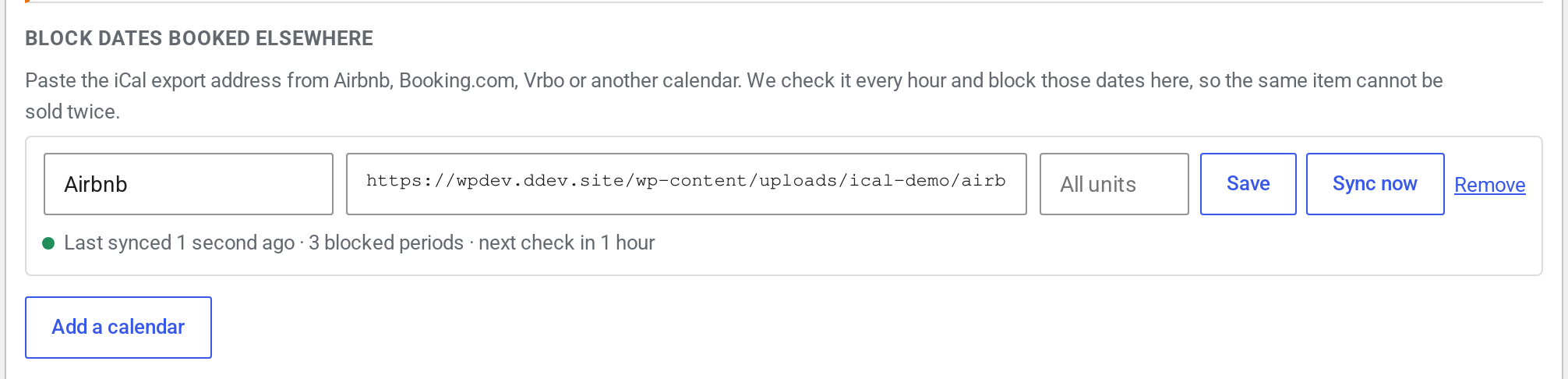
Under each calendar there is one status line telling you where things stand, for example:
✓ Last synced 12 minutes ago · 14 blocked periods · next sync in 48 minutes
Read it left to right: when we last managed to read the other calendar, how many blocked periods we are currently holding from it, and when we will look again. If the last attempt failed, the line says so instead and gives the reason and when we will retry. The dates we already hold stay blocked in the meantime — see below.
Removing a calendar here releases the dates it was blocking. Your own bookings are never touched by any of this.
What gets blocked, and what does not #
This is the part worth reading twice, because the answer surprises people who expect a calendar to show every booking.
The availability calendar shows dates you cannot sell, not dates you have sold. Your stock quantity is what decides that. If the product has five units, a date is only published as unavailable when all five are out. One kayak on hire out of five is not a problem for the next customer, so it is not a problem for the calendar either.
A worked example. You have five kayaks.
- Saturday: one kayak out. Four still free — nothing is published, and Airbnb can still sell Saturday.
- Sunday: four kayaks out. One still free — still nothing published.
- Monday and Tuesday: all five out. Monday and Tuesday are published as one “Unavailable” block, and every calendar subscribed to your address stops offering them.
- Wednesday: you allow a day of turnaround to check and clean the boats before they go out again. That day genuinely cannot be hired, so it is published too.
- Christmas Day, when the shop is closed: published, the same as any other day the item cannot go out.
That is the whole rule, and it is deliberate. If we published a date the moment one unit went out, you would lose four kayaks’ worth of Saturday bookings on every channel you sync with.
Products booked by the day, and products booked by the hour #
How much of a day gets published depends on how the product is sold.
- Booked by the date (a kayak hired “Monday to Wednesday”). A day is either yours or the customer’s; there is no half a day to sell. So when the last unit goes out at nine in the morning, the whole of that day is published as unavailable. Nothing is being lost — that day was gone the moment the booking was taken.
- Booked by the date and time (a jet ski by the hour, a meeting room, a studio). Here the hours matter, so the calendar publishes only the hours that are genuinely busy. A hire from 9am to noon publishes 9am to noon and leaves the afternoon on sale. A day booked end to end is still published as a whole day.
One thing worth knowing if you list an hourly product on a travel channel: Airbnb, Booking.com and Vrbo think in whole days and will usually round an hourly block up to the day or ignore it. Google Calendar, Outlook, Apple Calendar, a depot screen and other booking systems show the hours exactly. That is why the hours are published rather than rounded off — the calendars that can use the detail get it, and the ones that cannot are no worse off.
Finally, a product with stock management switched off has no limit on how many times it can be hired at once, so it can never be fully booked and its calendar will always be empty. The box tells you when that is the case. Set a stock quantity on the product’s Inventory tab if you want real availability published.
Which other listing sites this works with #
iCal is an open standard, not a deal between two companies, so there is no list of approved partners to be on. If a platform publishes an export address ending in .ics, you can paste it into Block dates booked elsewhere. If a platform can subscribe to a calendar by web address, you can hand it the availability address from the same box. Everything below was checked on the vendor’s own help pages, and each entry carries the page and the date we read it, because these menus get renamed and moved.
One thing worth saying first. Most iCal documentation is written by and for holiday-let hosts, because that is where it grew up, and it works identically for a kayak, an excavator, a projector or a photo studio — a calendar does not know what the item is. But it also means the marketplaces built for equipment, vehicles and boats are far less likely to offer iCal at all, and we have said plainly below which of them do not.
Vrbo, Expedia and Trip.com #
Vrbo reads and publishes calendars. In the Vrbo Owner Dashboard go to Calendar › Settings › Availability › Calendar sync › Connect calendars. Export calendar gives you Vrbo’s own address to paste into our box; Manage imported calendars › Import a calendar is where you paste ours. It is set up per property, you can import up to five calendars per property, and Vrbo re-reads them roughly every half hour. Vrbo’s own condition is worth knowing before you promise it to anyone: this only exists if you manage the property in the Owner Dashboard or the Owner app, and not if the property runs through third-party property-management software. (Read on help.vrbo.com, 20 September 2026.)
Expedia reads and publishes calendars too, and it is a separate job from Vrbo. In Partner Central go to Rooms and rates › Overview › Quick tasks › Connect calendars, choose the room or unit, add our address as an existing iCal calendar, then use Create link and Copy link to get Expedia’s own address. Two differences from Vrbo catch people out: it is set up per room or unit rather than per property, and Expedia says the sync lasts up to twelve months from the day you create it, so it has to be set up again. Availability moves about every two and a half hours, and the option is not offered at all for a room already connected through a channel manager, property-management system or central reservation system. (Read on apps.expediapartnercentral.com, 20 September 2026.)
Vrbo and Expedia are the same company but not the same calendar. They are two separate extranets, with two separate menus, two scoping rules and two refresh rates, and neither knows what you did in the other. If you have a Vrbo dashboard listing and a Partner Central listing for the same thing, connect both. The one exception is Vrbo’s Expanded Distribution: a Vrbo listing enrolled in it is shown on Expedia and other Expedia Group sites without a second listing existing anywhere, so the single Vrbo calendar already covers it. (Read on help.vrbo.com, 20 September 2026.)
Trip.com has no iCal we can find, and we are not going to imply otherwise. Trip.com Group’s published host documentation and its “list your property” FAQ do not mention iCal, iCalendar or .ics anywhere, and the answer it gives to keeping availability in step with other sites is to connect a channel manager. The eBooking extranet’s own help articles sit behind the partner login, so we cannot prove a negative — but plan on the answer being no, and reach Trip.com through one of the channel managers further down instead. (Read on trip.com/list-your-property/faq.html, 20 September 2026.)
Other platforms we checked #
These are in addition to Airbnb, Booking.com, Google Calendar, Apple Calendar and Outlook, whose paths are near the top of this page. “Import” means the platform can read our availability address and block those dates on its side. “Export” means it publishes an address you can paste into our box.
| Platform | Import | Export | Where to find it (vendor page, date read) |
|---|---|---|---|
| Agoda (Agoda Homes / YCS) | Yes | Yes | Calendar › Calendar connections. Copy calendar link to export; paste ours into Other website link and click Import. Only offered where the room type is a single room. Agoda calls these “calendar links” and never says “iCal”, but it is the same exchange. (partnerhub.agoda.com, 20 Sep 2026) |
| Outdoorsy (RVs, campervans) | Limited | Yes | Calendar tab in the Host dashboard, Calendar sync › Add calendar to import, Copy URL to export. Read the caveat below the table before relying on the import. (support.outdoorsy.com, 20 Sep 2026) |
| Peerspace (event and studio spaces) | Yes | No | Calendar › pick the space › Get Started › Continue › Import iCalendar (iCal) URL. Peerspace reads calendars but publishes no .ics of its own, so a Peerspace booking has to be blocked here by hand. (support.peerspace.com, 20 Sep 2026) |
| Boatsetter (boats) | No | Yes, but manual | Owner dashboard › My boats › Edit Listing › Calendar, scroll to Export Calendar and copy the link. Boatsetter states plainly that this “is not currently an automated calendar sync” and must be redone after each change, and that it cannot read an outside calendar. (support.boatsetter.com, 20 Sep 2026) |
| RVshare (RVs) | Says yes | Not documented | RVshare’s owner toolkit says to “sync your calendar using iCal”, but its detailed help article would not load for us and it documents no menu path publicly, so we cannot tell you where the buttons are or whether the export exists. Treat as worth trying, not as confirmed. (owner-toolkit.rvshare.com, 20 Sep 2026) |
The Outdoorsy caveat. Outdoorsy does not import from any address you give it. Its help page names the platforms it will sync with — Airbnb, RVshare, RVezy, Hipcamp, Newbook, Vrbo, Turo and Hostaway — so our address is unlikely to be accepted directly. Its export works normally, so the practical arrangement is: paste Outdoorsy’s address into our box so its bookings block your shop, and block Outdoorsy by hand or through a channel manager in the other direction.
Platforms that have no iCal at all #
These came up when we went looking, and the honest answer is that calendar sync is not available on them. If you list on one of these, a booking taken there has to be blocked on your product here by hand.
- Turo (cars) — no external calendar sync of any kind; a search of Turo’s own help centre for “iCal” returns nothing, while “calendar sync” returns only in-product blocking. Hosts block dates inside Turo. (help.turo.com, 20 Sep 2026)
- GetMyBoat (boats) — no iCal. It does block dates automatically against Boatsetter through a private link between the two, but the vendor says that is “not a full availability sync” and does not reach Google Calendar or any other outside system. (getmyboat.com, 20 Sep 2026)
- Google Vacation Rentals — not the same thing as Google Calendar, which does work. Google Vacation Rentals takes availability as XML or ARI feeds through an approved connectivity provider; there is no host-facing iCal. (developers.google.com, 20 Sep 2026)
- Fat Llama (equipment) — the UK site now redirects to Hygglo, and neither brand documents iCal. Availability is managed with “Block days” and vacation mode inside the account. (hygglo.com/uk, 20 Sep 2026)
- Tripadvisor / Holiday Lettings and Splacer — both closed. Tripadvisor ended its vacation-rentals product on 18 November 2025 along with Flipkey and Niumba, and Splacer’s site no longer serves. There is nothing left to connect to. (tripadvisorsupport.com, 20 Sep 2026)
Channel managers, if you are on several sites at once #
The names below are not listing sites. They are channel managers: software that sits between you and the listing sites and keeps one master calendar in step with all of them. If you are on more than two or three channels, connecting each one to each other one by hand quickly becomes a dozen separate iCal links to keep straight — whereas connecting a channel manager once means it maintains every channel, usually over each channel’s proper API rather than iCal, which is faster and carries prices as well as dates. Add one iCal link between us and the channel manager and your shop is in step with everything it manages.
All six of these do iCal in both directions, so any of them can exchange calendars with the box above.
| Channel manager | Import | Export | Where to find it (vendor page, date read) |
|---|---|---|---|
| Guesty | Yes | Yes | Properties › the listing › Calendar › Calendar sync (iCal), then Export Guesty calendar or Import calendar › Add an iCalendar link. Up to ten import links per listing. (help.guesty.com, 20 Sep 2026) |
| OwnerRez | Yes | Yes | Settings › Channels › Calendar Import/Export, then the Import or Export tab. (ownerrez.com, 20 Sep 2026) |
| Smoobu | Yes | Yes | Channels, search for Individual iCal and click Connect. Note that the export link on Configuration › Properties › Edit is a different link, meant for calendar apps rather than channels. (support.smoobu.com, 20 Sep 2026) |
| Hostaway | Yes | Yes | Listing › the listing’s iCal, then Copy the iCal link. (support.hostaway.com, 20 Sep 2026) |
| Lodgify | Yes | Yes | On the calendar, the Import/Export arrows at the top right, then Import Calendar or Export Calendar. (lodgify.com, 20 Sep 2026) |
| Tokeet | Yes | Yes | Add an iCal channel, then the Add button under Imported Calendars or Exported Calendars. (tokeet.com, 20 Sep 2026) |
Guesty adds one warning that applies to any of them: do not run an iCal link and a direct channel connection to the same place at the same time, or the two will disagree. Pick one route per channel.
Two things to be honest about #
Every platform reads on its own schedule, and none of them will tell you when. Vrbo says roughly half an hour, Expedia about two and a half hours, we check every hour, and Airbnb and Booking.com do not publish a figure at all. There is no button anywhere on our side that makes another platform look sooner, so treat calendar sync as something that closes the gap rather than something instant. The advice under A booking has not appeared at the other end yet applies to all of these.
Some platforms only publish, and never read. Peerspace reads calendars but publishes none; Boatsetter publishes one but reads none, and says its own is not automatic; Outdoorsy only reads from a short list of platforms it knows. Where a platform will not read our address, a booking taken here does not block it there, and you have to block it on that platform by hand. It is worth knowing which of your channels is in that position before it costs you a double booking.
Troubleshooting #
“That URL returned a web page, not a calendar file” #
You have pasted the address of a page rather than of a calendar. It happens to everyone: the address bar at the top of the browser while you are looking at your Airbnb calendar is not the export address. Go back to the other platform’s calendar-sync screen and look for the link it offers you to copy — it ends in .ics. The same message appears if the address is behind a login or a security check, because what comes back is a login page rather than a calendar.

A calendar we read stops answering #
If the other platform’s address goes missing, times out or returns an error, nothing is released. The dates we were already blocking stay blocked, the status line shows the error, and we try again later — waiting a little longer after each failure so a platform having a bad morning is not hammered. An outage never quietly puts your dates back on sale. Dates are only released when the other calendar successfully tells us the booking has gone.
Everything stopped updating after I clicked Rotate #
That is what Rotate does. The old address stops working immediately and permanently, and there is no way to get it back. Every calendar that was subscribed to it — Google, Airbnb, Booking.com, a member of staff’s phone — carries on showing whatever it downloaded last and never updates again, usually without complaining. After rotating, go round every place you pasted the old address and paste the new one in. Only rotate when you actually need to.
A booking has not appeared at the other end yet #
Calendar sync is not instant anywhere, and an hour is normal. Two separate delays add up:
- On the way in, we check each calendar you have added about once an hour, so a date sold on Airbnb can take up to an hour to block here. Sync now skips the wait when you need it immediately.
- On the way out, the other platform decides how often it reads your address, and we have no control over it. Google Calendar often takes several hours. Airbnb and Booking.com poll on their own schedule and do not publish it. There is no button on our side that makes them look sooner.
Because of that gap, calendar sync makes double bookings far less likely, not impossible. Two customers booking the last unit on two different channels within the same few minutes can still both get through. If an item is high-value and heavily booked, keep an eye on it around busy dates rather than trusting sync alone.
The blocked dates look like they are a day out #
Check the time zone on the calendar you are looking at rather than ours. Whole-day blocks are published without a time zone precisely so that they land on the same dates everywhere; a calendar app set to a different zone from your shop can still draw them a day early or late. Our dates always follow the shop’s own time zone, under Settings › General.
Why there is no calendar per serial number #
If you track individual units by serial number, you might expect a calendar for each one. There is not, and for an honest reason: a specific unit is only picked when the item physically goes out, so a booking three weeks from now is for “a kayak”, not for “kayak number 3” — which means a per-serial calendar could not truthfully say a named unit is free next Tuesday.
The product-level calendar has no such problem: it counts how many units are spoken for, which is exactly what decides whether you can take another booking.


