
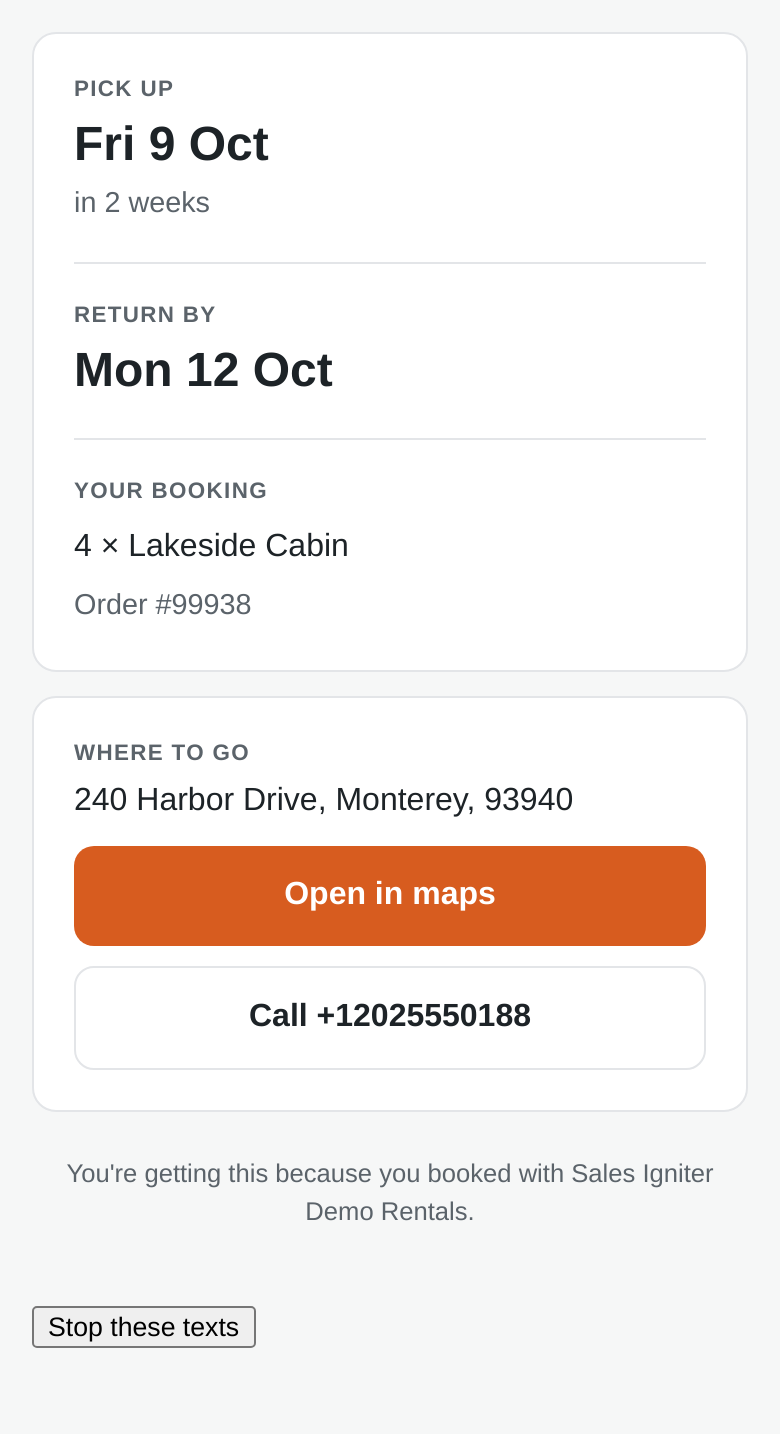
Text reminders send your customer a short message before they collect a rental, and another before it is due back, each carrying a link to a small page with their dates, your address and a button to call you. They go by SMS or WhatsApp from your own sending account — SMS through Twilio, WhatsApp through either Twilio or a direct connection to Meta. They exist for the customers who never open email: a text lands on a lock screen while somebody is packing the car.
Text reminders are part of Sales Igniter Rentals & Bookings Regular (and Pro, which includes Regular). They ride on the same reminder rules as the reminder emails, so you set the timing once and choose per reminder whether it also goes out as a text.
Which route are you on? #
A reminder can go out by email, which needs no account and no payment method, or by text, which needs a sending account behind it. There are three text routes, and the one you choose decides which account you open and who bills you. The table below compares those three; none of them is the recommended one.
- Email reminders — no account, no provider, nothing to pay, and on by the time you have set the timing. The three emails, the wording and the languages are in Email Reminders.
- SMS via Twilio and WhatsApp via Twilio — one Twilio account covers both channels. Setup, credentials, buying a number, A2P 10DLC and Twilio’s own troubleshooting are in Twilio, and WhatsApp via Twilio.
- WhatsApp via Meta — WhatsApp only, sent from a Meta app that belongs to your business. The Meta app, the System User token, the number registration and what switching carries over are in WhatsApp via Meta.
- Not sure yet? Read the comparison below first. Everything else on this page is true whichever text route you end up on.
SMS or WhatsApp: side by side #
All three routes send the same reminder and are set up in the same screen. They differ in what your customer needs, what you set up, whether you can edit the words, how long a message can be, who bills you and what it costs. WhatsApp appears twice because the route changes the paperwork and the bill, not anything your customer sees. You are not picking for good: the channel is set per reminder, and WhatsApp, then SMS if it cannot be delivered uses both channels.
| SMS via Twilio | WhatsApp via Twilio | WhatsApp via Meta | |
|---|---|---|---|
| What the customer needs | Any mobile phone that can receive a text. Nothing to install, nothing to accept. | WhatsApp installed, with the mobile number on the order registered to it. If they are not on WhatsApp the message cannot be delivered. | Identical. The customer cannot tell which of the two routes carried the message. |
| What you set up | A Twilio account and a phone number — or, outside the US and Canada, a free alphanumeric sender ID. In the US, A2P 10DLC brand and campaign registration as well. | A Twilio account, a WhatsApp Business Account, a dedicated phone number (it stops working in the normal WhatsApp app), Meta business verification, and an approved message template per reminder per language. | A Meta business portfolio, a Meta app with the WhatsApp product added, a dedicated phone number (same restriction), a System User access token, and an approved template per reminder per language. Business verification attaches to the WhatsApp Business Account, so it applies here too. |
| How long setup takes | Minutes outside the US. In the US, days to weeks for the 10DLC campaign review. | Minutes to register the sender; template approval is usually minutes to a day; business verification runs in the background and can take days. | About 30 to 60 minutes of form-filling across two Meta consoles before you have anything to paste in. Template approval and business verification then behave as in the column to the left. |
| Who owns the WhatsApp Business Account | Nothing to own — SMS does not use one. | Normally Twilio’s business portfolio. Twilio’s sign-up creates the account for you, inside its own. | Yours, inside your own Meta business portfolio. |
| Can you edit the wording? | Yes, in our settings, instantly, per language. | No. The wording is registered with Meta and Meta fills the variables. You choose an approved template and say which merge tag fills each variable; changing a word means another review. | Identical. No — the wording is registered with Meta and reviewed by Meta on both routes. |
| Message length | 160 characters per segment — but 70 if a single accented character or emoji appears anywhere in it. Longer messages are split and billed per segment. | Up to 1,024 characters in the template body, billed per message however long it is. | Identical. Up to 1,024 characters, billed per message however long it is. |
| Cost per message, US | About $0.0118–$0.0133 all in ($0.0083 to Twilio plus the carrier’s own $0.0035–$0.005). | About $0.0084 ($0.005 to Twilio plus Meta’s $0.0034 utility rate). | About $0.0034 — Meta’s utility rate, with no reseller fee on top of it. |
| Cost per message, UK / Germany | $0.056 / $0.112 per segment. | About $0.027 / $0.060 per message. | Not published here. Meta’s per-country rate card renders behind a logged-in calculator and the second-hand copies of it we could find disagreed with one another, so we are not printing a figure we cannot stand behind. What is certain is the gap: this route is Twilio’s $0.005 per message cheaper than the column to the left, whatever the underlying Meta rate turns out to be. Look your own country up inside your Meta account. |
| Sender rental | US local number $1.15/mo, toll-free $2.15; UK mobile $2.50; German mobile $30. An alphanumeric sender ID is free outside the US and Canada. | No extra number rental beyond the number you dedicate to WhatsApp. | Identical. Nothing beyond the number you dedicate to WhatsApp. |
| A month of reminders 200 rentals, two reminders each = 400 messages | US $7.65–$16.15 (including the number and the 10DLC campaign fee), plus $19 one-off registration. UK $22.40. Germany $44.80. | US $4.51. UK $10.80. Germany $24.00. | US $1.36 in message fees (400 × $0.0034), plus whatever the number you dedicate to WhatsApp costs you. For the UK and Germany, $2.00 less in fees than the column to the left — that is 400 messages × Twilio’s $0.005 — on a Meta base rate we are not printing here. |
| Who bills you | Twilio, plus the US carrier’s own pass-through fee on every message. | Twilio, on the same invoice as your SMS. Its $0.005 per message sits on top of Meta’s fee, which Twilio passes through at cost. | Meta, directly, against the payment method on your Meta account. Nobody in between. |
| Can the customer reply? | Yes to a real number — STOP works by reply. An alphanumeric sender ID cannot receive anything, so we add the required “you cannot reply to this” line and an opt-out link to every message. | Yes, in WhatsApp. Blocking or opting out there is reported back to us and recorded. | Identical for the customer. Yes, in WhatsApp, and blocking or opting out is honoured here as on the other route. The signals Meta sends us differ from the ones Twilio sends, which is our problem rather than yours. |
| Delivery visibility | Queued, sent, delivered or failed, with the carrier’s own error code and a plain-words translation, on the Reminders screen. | The same statuses, but asynchronous: “this number is not on WhatsApp” arrives minutes later, which is what the fallback wait exists for. | Identical. The same statuses, equally asynchronous, on the same Reminders screen. The WhatsApp, then SMS fallback still needs a Twilio account for the SMS half of it. |
| Who you contact when it breaks | Twilio support, and your own Twilio Console for the state of your 10DLC registration. | Twilio support, which you are paying for as part of the per-message fee. | No vendor support desk. Meta’s Direct Support is for partners and enterprise accounts; a business integrating directly gets Meta’s community forums. Our support can help with the plugin’s half of it, but not with your Meta account. |
| Regional limits | US carriers filter or block unregistered traffic, which is what 10DLC registration is for. Quiet-hours rules vary by state and country. | Meta has blocked WhatsApp marketing templates to US numbers since 1 April 2025. Utility templates — which is what a reminder is — still work to US numbers and are unaffected. | Identical. That block is Meta’s rule rather than a carrier’s, so it applies whoever sends on your behalf. Utility templates still reach US numbers. |
In the US that works out at roughly 3 to 8 cents per rental on the first two routes and under a cent on the third, and a single avoided no-show on a $120 rental pays for a year of any of them. One thing to watch in either column: a message that runs one character too long doubles every figure in the table, which is what the character counter in the message editor exists to prevent.
SMS and WhatsApp-via-Twilio prices were read from Twilio’s own pricing pages on 20 September 2026; the WhatsApp via Meta column was added on 21 September 2026 from Meta’s published $0.0034 US utility rate. We do not print per-country Meta rates, because Meta’s rate card renders behind a logged-in calculator and the second-hand copies of it disagree. Vendor pricing changes: check your own country’s rates before you budget on any of these.
Setting it up #
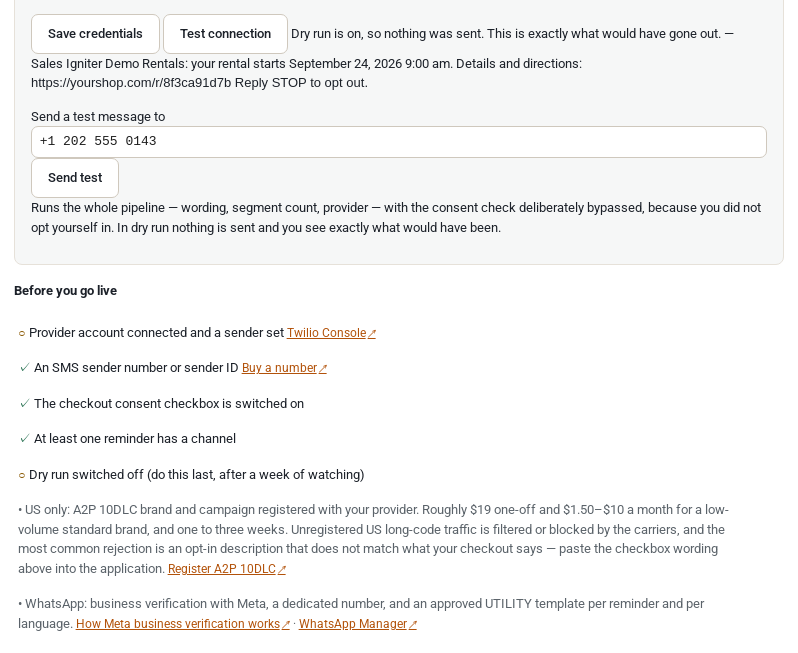
Everything lives in one place: Rentals › Settings › Text messages. At the bottom of the connection section there is a live go-live checklist that ticks itself off as you complete each step, including the parts we cannot check for you (10DLC registration, WhatsApp verification), which are listed as reminders rather than ticks.
Connection #

- Send text reminders — the master switch. Nothing sends until a provider is connected and at least one reminder has a channel.
- Dry run — on by default. See below; leave it on for a week.
- Send SMS through and Send WhatsApp through — the provider for each channel: Twilio, which carries SMS and WhatsApp via Twilio on one account; WhatsApp (direct from Meta), which is the WhatsApp via Meta route in the table above; or Write to the log (below). Meta’s route carries WhatsApp only, so a shop that wants both channels keeps Twilio alongside it for the SMS half.
- Credentials — which boxes appear depends on the provider you chose. Twilio, and WhatsApp via Twilio lists the Twilio ones and WhatsApp via Meta the Meta ones, with where each value is found. Whichever they are, they are stored separately from the rest of the settings, they are never included in a settings export, and once saved they are shown only as
••••••••3f2a. Leaving a credential box empty leaves the saved value alone, so you cannot wipe a token by accident. Test connection makes one cheap authenticated call and tells you whether your provider accepted it. - Send SMS from and Send WhatsApp from — your number or sender ID for each channel. On WhatsApp via Twilio, Send WhatsApp from is the sender you registered in the Twilio Console. WhatsApp via Meta has no send-from field at all: the Phone number ID you pasted in is the sender.
- Countries you are willing to text — defaults to your store’s own country. Opt in to each additional country deliberately. A text to a US mobile costs about a cent; some countries cost thirty times that, and one booking from one of them is invisible on the bill until a hundred are.
- Most messages per day — 500 by default, and a hard stop. This is the guard rail that turns a mistake into a support ticket instead of a four-figure bill.
- Shop name and shop phone in messages — what fills
{shop_name}and{shop_phone}. Both fall back to your WooCommerce store settings. Keep the shop name short: every character is billed.
Which reminders send a text #
Each of the three reminders — before pickup, before return and overdue — has its own Channel setting with four choices:

- Off — no text for this reminder. This is the default, so switching the feature on does not start texting anybody until you say which reminders to text about.
- SMS
- WhatsApp — by whichever of the two routes you have connected. The choice of route is made once, in the settings above, not per reminder.
- WhatsApp, then SMS if it cannot be delivered — WhatsApp only tells you minutes later that a number is not on WhatsApp, so there is a fallback wait setting (30 minutes by default) after which the SMS goes instead. The wait is never allowed to run past the pickup itself, and once we learn a number is not on WhatsApp we remember it for 90 days and go straight to SMS next time. Because Meta’s route carries WhatsApp only, this option needs a Twilio account for the SMS half if your WhatsApp is going via Meta.
The overdue reminder needs Send & Return, on every channel. A message that tells somebody their rental is late is only safe if something knows it has not come back, and Send & Return — checking rentals out and back in — is what records that. Both it and text reminders are part of Regular, so if you are reading this page you already have it. It is worth knowing all the same, because on the free base plugin the overdue timings are locked for exactly that reason, and there is nothing there for a text to hang off. The same explanation, in more detail, is on Email Reminders.
Quiet hours #
By default nothing sends between 21:00 and 08:00, and a reminder that falls inside that window is held until the window opens rather than thrown away — a held reminder still arrives in time for a 10am pickup, a skipped one never arrives at all. You can switch it to skip instead, and you can choose whether the clock is your store’s timezone (the default) or a guess from the customer’s phone number country. Where we do guess for a country with several timezones, we take the strictest end of it.

Set the window to the strictest one you send into. The US federal window is 08:00–21:00, but Florida, Oklahoma and Washington end at 20:00; France runs to 21:30; India does not start until 10:00.
Dry run, and the two other safety switches #
Three settings let you exercise the whole feature without sending anything or being charged anything, which is why it is safe to switch this on while you are still working it out.
- Dry run (on by default). Everything runs — the wording is rendered with real customer data, the segments are counted, consent is checked, quiet hours are applied, the row appears on the Reminders screen and an order note is written — and nothing leaves your site. Rows are labelled DRY RUN. Turning dry run off is deliberately the last item on the go-live checklist, after a week of watching what would have gone out.
- The “write to the log” provider. Instead of Twilio or Meta, choose this and every message is written to WooCommerce › Status › Logs and always succeeds. It needs no account, no number and no registration, so you can see the whole thing work before you have spent anything.
- Send everything to this number instead — a staging redirect. Every message goes to one number you nominate, with the real recipient’s number shown at the front of the text. Use it on a staging site; leave it empty on a live store.
Writing the messages #
This section is about SMS wording. WhatsApp wording lives in your Meta-approved template, whichever route you send by, and all you set here for WhatsApp is which merge tag fills each numbered variable — see Twilio, and WhatsApp via Twilio or WhatsApp via Meta. Each reminder has a Message box for SMS, plus an Other languages table where you can override the wording per language. We ship real wording for English, French, German, Spanish, Italian, Dutch and both Portuguese variants, so a French store sends French straight away; leave a box empty to use ours. The customer gets the message in the language they booked in.
These merge tags are filled in for you:
| Tag | What it becomes |
|---|---|
{customer_first_name} | The customer’s first name |
{shop_name} | Your store name |
{shop_phone} | Your store phone number |
{order_number} | The order number |
{pickup_date} | When the rental starts, e.g. Fri 3 Oct |
{pickup_time} | The pickup time, e.g. 9:00 am |
{return_date} | When the rental is due back |
{return_time} | The return time |
{items} | What they booked, e.g. 2 x Sea Kayak |
{link} | A short link to their booking page |
Anything else in curly brackets is not a tag and is removed rather than sent — a customer never receives a message with a stray { in it. The {link} tag is a short address on your own domain, about 33 characters, which opens a small mobile page showing the dates, your address as a maps link, a call the shop button and the order number. It shows no prices, no payment details and nothing about any other order.
The character counter, and why it matters #
You are billed per segment, not per message, and a segment is 160 characters of plain text. Go over and the message is split and you pay twice. That much is obvious; this is not:
One accented character or emoji that is outside the standard SMS alphabet drops the whole message to 70 characters per segment. Not the character — the whole message, including the 140 characters that were fine a moment ago. A tidy 150-character reminder that gains a single curly apostrophe or a kayak emoji becomes a three-segment message, and every reminder you send from then on costs three times what it did.
The counter under each message box shows the live character count, the segment count and which of the two alphabets you are in, and when you tip over it names the exact character that did it so you can replace it. Some accents are free — à è é ì ò ù ä ö ü ß Ç all fit in the 160-character alphabet, which is why the shipped German wording keeps “zurück” and the Italian keeps “più”. Others are not: á í ó ú ã õ ç ê all cost you the drop, which is why the shipped Portuguese says “retirada” and “devolver” rather than “locação” and “devolução”. Both are correct Portuguese; one of them is half the price.

Every one of the messages we ship is a single segment in every language, with the merge tags filled in and the STOP notice included. If you rewrite one, watch the counter.
One more rule about the wording, and it is a legal one rather than a stylistic one: keep it to the facts of this rental — date, time, place, link. Adding an offer, a discount or a promotion turns a service message into a marketing message, which needs a different kind of consent from every recipient, and in the US a separate 10DLC marketing campaign.
When the texts go out #
A text rides on exactly the same reminder rules as the reminder emails. There is no second set of timings on the Text messages tab, on purpose: a second set could only ever disagree with the first. The tab decides how each reminder goes out and what it says, not when.
- A rule is an amount of time before pickup, before return, or after the rental was due back, in hours or days. “2 hours before pickup” is as expressible as “2 days before”.
- A rule set in days can also have an optional send-at time of day — “the day before, at 09:00” — so your reminders land with the morning post whatever time the rental starts. That is not offered for rules set in hours, where it would have no coherent meaning.
- You can have several rules per reminder: a week before and a day before, each with its own timing, each sending once.
- Each rule can be switched off for the season without deleting it, and named, so the Reminders screen and the order notes say “Pickup reminder Day before, morning sent” rather than “rule 2”.
- A reminder that comes due while your site was asleep is still sent if it is less than 24 hours late and the event has not already happened — so a customer who books a same-day rental still gets their pickup reminder. Anything later than that is recorded as skipped and never sent. This is also what stops switching on a brand new rule from texting four years of past customers.
- If a booking is moved, the old reminder is dropped and a new one is scheduled for the new dates. If the rental is cancelled, collected early or already returned, the text is not sent — every message is re-checked against the live booking immediately before it goes out.
A text does not need the reminder email to be switched on. If you turn the pickup reminder email off in WooCommerce › Settings › Emails and set the pickup reminder’s channel to SMS, your customers get a text and no email. Equally, a failing mail server does not take the text with it.
Consent, STOP and the law #
This is the section that protects you, so it is worth reading even if you skim the rest. You are the sender of these messages. It is your brand on them, your number, your 10DLC campaign, your WhatsApp Business Account and your name on a complaint. We supply the tool; the legal obligation sits with your shop, every time. What the plugin does about that is make the careful thing the default.
The checkout checkbox #
Switching on Ask at checkout adds one checkbox under the phone field, on both the classic checkout and the Checkout block. It is never pre-ticked — a pre-ticked box is not consent in the EU and is not consent under the US TCPA. The wording we ship names the channel, says that message and data rates may apply and says how to stop, which is exactly what a 10DLC reviewer looks for; if you enable WhatsApp it changes to name WhatsApp too. You can rewrite it.
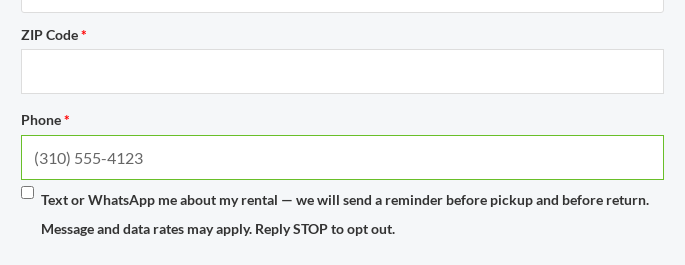
What gets stored is not a tick. It is a consent record holding the exact wording the customer saw, with the phone number, the page, the time and the order. That matters because the words change: when you rewrite the checkbox in 2028, your 2026 records still prove what your 2026 customers agreed to. The log is append-only — a withdrawal is a new entry, never an edit — so nothing in the history can be quietly rewritten, and it survives a data-erasure request with the number hashed, because the record that you stopped is exactly the record worth keeping.
There is a separate switch, Only text customers who opted in, which defaults on for EU and UK stores and off for US ones. A reminder about a rental somebody has already paid for is normally a service message rather than marketing, and needs no consent on that basis — but the line is drawn by what the message says, so leaving it on is the cautious choice.
STOP stops everything, immediately #
What follows is true on all three routes, because it is our own consent record rather than anybody else’s. It is held against the phone number rather than against the channel or the route, and it is re-checked immediately before every send, whichever way the message is about to travel. The routes differ only in how an opt-out reaches us in the first place: on Twilio the carrier reports it, and on Meta it arrives over a verified webhook. Those two mechanics are described on Twilio, and WhatsApp via Twilio and WhatsApp via Meta.
- A customer replying STOP — or quit, end, revoke, opt out, cancel, unsubscribe, or the same word in one of the shipped languages — is unsubscribed the moment the reply arrives. Not in ten days, not at the next batch.
- It stops every channel, and every route. Consent is held against the phone number, not the channel, so somebody who texts STOP does not then get a WhatsApp by either route. Only an explicit START from that same number turns it back on.
- It is re-checked at the moment of sending. A message queued three days ago is checked against the consent record immediately before the provider is called, so a text prepared last week does not go out to somebody who said stop yesterday.
- HELP or INFO gets an automatic reply saying who you are, what these messages are and how to stop. A reply we do not recognise is flagged for a human on the Reminders screen rather than thrown away — somebody asking “can I keep it another day?” needs you, not a robot.
- Stopping texts does not stop the reminder emails, and the reply says so. They are separate.
The rules you are working under #
We are not lawyers and this is not legal advice. What follows is a plain description of which regimes apply, so you know what to ask about.
- United States — the TCPA. Purely informational messages need prior express consent; anything with marketing content needs prior written consent and a different 10DLC campaign, and the standard applies retroactively to everyone you already sent to. There are also quiet-hours rules and a strict rule about honouring revocation by any reasonable method.
- EU and UK — GDPR plus ePrivacy and PECR. Sending a reminder about a contract the customer entered into is ordinarily lawful processing; the stricter question is ePrivacy (PECR in the UK), which requires consent for direct marketing by text. A genuine service message is outside it — the ICO names appointment reminders as an example — but, in the ICO’s own words, if your service message has elements that are direct marketing, even if that is not its main purpose, it counts as direct marketing. In the UK, consent has to cover the specific channel, which is why our checkbox names it.
- Everywhere, the same line decides it: the moment there is an offer in the message it is marketing, and every rule above gets stricter.
If you send to more than one country, or you want to put an offer in a reminder, talk to a lawyer first. That is a short conversation and a cheap one.
Before you go live, send yourself a test #
Do not switch dry run off and trust that the first real reminder will arrive. Send yourself a real message first, to your own mobile, from the finished configuration. We verify every part of the request we make, but only your provider account, your registered campaign and your sender can prove a message reaches a handset — and those are exactly the parts that come back rejected when a registration is incomplete.
- Save your credentials and press Test connection. Twilio, or Meta, should accept them.
- Put your own number into Send a test message to and press Send test. It runs the whole pipeline — wording, segment count, provider — with the consent check deliberately bypassed, since you did not opt yourself in. With dry run on, you see exactly what would have gone out; with it off, your phone rings.
- Check the message on the handset, not just on screen. Read the sender it came from, check the link opens, and count how it landed.
- If you are using WhatsApp, do the same again for WhatsApp, on whichever route you connected — a template can be approved and still fail if the variable count does not match.
- Then leave dry run on for a week of real bookings and read the Reminders screen each morning. When what it shows is what you wanted to send, turn dry run off.
Seeing what happened #
Rentals › Reminders answers “did it send?”. It lists every message with tabs for Queued, Sent today, Failed and All, and a search box that finds a message by order number, phone number or message text.
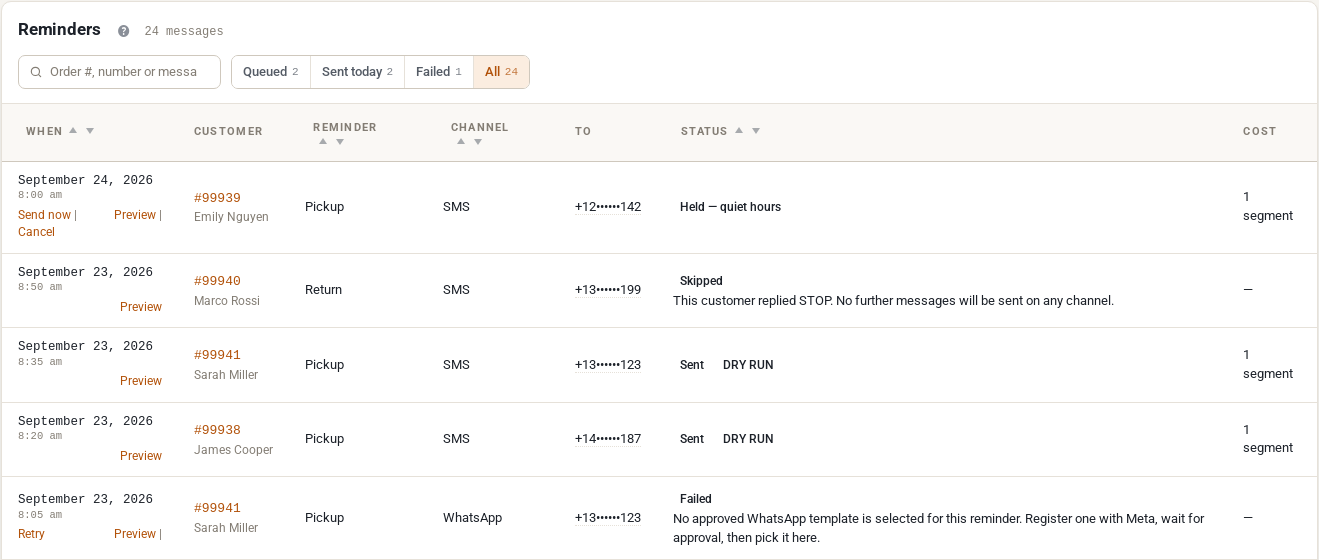
- When it was due, which customer and order, which reminder, which channel, and the number it went to — masked in the middle by default, because this screen ends up on a screen share during a support call, with a click to reveal it.
- Status: queued, sent, delivered, failed, skipped, cancelled — and where something did not send, the reason in plain words rather than a code.
- Cost: how many segments the message was, and what your provider charged for it once they tell us.
- Row actions: Preview shows the exact words that were sent to that customer, Send now, Cancel and Retry.
Every outcome also writes an order note on the WooCommerce order — “Pickup reminder sent by SMS to +13••••••123 (1 segment)” or the failure and its reason — so the record is where your support staff already look. Provider errors are written to WooCommerce › Status › Logs as well, with the credentials and the full number redacted.
When a text does not arrive #
Start at Rentals › Reminders and find the row. It will name one of these. Errors that come from your provider rather than from us are on that provider’s own page — Twilio, and WhatsApp via Twilio and WhatsApp via Meta each end with theirs.
- “No phone number on the order.” WooCommerce’s phone field is optional on the block checkout by default, so on a modern store a real share of orders simply have no number. Make it required in WooCommerce › Settings › Accounts & Privacy if you want texts to reach everybody. The email reminder still goes out.
- “Unparseable phone number.” WooCommerce barely validates that field — a row of brackets passes it — so some numbers cannot be turned into a real international number. This is recorded at the moment the reminder is queued, which is usually days before the rental, so there is time to call the customer and correct it. Fix the phone number on the order and the next reminder for that order will use it.
- The customer replied STOP. The row is skipped and says so, and it will keep being skipped on every channel until that number sends START. This is working as intended and you should not work around it.
- “Inside your quiet hours.” The message is being held, not lost; it will go out when the window opens. If the row says it was skipped instead, your quiet-hours setting is on skip rather than hold.
- Everything says DRY RUN. Dry run is still on. It is on by default. Turn it off in Rentals › Settings › Text messages once you are happy, and send yourself a test afterwards.
- “The daily message cap has been reached.” The 500-a-day guard rail fired. If that is legitimate volume, raise it; if it is not, something is wrong with a date and the cap has just saved you a large bill.
- The country is not on the list. Only your store’s own country is enabled to begin with. Add the country on the Text messages tab.
- The reminder email is switched off. That does not stop the text. If nothing at all went out, check the reminder rule itself is enabled and that the reminder’s Channel is not set to Off — Off is the default for all three.
- An error from Twilio or from Meta. The row shows the provider’s own message in plain words rather than a code. Which codes mean what, and where to fix each one, is on Twilio, and WhatsApp via Twilio and WhatsApp via Meta.
- Nothing appears on the Reminders screen at all. Check the master switch, check that your provider credentials saved, and check the rule’s timing — a reminder whose moment passed more than 24 hours ago is never sent.
What this does not do #
Stated plainly, so you can plan around it rather than discover it.
- No per-rule channel choice. The channel is set per reminder — before pickup, before return, overdue — not per timing rule. You cannot currently send the 3-hour pickup reminder by SMS and the 2-day one by email only.
- No WhatsApp wording in our settings, on either route. Meta owns the words; we fill the variables. This one is not coming back.
- Retries are deliberately small. Three attempts, at 1, 5 and 30 minutes, and only when the provider says the failure was temporary. A late reminder is cancelled rather than sent: a text saying your rental starts in two hours, delivered at midnight, is worse than nothing and still costs money.
- Two providers, and no others. Twilio for SMS and WhatsApp, and Meta directly for WhatsApp. The plugin is built so a third is a small addition, and developers can register their own, but nothing else ships today.
- No two-way conversation. Incoming messages are handled for STOP, START and HELP only. Anything else is flagged for you to answer from your own phone.
- No marketing campaigns. No blasts, no “we miss you”, no coupon texts. That is a different product with a different consent standard, and building it into a rental plugin would invite trouble.
- No staff notifications (“text the manager, this rental is overdue”), no voice calls, no RCS.
- No per-product or per-category reminder settings. The settings are store-wide.
- No dashboard tile or Send/Return summary line yet — the Reminders screen is where you look. Message wording is not yet registered with WPML or Polylang String Translation either; use the per-language rows on the settings tab.
- We do not sell you messaging. There is no credit balance to buy from us and no relay we run on your behalf. It is your own account with Twilio, or with Meta, always.
Where to go next #
Everything above is true whichever text route you send by. The setup, the credentials and the provider’s own error messages live with the provider:
- Email Reminders — the three reminder emails, editing them in place, and how the seven shipped languages behave when you rewrite the wording.
- Twilio, and WhatsApp via Twilio — opening the account, buying a number or sender ID, A2P 10DLC registration in the US, setting up WhatsApp through Twilio, and Twilio’s error codes.
- WhatsApp via Meta — the Meta app, the System User access token, registering your number, templates on the direct route, and what moving from Twilio does and does not carry over.


